What Is IMAG Projection? A Clear Guide to Live Event Screens
If you’re wondering what is IMAG projection, it’s the live camera image shown on large screens so people across a venue can see a speaker’s face, gestures or on-stage activity more clearly. At the back of a deep conference room, for example, the speaker may be easy to hear but difficult to see.
IMAG is easy to confuse with projection mapping or a livestream. They can use related cameras and display equipment, but serve different purposes: IMAG brings stage detail closer for the in-room audience, while a livestream sends video to remote viewers. The screen is only one part of the setup. Camera framing, vision switching, display choice and audience sightlines all affect how clear and useful the image is.
This guide explains how IMAG works, where it fits in an event programme and what to consider when planning for people seated further from the stage. It also compares IMAG with slides, playback and livestreaming. LivewireAV brings camera packages, vision switching, LED walls and projection together as part of event production, so the live image supports the wider audience experience.
Table of Contents
What Is IMAG Projection, and What Does It Do for an Event Audience?
IMAG projection is the real-time display of live camera images, enlarged so an in-person audience can see people and activity on stage more clearly. IMAG stands for Image Magnification. It gives attendees a closer visual view while they continue watching the event in the room.
Although “projection” can describe how an image appears on a screen, IMAG refers to using live video to magnify what is happening. The display could be a projected image or an LED wall. The purpose is practical: make a face, gesture or small stage detail easier to see, rather than add visual effects for their own sake. The What is IMAG Projection? reference outlines the term and its common applications.
What does image magnification mean in a live event?
A camera captures the stage action, and its live picture appears on venue screens. At a conference, for example, a camera might frame a speaker’s face and upper body. Attendees further back can then follow expressions and gestures as well as the speaker’s voice.
During a demonstration, a camera might show a product detail or hand movement that is hard to make out from the back of the room. The image should support the moment, not distract from it. A useful close-up keeps attention on the relevant action and gives the audience a clear visual reference.
When is IMAG useful for an in-person audience?
IMAG can help when distance, room shape or stage layout makes direct viewing difficult. In a deep hall, across a wide stage or where sightlines are obstructed, some attendees may hear a presenter clearly but struggle to see their expression. Whether IMAG is useful depends on the room and programme, not simply the audience size.
Live images complement the stage rather than replace it. People nearby can watch the speaker directly, while those further away can glance at the screens for detail. This is particularly useful when expression, movement or a small object matters to the moment. In a smaller room with clear sightlines, the audience may already have a good view without magnification.
Start by identifying what attendees need to see, and when. A speech may call for a steady view of the speaker; a panel discussion may need camera shots that help people follow whoever is talking. Slides or other event visuals may be more useful for some programme items. Match the image to the stage action so the screen has a clear purpose and helps the audience stay connected to the event.
How Does an IMAG Projection Setup Work During a Live Event?
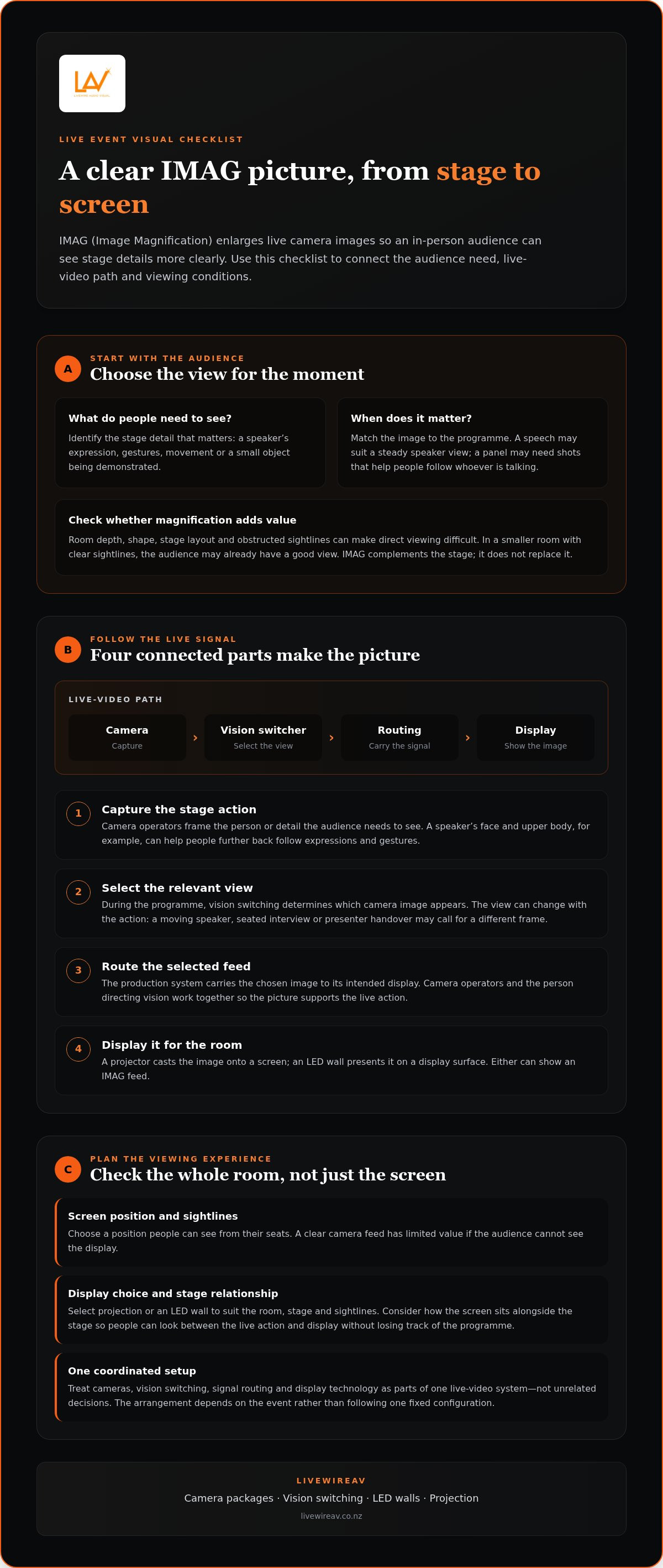
An IMAG setup is a coordinated live-video path, not simply a camera pointed at a screen. To understand how IMAG projection works, follow the image from capture to display: a camera records the live action, an operator selects the relevant view, the signal is routed through the production system, and a screen or LED wall shows it to the audience.
The live signal path runs from camera capture, through image selection and routing, to a venue display. Each stage has a distinct role. The camera creates the view, vision switching determines which view appears, routing carries the selected image, and the display makes it visible around the room.
From camera image to live screen
Cameras capture what is happening on stage. During the programme, operators frame the action while a vision switcher selects which camera image the audience sees. The selected feed is then routed to the intended display. This lets the image follow the event, rather than leaving one camera view on screen regardless of what is happening.
Camera selection follows the programme and its cues. A speaker moving across the stage may need a different frame from a seated interview; a presenter handover may call for a timely change of view. Camera operators and the person directing the vision switch work together so the audience sees a composed picture that supports the action. The camera and switching arrangement depends on the event, rather than following one fixed configuration.
What the screen or projector contributes
The display is the final part of the signal path. A projector casts the live image onto a screen, while an LED wall presents it directly on a display surface. Either can show an IMAG feed. The choice and position should suit the room, stage and audience sightlines. A clear feed has limited value if people cannot see the screen from their seats, so placement is part of the viewing plan.
Screen size and position also affect how the image sits alongside the stage. The audience should be able to look between the live action and the display without losing track of the programme. For a closer look at display considerations for conferences, the conference LED screen hire guide explores how screen choices fit into an event setup.
Planning the camera, switcher and display as one system avoids treating them as unrelated decisions. LivewireAV’s camera packages and vision switching bring those live-video elements together within event production, with display technology selected to support the audience view.
IMAG Projection vs Livestreaming, Recording and Projection Mapping
These formats can use related video equipment, but they solve different problems. To compare IMAG projection with livestreaming or projection mapping, start with the intended audience and where they see the image. IMAG is for people attending in person: it brings a live view of the stage closer on venue displays.
IMAG compared with livestreaming and event recording
IMAG and livestreaming can run at the same event, but their outputs are intended for different viewers. The in-room audience sees live camera images on venue displays; remote viewers watch through a stream. The production may use shared cameras or other resources, but the viewing needs differ. A room display should support local sightlines, while a stream is framed for people watching elsewhere.
Recording serves a different purpose. It captures event content for later viewing rather than magnifying the action for the audience in the room. A recording can be made alongside IMAG or streaming, but the use of cameras does not make these formats interchangeable. Each output needs to serve its audience and purpose.
IMAG compared with projection mapping and presentation slides
Projection mapping aligns designed visuals with a physical surface, such as a building façade or stage set, so the imagery fits its shape. That is a creative display approach, not another name for IMAG. Mapping may appear at the same event, but it is not required for a live camera feed.
Slides and graphics are different again. They show a speaker’s key points, titles or prepared visuals, while IMAG shows live camera coverage of the stage. A programme can switch between these sources as its content changes. Clear cues help the production team choose the right visual at the right time, so the screen supports the session rather than competing with it.
For events that need both in-room screens and remote coverage, LivewireAV’s hybrid and livestream event production coordinates the different audience outputs in one production plan.
What Should Organisers Plan Before Using IMAG Projection?
A useful IMAG plan starts with the people in the room, not with a screen specification. Consider how far attendees sit from the stage, whether the room is wide or deep, and what they need to see during each part of the programme. A layout that works for a keynote may not provide the same view during a panel or demonstration.
Before settling the design, map the main viewing areas and note anything that could obstruct a clear view, such as pillars, stage scenery or equipment positions. These details help determine camera positions and screen placement. The display approach should support actual audience sightlines rather than follow a universal screen-size rule. Venue conditions matter.
Match the visual plan to the room and audience
Review the seating layout, stage orientation and likely viewing angles together. If the stage spans a wide room, screen positions may need to serve more than one viewing area. In a deep room, give particular attention to the rear seats. The aim is to make the live image easy to see without drawing focus away from the stage.
Walk through the space from different audience positions, including the sides and rear. This gives the production team a practical basis for planning camera sightlines and displays. Broader considerations for audio visual for large conferences can also help organisers place IMAG within the wider technical plan.
Coordinate camera coverage with the event programme
Review the running order and mark moments when a close-up or alternate view would add useful context. A speaker’s walk-on, a panel handover or a live demonstration may each call for a different camera view. Planning changes around programme cues helps the live images follow the action, rather than appear as unrelated screen content.
Share the programme cues with the camera and vision team, then rehearse key transitions where practical. Rehearsal clarifies when views change and how camera coverage supports movement on stage. It also gives the team a chance to align the visual sequence with presentations, walk-ons and demonstrations before guests arrive.
A concise planning brief can bring the room and programme together. Include:
Seating layout, stage orientation and known sightline obstructions.
Audience areas that need a clear view of the live image.
Programme moments that benefit from close-ups or alternate camera views.
Presentation and transition cues that affect what appears on screen.
With these details in place, camera positions, screen placement and content can be planned as connected decisions. LivewireAV combines camera packages, vision switching and display technology within event production. Plan your event’s IMAG production with LivewireAV.
How LivewireAV Brings IMAG into a Coordinated Event Production
IMAG works best when it is planned as part of the event’s overall technical production, not treated as a screen added at the last minute. The audience experience depends on connected decisions: what the cameras capture, how vision switching follows the programme, where displays are positioned, and how video works alongside audio and lighting.
For organisers asking what IMAG projection means in practice, LivewireAV brings together the camera, switching and display elements that make live images useful to people in the room. The production plan is shaped around the event format, venue and intended audience view, with technical management coordinating equipment and show cues.
Connect cameras, vision switching and event displays
Camera packages capture the stage action, while vision switching selects the live image shown to the audience. LED walls or projection can display that feed, depending on the event’s visual plan and venue conditions. Each part has a role: camera framing provides the view, switching follows the programme, and display placement helps attendees see it from their seats.
These choices work together. At a conference, camera coverage might support different programme moments, while screen position is considered alongside the room layout and stage. LivewireAV plans camera packages, vision switching and display technology in context, rather than treating each as a separate equipment decision. Experienced technicians support the technical production, coordinating show cues and live operation with the event schedule.
Plan IMAG as part of the wider event experience
IMAG requirements vary with the event format, venue and view attendees need. A conference with presentations, speakers and panel discussions may call for a different visual plan from a performance or demonstration. The wider production plan also considers how video sits alongside sound, lighting, stage activity and other on-screen content.
Early coordination gives the production team a shared understanding of the programme, key cues and intended audience experience. It helps align camera coverage with stage activity and lets display decisions account for venue conditions. For a broader view of how these technical elements come together, LivewireAV’s premium event production guide explores the planning behind coordinated event delivery.
If you’re developing an event brief, discuss IMAG as part of your event production plan with LivewireAV. A conversation about the programme, venue and audience view can help shape the approach to cameras, vision switching and displays.
Shape the Audience View for Your Next Event
After understanding what IMAG projection is, define the audience experience you want your event to deliver. Which moments need close visual attention? Where will guests be seated, and what should they be able to follow from those positions? These priorities turn an initial idea into a focused production brief.
Bring together your programme, venue information and intended audience view early. This gives the production team a clear basis for discussing how IMAG fits the event alongside other technical requirements. You do not need every detail resolved before starting the conversation. A clear sense of the event’s purpose and key moments is a practical place to begin.
LivewireAV can shape those requirements into an event production plan, with technical elements coordinated around the programme and venue. Discuss IMAG as part of your event production plan with LivewireAV.
Frequently Asked Questions
Is IMAG projection the same as projection mapping?
No. IMAG shows live camera coverage of people or activity, while projection mapping aligns designed visuals with a surface such as a stage set or building. A conference might use IMAG to show a speaker’s expression, then use mapped imagery for a separate creative segment. The two approaches can appear at the same event, but they serve different purposes and need different visual planning.
Can IMAG show presentation slides and a live camera image at the same time?
Yes. A live image and slides can be shown together if the video system is set up to combine them, such as in a split-screen layout or with slides beside a speaker close-up. The best arrangement depends on what the audience needs to read and see. A detailed chart may be clearer on a full slide; during discussion, a speaker image may take priority.
How many cameras does an IMAG event need?
There is no fixed camera count for every event. A single camera may suit a simple programme with one main stage position, while a panel, moving performer or demonstration may benefit from additional viewpoints. The decision depends on the stage layout, programme and moments that need close coverage. Planning those needs first helps avoid adding camera positions that do not improve the audience’s view.
Can IMAG be used at an outdoor event?
Yes. IMAG can be part of an outdoor event, but the display plan needs to suit the site conditions. Daylight can affect how clearly a projected image is seen, while audience layout, ambient light and weather exposure can influence display placement and equipment planning. A covered stage or changing outdoor conditions may also affect camera positions and sightlines. Consider these factors as part of the event plan.
Does IMAG work for a hybrid event with remote attendees?
Yes. An event can use IMAG for people in the venue and a livestream for remote attendees. Camera coverage may support both, but each audience has a different view: in-room screens help people follow the stage, while online viewers see the stream output. Plan for both audiences, particularly during slide changes, audience questions and moments where a close-up matters.
What happens if the live camera image is unavailable during an event?
The screen can move to another planned source, such as a presentation slide or holding visual, while the technical team responds. If another camera is part of the production, the vision operator may be able to select its feed instead. The appropriate fallback depends on the programme and system design, so decide in advance which content should appear if a live view is interrupted.


Comments