Risks of Using Cheap Event AV: What to Check Before You Commit
What if the lowest AV quote creates the greatest uncertainty on event day? The risks of using cheap event AV often come not from the price itself, but from what the proposal leaves out: suitable equipment, setup time, experienced crew or a plan for technical issues. If those details are unclear, it’s difficult to compare quotes fairly or know what support your programme needs.
A smooth event depends on more than equipment arriving at the venue. Sound, screens, lighting and live cues need to work together, with technical management in place to keep presentations and speakers on track. This article explains how gaps in scope, equipment suitability, staffing and preparation can affect your event, and what to look for when assessing proposals. You’ll learn how to compare the operational details, not just the headline price, and choose an AV approach that fits your event without adding avoidable risk.
Table of Contents
What are the real risks of using cheap event AV?
When budgets are tight and deadlines are close, a lower AV quote can be appealing. It may leave room for other priorities and appear to solve a pressing planning decision. But price alone doesn’t show whether equipment or service quality is poor. The risks of using cheap event AV arise when the proposal doesn’t match what the programme, venue and audience actually require.
Event AV risk is the chance that the technical provision won’t meet the needs of the programme. That can happen even when the equipment works as intended: a sound system may not suit the room, a screen may be difficult to see from some seats, or a presentation format may not play correctly. Audiovisual technology combines sound, vision and supporting systems, so the components need to be selected and configured to work together, not just listed on a quote.
When does a lower AV quote become a genuine event risk?
A lower quote becomes risky when its inclusions are too vague to show who is responsible for essential tasks. For example, it may be unclear whether anyone is planning the setup, testing presentation playback or operating equipment during the programme. If those jobs fall to the organiser by default, gaps may only become apparent during setup or in front of an audience.
Equipment suitability matters as much as whether it powers on. A microphone that can’t be heard clearly across the room, a display that’s hard to see from the back, or a playback connection that doesn’t support the supplied content can interrupt delivery. Saving money by simplifying a setup may be reasonable if it still meets the brief. Removing necessary testing or live technical support is a different trade-off: it shifts the work and uncertainty to the event team.
Which events are less forgiving of technical gaps?
A short internal meeting with one presenter and a straightforward slide deck may need a simpler setup than a multi-session conference. The conference could involve several speakers, different presentation files, microphones passed between panellists and tightly timed transitions. Each change creates another point where equipment, cues and people need to be coordinated.
An exhibition may need sound and screens to serve different areas, while a live-streamed programme has both in-room and remote audiences to consider. A clear presentation in the venue doesn’t automatically mean remote viewers can hear it properly. These formats can make gaps more noticeable because more elements must work together, but that doesn’t mean every event needs the same equipment, crew size or production scale.
Start with the programme, not a standard package. Identify what the audience needs to hear and see, how content will be presented, and where speakers or transitions add complexity. Then match the technical scope to those requirements. A well-planned, modest setup can be more suitable than a larger one that hasn’t been designed around the event. The practical question is not simply whether the quote is low, but whether it accounts for the work needed to deliver the programme reliably.
How can cheap event AV create problems on event day?
Problems can develop well before anyone switches on a microphone. If the brief doesn’t capture the room, audience layout, content formats and running order, equipment may be selected without enough context. At setup, the system then has to be fitted to the space and connected. If testing is rushed or responsibilities are unclear, small gaps can carry through to the live programme and pack-down.
The risks of using cheap event AV aren’t limited to faulty gear. Equipment can be in working condition yet still be unsuitable for the room, incompatible with presentation devices, configured incorrectly or unfamiliar to the person operating it. Those are separate issues, and each calls for a different response: suitable selection, connection checks, system setup and operator preparation.
What happens when equipment is under-specified or poorly integrated?
A sound system with insufficient coverage may make speech difficult to follow in parts of a room. A screen can be working properly but still leave slides unreadable from some seats. A presentation connection that doesn’t match the organiser’s device may require last-minute changes. None of these outcomes is inevitable, but they’re more likely to become a distraction if the room and content haven’t been considered together.
Audio, video, lighting and show cues also share a signal flow. A speaker change, video playback or lighting transition may depend on several elements being ready at the right moment. A failure to coordinate them can create a pause, missed cue or awkward handover, interrupting the audience’s focus even if each individual item of equipment functions. Major Special Event Security Guidelines address broader event planning and communications. The useful principle here is that technical arrangements need to sit within an organised event plan.
Why do staffing and contingency arrangements matter?
Equipment being present isn’t the same as having someone actively operate it. If a speaker order changes, a presentation needs adjusting or a microphone needs attention, a technician can manage the cue and troubleshoot while the organiser continues coordinating the event. Without clear ownership, those tasks may land with someone who is also managing speakers, timing and guests.
Preparation should include a clear contact point for programme changes, time to test playback and microphones, and an agreed response if a key component isn’t working as expected. Contingency planning doesn’t mean duplicating every item. It means deciding in advance how the team will respond and who will make the call. This is especially useful for conferences, where audio visual for large conferences involves coordinating sessions, speakers and transitions.
Preparation and clear ownership reduce avoidable uncertainty by making each technical task, cue and response someone’s responsibility. LivewireAV’s project-based production brings design, setup, technical management and on-site operation together, with the configuration tailored to the event and venue. For a programme with several moving parts, managed event AV production gives the organiser a clear technical team to coordinate with from preparation through delivery.
How should you compare a cheap event AV quote with a managed proposal?
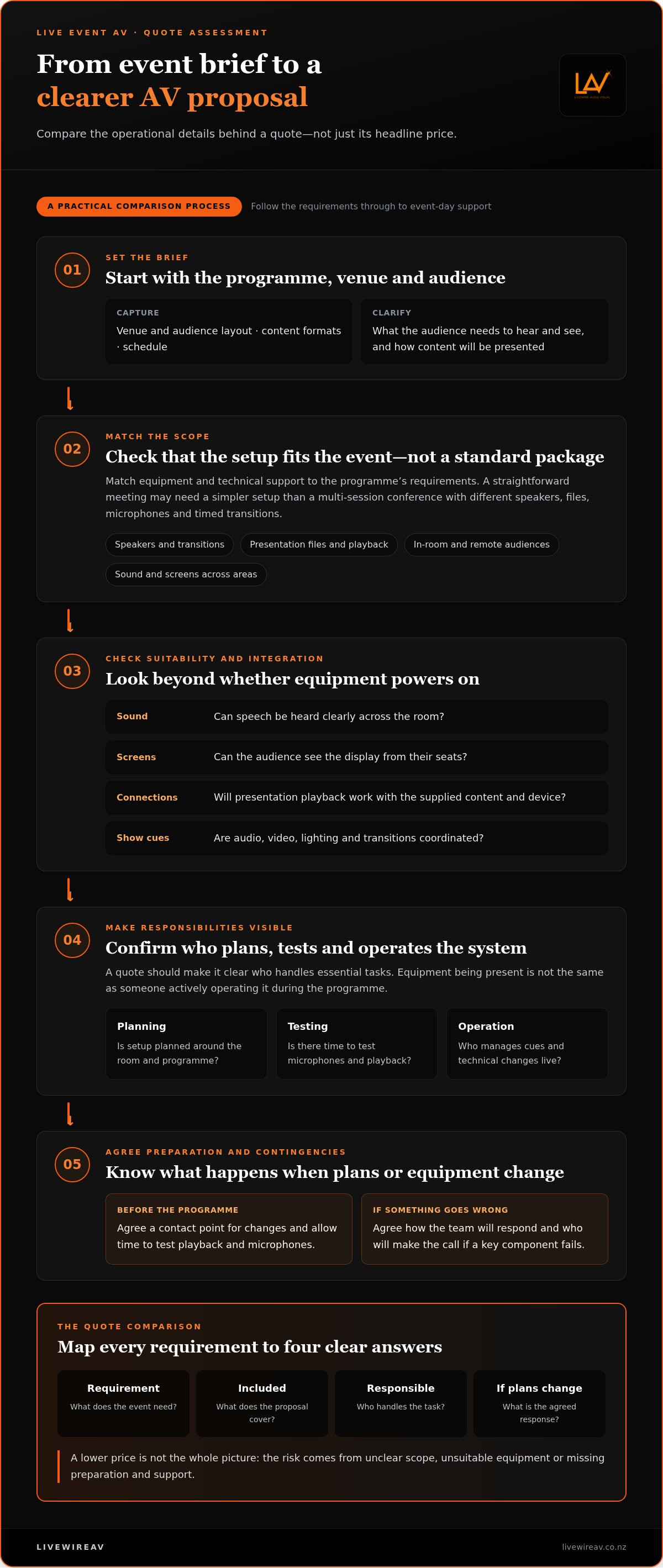
A fair comparison starts with the same event brief. List what the programme needs, then trace each requirement through the proposal: what’s included, who’s responsible and what happens if plans change. This shifts the decision away from equipment lists and headline figures towards the full delivery responsibility. A lower quote may still suit the event, but only if its scope covers the work needed to deliver it.
Use a comparison framework such as this for each proposal:
Requirement: Note the audience format, venue needs, content and programme elements, such as speech reinforcement, presentation playback or livestreaming.
Inclusion: Record the equipment, quantities, preparation and event-day tasks specified. Compare the detail with the brief rather than assuming similar labels mean similar provision.
Responsible person: Name who owns design, venue coordination, setup, testing, cue operation, programme changes and pack-down.
Contingency: Capture the agreed response if a device, connection or cue doesn’t work as expected, and who communicates decisions during the event.
This makes omissions visible. It also helps separate a genuine difference in scope from a difference in wording. If one proposal specifies an operator for show cues and another leaves operation unaddressed, those aren’t like-for-like offers, even if their equipment lists look similar.
Which inclusions should an event AV proposal make clear?
Look for production design, equipment and crew, plus venue coordination where it’s needed. The scope should also make clear whether delivery, setup, testing, live operation and pack-down are covered. For a programme with cues, establish who manages them, how changes are communicated and who handles technical decisions. Note assumptions and exclusions too, especially tasks that could otherwise default to the organiser.
How do you compare value without assuming more gear is better?
Match every item to a job in the programme. Consider whether sound will serve the audience in the venue, screens will make content visible, cameras are needed for the format, and lighting supports the event’s requirements. Then consider how those choices fit together. A larger equipment list isn’t automatically a better solution if it adds complexity without improving the audience experience.
Venue conditions and content matter. Sightlines, room layout, speaker positions and presentation formats can all affect which configuration is appropriate. A proposal should make the reasoning clear enough to connect the selected equipment with the event’s needs. For wider context on how those decisions fit into a production plan, premium event production planning explores the relationship between preparation and delivery.
Comparing this way helps reveal the practical risks of using cheap event AV: not simply that a proposal costs less, but that important responsibilities or requirements may be left outside its scope. The strongest value is a well-matched plan with clear ownership, not the longest equipment list.
What can you do to reduce event AV risk before signing off?
A little structure before approval can prevent assumptions from becoming event-day decisions. Work through the brief, production scope and responsibilities in sequence, then record how the team will handle changes. This makes it easier to spot gaps while there’s still time to resolve them.
Confirm the outcome. Define what the audience needs to hear, see or take part in, including any remote participation.
Map the programme. Note speakers, presentations, transitions, playback and moments that need specific cues.
Align the scope. Match equipment, preparation and technical support to the programme and venue, rather than selecting items in isolation.
Assign responsibilities. Identify who approves changes, operates cues, communicates with presenters and makes technical decisions.
Document contingencies. Agree practical fallback actions for critical audio, visual or playback elements, and record who initiates them.
These steps turn a broad quote into a plan the organiser and production team can work from. They also help expose the risks of using cheap event AV when a proposal’s assumptions or exclusions leave key decisions until setup or show time.
What should your event AV brief include?
Give the production team the audience size and format, speaker count, presentation types and programme timings. Describe the venue, including access arrangements, available infrastructure and known technical constraints. Add relevant audience access needs, such as requirements that affect how content is heard or seen, and note remote participation where applicable. The clearer the brief, the more accurately the proposed production can be tailored to the event.
How should you plan for changes and technical issues?
Set out who can approve changes to the show, who passes those decisions to the operators and how urgent issues should be communicated. For critical playback, audio and visual elements, record a realistic fallback, such as an agreed alternative presentation method or a revised cue. Review event-specific safety requirements against current New Zealand guidance and venue information. Don’t rely on assumptions carried over from another event.
Keep the working plan accessible to the people who need it. A concise running order, contact list and change process can help presenters, organisers and technical operators stay aligned. LivewireAV’s production planning brings design, setup and technical management together, with equipment and configuration tailored to event and venue requirements. To shape a production approach around your programme, explore LivewireAV event production.
Why choose managed event AV production over a cheap, equipment-only approach?
Equipment is only one part of a working event production. A managed approach connects planning, system design, equipment, setup and live operation, so technical decisions are considered as one coordinated job. That gives the organiser a clear production team to work with, rather than separate tasks and hand-offs to reconcile across preparation and delivery.
LivewireAV brings these elements together, tailoring equipment and configuration to the programme and venue. The aim isn’t to add production for its own sake. It’s to identify what the event needs, plan how the technical elements will work together and provide the support to operate them during the show. That distinction matters when weighing the risks of using cheap event AV: an equipment list alone doesn’t describe who will make the system work in practice.
What does a managed production team take responsibility for?
Production begins with designing and configuring audio, visual and lighting systems around the event’s requirements. Setup and technical management then put that plan into operation. On-site technicians and operators manage equipment and cues during delivery, helping coordinate transitions and respond to technical needs as the programme unfolds.
The organiser still owns the event’s content and programme decisions. The production team supports the technical execution, with clearer ownership of how those decisions translate into cues, playback and system operation. That division can reduce the number of technical details the organiser has to manage personally.
When is integrated AV support especially useful?
Coordination can be particularly valuable at conferences, exhibitions, corporate gatherings, sporting events and outdoor productions. These formats may combine several technical elements or involve speakers, screens and programme transitions that need to stay in sync. The right production scope depends on the event, though: a straightforward gathering doesn’t automatically need the same setup or crew as a complex show.
For events with remote audiences, in-room sound and visuals are only part of the experience. Camera feeds, vision switching and livestream delivery need to support the programme as it happens. Hybrid conference AV planning can help organisers understand the extra coordination involved when a conference serves both in-person and online attendees.
Integrated production also gives the team a shared view of the event plan. If a speaker order changes or a presentation needs to be adjusted, operators can work from the updated programme and manage the relevant technical cues. This helps limit hand-offs and keeps the organiser focused on the people and priorities that sit beyond the control desk.
Reliable production is planned, tailored and actively managed. To discuss an event production approach shaped around your programme and venue, discuss event production with LivewireAV.
Make your next production decision with confidence
The next step is to treat technical planning as part of the event plan, not a detail to resolve once the venue is set. Before approving a proposal, be clear about the experience you want guests to have and the level of technical ownership that will help deliver it. That perspective makes it easier to assess the risks of using cheap event AV without assuming that the lowest quote is automatically the wrong choice.
LivewireAV brings design, setup and technical management together, with on-site technicians and operators managing equipment and cues. Production equipment and configuration are tailored to the venue and programme, keeping the focus on what your event needs rather than unnecessary scale.
Give your production a considered start. Discuss your event production requirements with LivewireAV and take the next step towards a clear, well-planned event.
Frequently Asked Questions
Can cheap event AV work for a small event?
Yes, a lower-cost setup can suit a small event if its requirements are straightforward and the equipment fits the space. For example, a workshop with one presenter and a fixed slide deck may need fewer technical elements than a multi-speaker programme. Still, decide who will help if a laptop won’t connect or a presenter needs a microphone adjustment. That keeps a simple setup practical without relying on everything going perfectly.
Is cheap event AV equipment always unreliable?
No. Price alone doesn’t tell you whether equipment is in good condition or appropriate for your event. The risks of using cheap event AV can instead come from a mismatch between the equipment and the task: for instance, a sound system may work but not suit the room. Consider how it will be configured, whether devices are compatible and whether someone familiar with the setup can support its operation.
What should I look for in an event AV quote?
Look for enough detail to understand what the production will actually deliver, not just a list of equipment. Check that the proposal reflects your running order, venue and content, and that it describes the work around each item. For instance, a screen may be listed, but the quote should make its intended use clear. Review assumptions and exclusions carefully so differences between proposals aren’t hidden by broad labels.
Can I hire event AV equipment without an on-site technician?
It may be workable for a simple event if a capable organiser or venue team member can take responsibility for the system. Before choosing that approach, identify who will connect devices, check sound levels, prepare content and assist speakers. Consider what else that person is doing during the event. If they’re also greeting guests or managing the schedule, technical tasks may compete with those responsibilities at the wrong moment. LivewireAV provides managed production with on-site technicians and operators to manage equipment and cues.
How do venue conditions affect event AV choices?
Venue conditions influence how sound travels, where screens can be positioned and how the audience sees the stage. For example, daylight from large windows may affect screen visibility, while a wide room may require a different sound arrangement from a compact meeting space. Outdoor events bring different environmental considerations. Share floor plans, access details and known restrictions early so the proposed setup can respond to the actual site.
What happens if event AV fails during a presentation?
The response depends on the fault and the agreed plan. If a video won’t play, the presenter may be able to continue with a prepared alternative, such as speaking to key points while the operator investigates. Decide in advance who can pause or adjust the programme, and how that decision reaches the presenter. Keeping essential content available in an alternate format can also help the team respond without rushing.
Does a hybrid event need a different AV plan from an in-person event?
Usually, yes, because the production needs to serve remote viewers as well as people in the room. A camera view that works for online attendees may not show presentation content clearly, and room audio may need to be managed for both the venue and the remote feed. Consider how online questions will reach the presenter and who will monitor them. The right setup depends on the programme and how remote guests will participate. Discuss your hybrid event production requirements with LivewireAV.


Comments