Choosing the Right LED Screen for Your Event: Buying Guide
Could a bigger LED screen make your event harder to follow? Choosing the right LED screen for your event isn’t about size alone. Viewing distance, audience sightlines and the content on screen all affect whether people can see and read it comfortably.
It’s easy to focus on screen dimensions or feel unsure how pixel pitch affects image clarity. But venue conditions matter too: ambient light, stage layout and the programme can all shape which display approach will work best. A screen that suits a presentation in a dim room may not be the right fit for a bright exhibition space.
This guide covers the screen characteristics to consider, how LED walls compare with projection, and what to plan for in different event conditions. Audience position and image requirements help narrow the options, while coordinated technical production brings the display into the wider event plan. LivewireAV provides LED walls, projection and experienced event technicians to support a considered setup that suits your programme.
Table of Contents
Choosing an LED Screen for Your Event Starts with the Audience
LED Screen Specifications Explained: Pixel Pitch, Resolution and Brightness
LED Screen or Projection? Compare the Options for Your Event
Plan the LED Screen Setup: Content, Sightlines and Event Logistics
Choose an LED Screen with LivewireAV’s Event Production Team
Choosing an LED Screen for Your Event Starts with the Audience
Choose an event screen for sightlines, content and venue conditions, not size alone. A larger display won’t help if people can’t see it around stage scenery, columns or other guests. Start by identifying what the audience needs to see, where they’ll be sitting or standing, and how the screen will support each part of the programme.
The requirements change with the event. At a conference, slides and speaker close-ups may need to remain clear from the back of the room. An exhibition might call for branded visuals that attract attention as people move through the space. A corporate function may combine presentations with live feeds, while an outdoor production must account for daylight, weather exposure and changing audience positions.
An event LED screen is a display made from light-emitting diodes, arranged to show images and video at a scale suited to the audience and venue. Understanding the fundamentals of LED display technology helps frame the choice, but the right setup depends on the specific event.
Before comparing screen options, establish the basics:
Audience: Who needs to see the display, and from which seated or standing positions?
Venue: What are the room layout, ambient light, available floor or rigging space, and movement routes?
Content: Will the screen show slides, speaker close-ups, live feeds, branded visuals, or a mix?
Programme: When is the display needed, and how will its role change between sessions or activities?
What does the audience need to see?
Separate the screen’s jobs before deciding its placement and dimensions. Slides rely on readable text and diagrams; speaker close-ups help people at a distance follow the presenter; live feeds show activity elsewhere in the venue; branded visuals support the event’s look and messages. If one display needs to handle several uses, consider how the content will change throughout the programme.
Audience size matters, but seating shape and viewing positions matter just as much. Check the farthest seats, side angles and standing areas. If a column or stage element blocks the view, repositioning the screen or planning additional display positions may be more useful than simply making one screen bigger.
What does the venue allow?
Assess the room before settling on a screen plan. The layout may limit where a display can sit or be rigged, while ambient light can affect how clearly content reads. Allow for audience movement too, especially at exhibitions or functions where people circulate rather than face the stage throughout.
Outdoor events bring different conditions: daylight, exposure and the way the audience is spread across the site all shape the setup. Don’t assume an indoor arrangement will translate directly outdoors. For more detailed planning around those variables, see LivewireAV’s outdoor event production guide. Include the screen in the wider technical production plan so its position, content and live use work together.
LED Screen Specifications Explained: Pixel Pitch, Resolution and Brightness
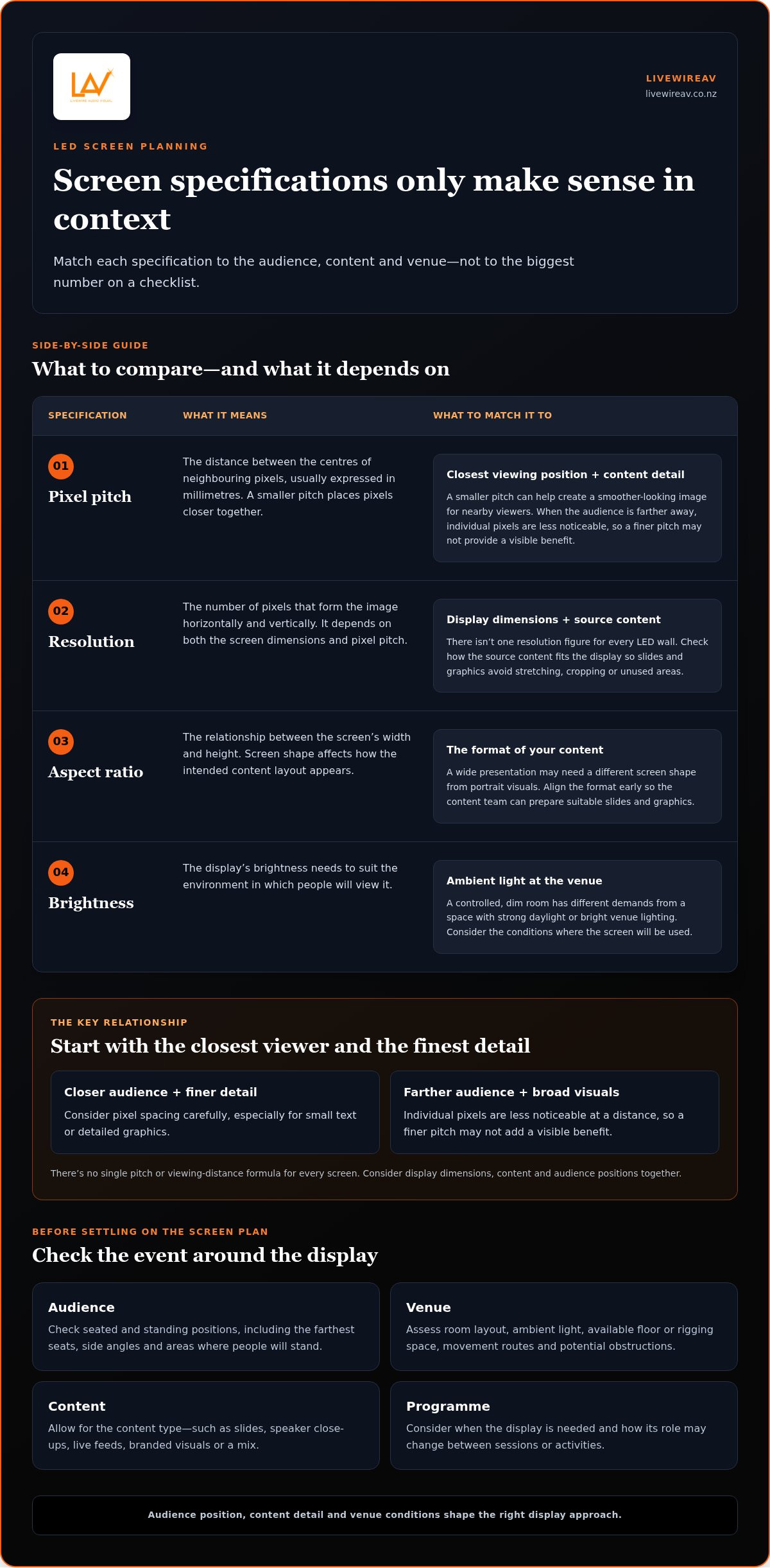
Screen specifications only make sense in context. A fine-pitch display may suit viewers seated close to the screen, while a larger pixel pitch can be appropriate when the audience is farther away. Content detail, display dimensions and venue lighting all affect what people will see. For choosing the right LED screen for your event, use specifications to address a viewing need, not as a checklist where the biggest number automatically wins.
Pixel pitch, viewing distance and content detail work together: the closer the audience and the finer the on-screen detail, the more carefully pixel spacing needs to be considered.
How should pixel pitch relate to viewing distance?
Pixel pitch is the distance between the centres of neighbouring pixels, usually expressed in millimetres. A smaller pitch places pixels closer together, which can help create a smoother-looking image for people viewing from nearby. With a more distant audience, individual pixels are less noticeable, so a finer pitch may not provide a visible benefit for the event.
Consider the closest viewing position as well as the back row. A presentation with small text or detailed graphics needs a different image approach from broad visuals designed to be seen across a large space. There’s no single pitch or viewing-distance formula that suits every screen: display dimensions, content and audience positions need to be considered together.
Which other display specifications affect the result?
Resolution describes how many pixels form the image horizontally and vertically. It depends on both screen dimensions and pixel pitch, so there isn’t one resolution figure that applies to every LED wall. The source content matters too. A slide deck built for a different aspect ratio may need adjusting to fit the screen cleanly and avoid stretching, cropping or unused areas.
Aspect ratio is the relationship between the screen’s width and height. Aligning it with the content helps preserve the intended layout. For example, a wide presentation may need a different screen shape from a composition designed around portrait visuals. Planning the format early gives the content team time to prepare suitable slides and graphics.
Brightness should suit the environment. A screen in a controlled, dim room has different demands from one competing with strong daylight or bright venue lighting. The aim is clear, comfortable viewing, not maximum brightness by default. Consider where the display will sit, the light falling on it and whether that light changes during the programme.
Refresh rate also deserves attention if cameras will film the screen or live vision is part of the event. The display and camera settings can affect how the image appears on camera, including the risk of visible flicker or banding. A coordinated technical plan considers the content, screen and camera use together, then checks how they perform in practice.
LivewireAV can bring LED walls, projection and technical production into one event plan, connecting display choices with content and operating requirements. Explore LivewireAV’s event display and production support as part of planning a cohesive setup.
LED Screen or Projection? Compare the Options for Your Event
LED walls and projection can both support a clear, cohesive event experience, but they suit different briefs. The practical choice depends on the venue, the look you want to create, the content and how the audience will view it. Neither approach is automatically best. Compare them against the same requirements before settling on a setup.
When might an LED wall suit the brief?
An LED wall may suit an event that needs a prominent, dedicated visual surface for presentations, changing content, branding or live camera feeds. It can be considered for a stage design where the display is a central visual element, or for an exhibition environment where content needs to work as part of the space. Suitability still depends on audience positions, venue conditions and how the screen fits into the full production plan.
When might projection be a better fit?
Projection may suit a brief where an available surface is central to the design, or where projected imagery is intended to blend with the venue rather than sit on a dedicated LED surface. Ambient light, surface characteristics and viewing angles all affect the result. Assess these factors alongside the same content, audience and programme requirements used to consider an LED wall.
For a fair comparison, map each option to the event’s intended visuals, room conditions and audience positions. Then consider how it will integrate with staging, lighting, cameras and content playback. This avoids choosing on display format alone and keeps the focus on what guests need to see. For conferences, where presentations and speaker visibility often need to work together, LivewireAV’s conference LED screen hire guide explores event-specific planning considerations.
Ultimately, choosing the right LED screen for your event means weighing LED and projection against the same brief, rather than assuming one format will suit every venue. A coordinated technical plan connects the display approach with content, staging and live operation.
Plan the LED Screen Setup: Content, Sightlines and Event Logistics
A well-planned display is more than a screen in the right place. Content, stage layout, audience positions and show timing need to work together. Before finalising the setup, establish the event brief, venue layout, audience sightlines, content formats, playback sources and operating cues. That information gives the technical team a practical basis for coordinating the display with the programme.
Use this sequence to organise the planning:
Set the brief. Define what the screen needs to do at each point in the programme, such as showing a presenter’s slides, displaying a camera feed or supporting branded visuals.
Map the room and stage. Review the stage position, screen location, seating plan and any features that could obstruct a view. Check sightlines from the back and sides, not just the central seats.
Confirm the content mix. List static slides, motion graphics, video and live camera content. Note who supplies each item and when it needs to appear.
Plan formats and playback. Align aspect ratio and resolution with the display. Prepare the relevant playback equipment, presentation sources and handover process.
Schedule setup and testing. Fit screen installation, content checks and operational testing into the event schedule, then align show cues with programme transitions.
Before finalising an LED screen plan, establish what the audience must see, where they’ll view it, which content sources are involved and how the display will be operated throughout the programme. Reviewing stage position, audience seating and screen placement together can expose blocked views or awkward angles while there’s still time to adjust the layout.
Prepare content and playback requirements
Different content types place different demands on a display plan. Static slides need legible layouts; motion graphics and video need to be prepared in a suitable format; live camera content depends on the event’s camera and vision workflow. Confirm the aspect ratio and resolution before content is finalised, so graphics can be designed for the screen rather than stretched or cropped at show time. Include playback equipment, presentation handovers and the order of materials in the run sheet.
Coordinate setup, testing and live operation
Build load-in and installation into the venue schedule, followed by checks of the screen, playback sources and planned content. Rehearse key show cues, especially transitions between presentations, video and camera feeds. During the programme, technical operators can monitor playback and respond to changes in sequence, keeping display content aligned with what’s happening on stage.
Screen planning sits within the wider production schedule, alongside staging, cameras and other technical requirements. LivewireAV’s premium event production guide covers broader coordination considerations. For a display plan shaped around your content, venue and programme, plan your event production with LivewireAV.
Choose an LED Screen with LivewireAV’s Event Production Team
Choosing the right LED screen for your event is one part of a wider production decision. The display needs to work with the programme, content, venue and other technical elements, not operate as a separate feature. LivewireAV brings LED walls and projection into a coordinated production plan, with experienced technicians supporting setup and live delivery for events throughout New Zealand.
That joined-up approach connects early decisions with what happens on show day. A conference may need slides and camera feeds to follow speaker cues. At an exhibition, display content may need to work alongside lighting and audience movement. An outdoor event brings its own venue conditions and operational considerations. In each case, the screen plan is shaped around the event’s objectives rather than a fixed package.
What does an integrated screen plan account for?
A screen doesn’t work in isolation. Its position and content can affect camera framing, stage lighting and how the audience follows the programme. A coordinated plan considers these elements together, so cues and technical handovers are organised before the event. This supports a composed operation, particularly when a programme moves between presentations, video, live feeds and other moments on stage.
Depending on the event brief, the production plan may bring together:
Display: LED walls or projection selected to suit the content and venue.
Audio: sound coverage coordinated with the stage and audience layout.
Lighting: visual requirements considered alongside screen placement and camera views.
Cameras and vision: live feeds and switching aligned with the screen content and show cues.
What are the next steps for your event brief?
Start with the practical details: event format, audience, venue layout, programme and what the visuals need to achieve. Share the content types you expect to use, such as presentation slides, branded material or live camera feeds. These details help shape a production approach for the project, whether it’s a conference, corporate function, exhibition or outdoor event.
LivewireAV can bring the display into the wider technical production plan and coordinate it with the event’s other requirements. The aim is a considered setup, prepared content and a team focused on live operation. You don’t need to arrive with every technical decision settled. A clear brief gives the production team a useful starting point.
For your event, discuss a tailored event production proposal with LivewireAV. Share your event format, venue details and visual objectives to start shaping a coordinated plan for the programme.
Shape the Visual Plan for Your Next Event
The strongest screen plan starts with a clear purpose. Before settling on a display, think about the moment you want it to support: a presenter’s key message, a live connection with the audience, or a visual identity carried through the event. That gives your production team a practical brief to build from, while leaving room to refine the technical details around the venue and programme.
Choosing the right LED screen for your event is easier when those goals are clear from the outset. You don’t need to have every specification decided. A useful starting point is to outline your event format, what guests need to see and any venue details that could shape the setup. From there, LivewireAV can develop an approach tailored to your production requirements.
Discuss your event’s LED screen and production requirements to take the next step towards a considered visual plan. With the right preparation in place, your display can support the programme and let your event take centre stage.
Frequently Asked Questions
How do I choose the right LED screen size for my event?
Choose a size that lets the audience see the content comfortably from the places they’ll actually be viewing. Mark the stage and screen positions on the venue layout, then consider the furthest seats, side seating and any standing areas. Check that the display won’t compete with stage scenery or block other views. Choosing the right LED screen for your event means balancing those sightlines with the role the screen plays in the programme.
What is pixel pitch, and how does it affect LED screen viewing distance?
Pixel pitch is the spacing between pixels on an LED display. From close up, viewers may notice the pixel structure more readily, particularly on text-heavy slides or fine graphics. At greater distances, that detail is less apparent. For a practical assessment, consider the closest audience position and the most detailed content, not just the screen’s overall dimensions. The appropriate pitch depends on the specific display plan, rather than a universal viewing-distance rule.
Is an LED screen better than a projector for an event?
Neither is automatically better. The right choice depends on the visual result you want and what the venue can support. A dedicated LED surface may suit a stage design built around changing visuals, while projection may work with a suitable surface that forms part of the event design. Consider how the display will look in the room and fit with the staging. A production plan can compare both approaches against the same brief.
Can an LED screen be used outdoors?
Yes, an LED screen can be used outdoors when the equipment and setup are suited to the conditions. Planning should account for daylight, possible weather exposure, the screen’s position and how the audience will spread across the site. The production plan also needs to consider safe placement, power and how the display will be protected and operated. Outdoor requirements vary by event, so an indoor setup shouldn’t simply be assumed to suit outside.
What content formats should I prepare for an event LED screen?
Prepare the materials the programme will use, such as presentation slides, still graphics, video files and any live camera content. Confirm how presenters will supply or hand over their slides, and organise files in show order with clear names. Check that fonts, images and video playback work on the intended system before the event. Keeping a separate copy of essential content can also help the team respond calmly if a file needs replacing.
How far away should the audience sit from an LED screen?
There isn’t one viewing distance that suits every screen. The closest and furthest audience positions, pixel pitch, screen dimensions and content detail all affect the result. Review the layout from several representative seats, including side angles, and check that text remains readable and visuals look appropriate. If the event includes close-up viewing, give that position particular attention during planning. Assess the screen and seating arrangement together.
Do I need technicians to operate an LED screen during my event?
For a live programme with changing content, presentation handovers or camera feeds, technicians can coordinate cues and monitor playback. A static display with no live changes may need less intervention, but show-day issues can still arise with content or inputs. LivewireAV provides experienced event technicians as part of its production support, helping keep display operation aligned with the programme.


Comments