LED Wall Backdrops for Events: Creative Stage Ideas That Work
What if the most effective LED stage backdrop is the one that knows when to stay still? A screen can give a stage depth, atmosphere and clear event branding, but fast-moving visuals can compete with a speaker or performer. Planning LED wall backdrop hire Auckland means more than choosing a screen size or finding striking imagery. The content needs to support the live moment, suit the room and work with the lighting and staging around it.
To choose visuals that work from different seats, start with the event programme, stage layout and audience experience. This guide explores backdrop ideas for different event moments, explains how content and screen placement shape what people see, and outlines how to prepare for a coordinated production. From subtle branded backgrounds to immersive scene changes, the aim is the same: a cohesive stage where the screen supports the event rather than taking attention away from it.
Table of Contents
Why use an LED wall backdrop to shape an event experience?
An LED wall backdrop is a large-format visual surface integrated into a stage or event setting. It can display a speaker’s name, frame a presentation, establish the atmosphere for a performance or give a launch a clear visual identity. Rather than simply filling the space behind the stage, an effective backdrop has a defined role in the programme.
An LED wall backdrop earns its place when each visual helps the audience understand the moment, message or mood. That might mean holding a calm brand frame throughout a conference session, then showing a carefully timed title card for an announcement. The LED display technology behind video walls allows for flexible visuals, but the content still needs to serve the event. Begin with the audience experience, not the novelty of a large screen.
Plan the backdrop around everything else on stage. Busy graphics, excessive movement and competing messages can pull attention away from a presenter or performer. Screen position also affects sightlines: if a presenter blocks key content or people seated at the sides can’t see it clearly, the backdrop won’t do its job. Keep the focal point legible and aligned with the stage action.
What should a stage backdrop do for the audience?
Start by deciding what the audience should feel or understand. A conference backdrop might reinforce the event identity and create a consistent setting for each speaker. A performance could use colour and imagery to establish a distinct atmosphere. Keep text brief and visual hierarchy simple, so the presenter remains the natural focus.
Check sightlines across the audience area. Place important words and graphics where they won’t be obscured by people on stage, and avoid putting a bright focal point directly behind a speaker’s head. Clear, restrained visuals help guests follow both the message and the person delivering it.
When does an LED backdrop suit the event format?
LED backdrops can work well for conferences, product launches, award events and performances, especially when the stage needs to establish context or change its visual setting as the programme progresses. A conference may benefit from consistent branding between talks, while a launch could use a reveal graphic at a planned moment. At a performance, changing imagery can support the action.
Movement isn’t automatically an improvement. If the event needs a steady visual identity, a static design may be more effective than continuous animation. Let the objective guide the choice: clarify the message, support the moment and keep the audience’s attention where it belongs.
Creative LED wall backdrop ideas for different event moments
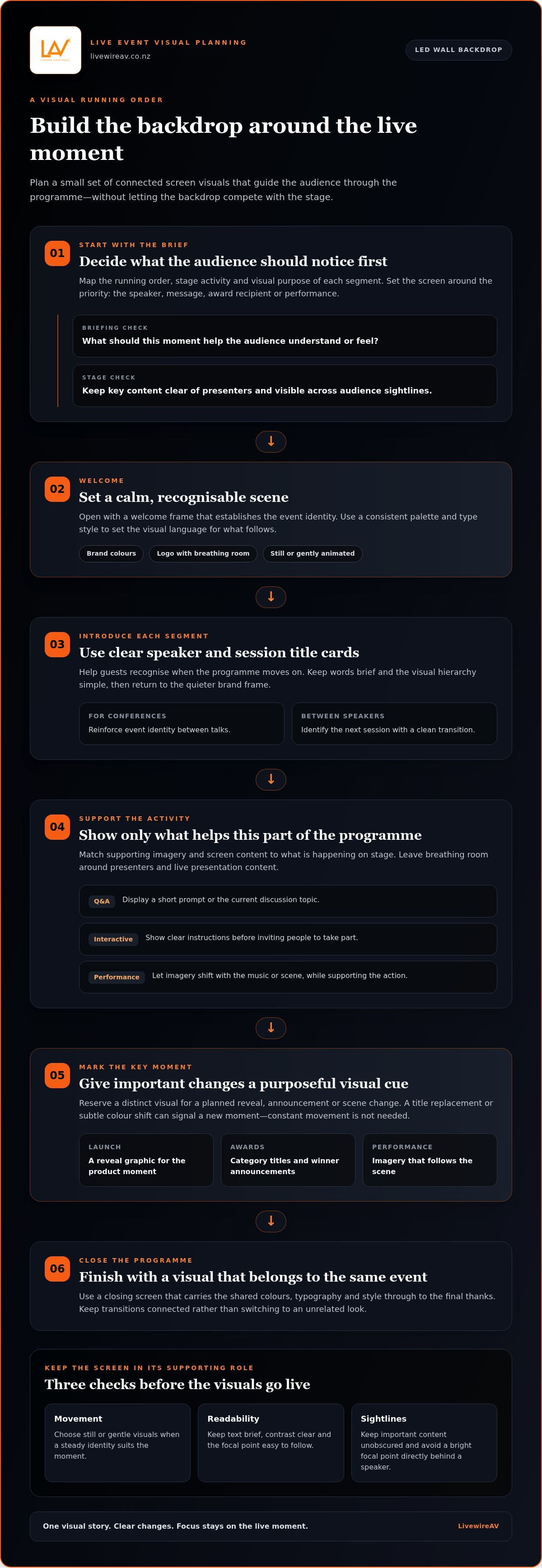
A useful concept gives the screen a clear role throughout the programme. Instead of running one loop from doors opening to the final thanks, plan a small set of related visuals: a welcome frame, speaker or segment title cards, supporting imagery and a closing screen. A consistent palette and type style can tie these moments together, while purposeful changes help the audience recognise when the programme has moved on.
One backdrop concept can shift with the event, moving from a quiet welcome to focused speaker support and a distinct visual cue for a key moment. The change might be as simple as replacing a title or introducing a subtle colour shift. Constant motion isn’t needed to make the design feel considered.
Brand-led visuals that keep the stage professional
For a corporate presentation, create a restrained frame using the organisation’s brand colours, logo and campaign imagery. Keep the logo visible without making it the only feature, and leave breathing room around the presenter and any live presentation content. A static or gently animated background is usually easier to follow while listening. If a key message needs emphasis, show it as a clear title card, then return to the simpler frame.
Atmospheric backdrops for launches, awards and performances
For a launch, use abstract movement, texture or imagery related to the subject to build anticipation, then reserve a distinct visual reveal for the product moment. At an awards event, a consistent graphic style can carry the audience from arrival visuals to category titles and winner announcements. For a performance, imagery can shift with the music or scene, provided it supports rather than distracts from the action.
Keep changes legible and connected. Shared colours, typography and motion can make different segments feel like parts of one event, even as the screen content changes. A simple transition between sections can feel more cohesive than an abrupt switch to an unrelated look.
Ideas for audience participation and programme transitions
Use the screen to make participation easier to follow. During a question-and-answer segment, display a short prompt or the current discussion topic. For an interactive session, show clear instructions before inviting people to take part. Between speakers, a title card can identify the next session and provide a clean visual transition. Keep instructions brief, with enough contrast and space to read across the room.
For each segment, decide what the audience should notice first: the speaker, the message, the award recipient or the performance. Then shape the screen content around that priority. This simple check helps prevent multiple focal points from competing at once.
A creative brief for an LED wall backdrop is most useful when it includes the running order and the visual purpose of each segment. These details help align screen content with stage activity and technical production. If you’re developing a concept for a live event, coordinated event production brings the screen and wider stage plan together.
LED wall backdrop or another stage background: what fits the brief?
An LED wall isn’t automatically the best choice for every stage. Start with what the background needs to do: stay consistent, display changing content, add physical character or make information visible. Consider the room, audience sightlines and programme before deciding. A screen can feel calm and professional when its content is controlled, while a printed or scenic backdrop may suit an event that needs a fixed look.
Use this comparison to narrow the options. Each format has a different role, and combinations can work when the brief calls for both adaptable imagery and physical depth.
When does a screen add more than a static backdrop?
Choose an LED screen when content needs to change meaningfully between programme moments, such as moving from a welcome graphic to a launch reveal or award title. The movement can be subtle: a slow background transition or one planned change may be enough. Still artwork can also be effective on an LED wall, giving the stage a consistent, uncluttered frame without continuous animation.
How do projection and scenic styling differ from LED visuals?
Projection relies on a suitable surface and room conditions, so consider it alongside light levels and stage design. LED displays produce imagery directly on the screen, while scenic elements provide physical depth that pixels can’t replicate. These approaches can complement each other. Match the format to the brief rather than treating one technology as universally better.
An LED wall needn’t overwhelm the stage. Keep movement purposeful, limit on-screen wording and leave clear visual space around presenters. If slides or live camera images share the screen, plan how they relate to the backdrop instead of layering competing focal points. Choose the format that supports the event’s content, audience and setting with the least friction.
How to plan LED wall backdrop content and stage integration
A strong result starts with a production plan, not a folder of graphics. The backdrop needs to suit the event objective, the room and the way people will use the stage. Work through these steps early so content, screen layout and live cues are planned together.
Set the objective. Define what the audience should understand or feel, then identify which programme moments need visual support. This separates essential content from decoration.
Map the stage. Mark the screen, presenter positions, lectern, scenic elements and other visual surfaces. Check sightlines from the back and sides of the audience area, including where a presenter might obscure the screen.
Establish viewing priorities. Decide what needs to be noticed first. Make key text large enough to read at the expected viewing distance, use clear contrast and keep important details away from areas likely to be blocked or cropped.
Brief the content. Gather approved logos, brand colours, campaign imagery, session titles and key messages. Note which visuals should stay consistent and where a change is needed, such as a speaker introduction or reveal.
Coordinate technical delivery. Align artwork dimensions and aspect ratio with the screen layout, then agree on playback formats and how each visual will be called during the programme. This reduces last-minute resizing and makes transitions easier to manage.
Review the complete stage. Check the content alongside presenter placement, lighting and the running order. A visual that looks balanced on a laptop may feel crowded behind a speaker or compete with stage lighting in the room.
Keep the hierarchy simple: one main visual idea, limited supporting text and enough open space around the presenter. For a conference, that might mean a consistent branded frame with a clear session title rather than a full slide deck behind the speaker. The conference LED screen hire guide offers further detail on planning a screen for presentation use.
Prepare visuals for the screen and the room
A useful content brief describes the audience, event segments and response each visual should support. Supply artwork in the agreed dimensions and keep text concise, high-contrast and uncluttered. Match the aspect ratio and playback format to the production plan so graphics display as intended, without awkward cropping or distortion. Review assets in context, not just on an individual device.
Coordinate the backdrop with stage lighting and live cues
Lighting can change how screen imagery reads, while a bright or busy background can compete with the presenter. Coordinate colour, intensity and focus so faces remain clear and the LED content retains its intended role. Map screen changes to the running order, including speaker entrances, transitions and key announcements. This gives the people operating the show clear, predictable cues. Explore live event lighting design for more on bringing lighting and visuals together.
Content and stage integration work best when they’re developed as part of one production plan. Plan your event’s LED wall and technical production with the screen, content and live cues in view from the outset.
How LivewireAV brings an LED wall backdrop into the event plan
An LED wall works best as part of a coordinated event production plan, not as a separate visual layer added at the last minute. LivewireAV provides LED walls as part of its wider technical production work, aligning the screen with the event brief, stage layout and programme. This keeps the backdrop relevant to each moment and gives presenters, performers and visuals a clear place in the overall design.
Planning also considers how the screen relates to other production elements. Depending on the event, these may include projection, camera packages, vision switching and intelligent lighting design. For a presentation, the plan needs to account for how speaker images, presentation content and background visuals share the audience’s attention. For a live performance, screen changes and lighting cues can be considered alongside the programme so they support the action rather than compete with it.
From backdrop concept to a coordinated production plan
Planning starts with the event goals and the practical shape of the stage. The team considers the visual concept, presenter or performer positions, programme transitions and the role the screen needs to play. Those decisions inform how content and cues fit into production, rather than treating the backdrop as a standalone feature.
Experienced technicians support the preparation and management of live visuals as part of event delivery. Clear coordination keeps screen content connected to the running order and wider technical plan. For broader context on bringing event elements together, explore premium event production planning.
What to include when discussing your event brief
A useful brief gives the production team context to shape the approach. Include the event type, audience, venue details and key programme moments, along with available brand assets and the visual tone you want the stage to convey. Share presentation or camera requirements too, so the screen can be planned in relation to other content and stage activity.
Event purpose: What should the audience take away, and which moments need visual emphasis?
Stage and venue: What does the stage layout look like, and where will presenters or performers stand?
Content: Which logos, colours, images, titles or presentation materials need to appear?
Programme: Where do visuals need to change, and what transitions should be supported?
Production needs: Will projection, cameras, vision switching or lighting work alongside the LED wall?
These details connect the creative idea to practical stage and production requirements. LivewireAV brings those considerations into one event production plan, supported by on-site technical management. To discuss production for your brief, talk with LivewireAV.
Shape the stage around your next event
Give your LED backdrop a clear purpose before the creative work begins. Decide what guests should notice, where attention needs to sit during each programme moment and what the screen must communicate. This gives your event team a practical starting point for turning a visual idea into a stage plan that feels coherent on the day.
Bring the event brief, venue information and key programme moments into one conversation. A shared plan makes it easier to align the backdrop with the wider production and keep the creative direction grounded in how the event will run.
LivewireAV supports event production for conferences, exhibitions, corporate gatherings, sporting events and outdoor productions throughout New Zealand, with experienced technicians and modern equipment. Discuss your event production requirements with LivewireAV and start planning a stage backdrop that helps your event make its message clear.
Frequently Asked Questions
Can an LED wall backdrop display still images as well as video?
Yes. An LED wall can display static artwork, motion graphics or video, depending on the event plan and prepared assets. A session title or sponsor frame may work best as a still, while a short video may suit a planned reveal. Keep wording readable across the audience area and avoid motion without a clear purpose. Coordinate content dimensions and playback with the production plan, then review the sequence before the event.
Will an LED wall backdrop distract from speakers?
It can, but distraction depends on the content and placement, not simply on having a screen. During a presentation, use uncluttered artwork and avoid fast movement or strong visual contrast directly behind the speaker. Save more expressive graphics for a transition or a moment when the presenter isn’t speaking. Review the backdrop from the audience’s perspective so the speaker’s position and key screen content don’t compete for attention.
How can an LED backdrop look good in event photographs?
Coordinate screen content with the camera and lighting plan, as exposure, screen brightness and contrast all influence the captured image. Clear artwork with simple shapes and limited text is often easier to compose than a dense graphic. During preparation, view the backdrop through the event camera and check the framing and how the screen sits behind people on stage. Results can vary with camera, venue and production conditions.
Can an LED wall backdrop include sponsor logos?
Yes. Sponsor logos can be included in planned screen content, with placement and timing guided by the event’s branding requirements. Use a consistent layout and size logos so they’re identifiable without overpowering the main message. A dedicated sponsor frame during arrivals or a break gives the logos space, while keeping them off speaker-support visuals can help presentations remain clear. Include sponsor content in the running order so it appears at relevant moments.
What information should we prepare before planning an LED stage backdrop?
Prepare the event purpose, programme, audience details, stage layout, brand assets and the visual tone you want to establish. Include existing presentation materials and note where content needs to change, such as between sessions or before an announcement. This information helps the production team shape the visual approach and coordinate technical requirements. You don’t need to settle screen specifications on your own before discussing the brief.
Is an LED wall backdrop suitable for a small stage?
It can be, depending on stage dimensions, viewing distance, sightlines and the backdrop’s role. On a compact stage, a restrained layout may provide context without making the screen feel like the only focal point. Consider where presenters stand and whether the screen remains visible from audience seats at the sides. The right proportion is more useful than applying a universal minimum screen size, which may not suit every room or stage plan.
Can LED wall content change during an event?
Yes. Content can change between planned programme segments, such as moving from an opening visual to speaker support or a transition graphic. Map each change to the running order and agree on how it will be cued, so the right visual appears at the right point. Include those changes in production preparation and test the sequence. Not every event needs motion; a consistent still can be the better choice for some moments.


Comments