Weatherproofing AV Gear for Outdoor Events: A Guide
A rain cover can shield AV gear from a shower, but if it restricts airflow, it may create another problem. Weatherproofing AV equipment for outdoor events takes coordinated planning, not just a cover or an IP rating.
Rain is only one risk. Wind, dust, UV exposure and condensation can also affect equipment, while poorly chosen enclosures may contribute to heat build-up or make equipment harder to operate. An IP rating describes protection from solids and water under specified test conditions, but it doesn’t cover every outdoor situation.
This guide explains how to assess weather exposure and match protection to each part of a system, while keeping airflow, access and safe operation in view. You’ll also find a practical checklist for planning, setup and live conditions, plus guidance on how coordinated production planning and experienced on-site technicians can help keep audio, video and lighting reliable as the weather changes.
Table of Contents
What's involved in weatherproofing outdoor AV gear?
Weatherproofing AV equipment for outdoor events means planning in layers to limit exposure and maintain safe, reliable operation. The right approach depends on the equipment, where it sits, how it’s installed and the conditions it must operate in. A speaker under a canopy has different needs from a display in direct sun. Connectors and cable routes may also be exposed even when the main equipment is sheltered.
Weather-resistant doesn’t mean suitable for every condition. Equipment designed to withstand some moisture or dust still has limits, and its protection can depend on correct installation and use. An IP Code helps describe an enclosure’s protection against solid objects and water, but it doesn’t account for every element of an event environment or setup.
Weather exposure planning means protecting the whole signal and power path, not simply covering the equipment. A cover alone can’t account for site layout, wind, water movement, airflow or access during operation. Poorly positioned covers and enclosures may also restrict ventilation and contribute to heat build-up. Protection needs to work with the equipment’s operating requirements, not against them.
Which weather conditions create the greatest risks for event AV?
Rain and wind-driven spray can reach equipment from directions that a shelter doesn’t block. Airborne dust may affect exposed connections, while strong sunlight can heat surfaces and make displays harder to see. Humidity and temperature changes matter too, as moisture can form through condensation when conditions shift.
Outdoor conditions can vary from event to event, so base planning on the actual site and forecast. Pay particular attention to wind. It can drive rain beneath temporary protection, move covers and place extra strain on shelters or other temporary arrangements.
Which AV components need weather planning?
Consider the full system: speakers and microphones, mixing positions, LED displays, projectors, lighting and control equipment. Each has a different location and operating need. A covered mixing position, for example, may protect the operator and controls, but it won’t automatically protect equipment positioned elsewhere.
Include power distribution, connectors and signal cables in the plan. Check cable transitions between exposed and sheltered areas, where water may track along a route or reach a connection. Keep equipment access and airflow in view as you organise the layout, so protection supports operation rather than obstructing it.
How IP ratings, enclosures and operating conditions affect outdoor AV
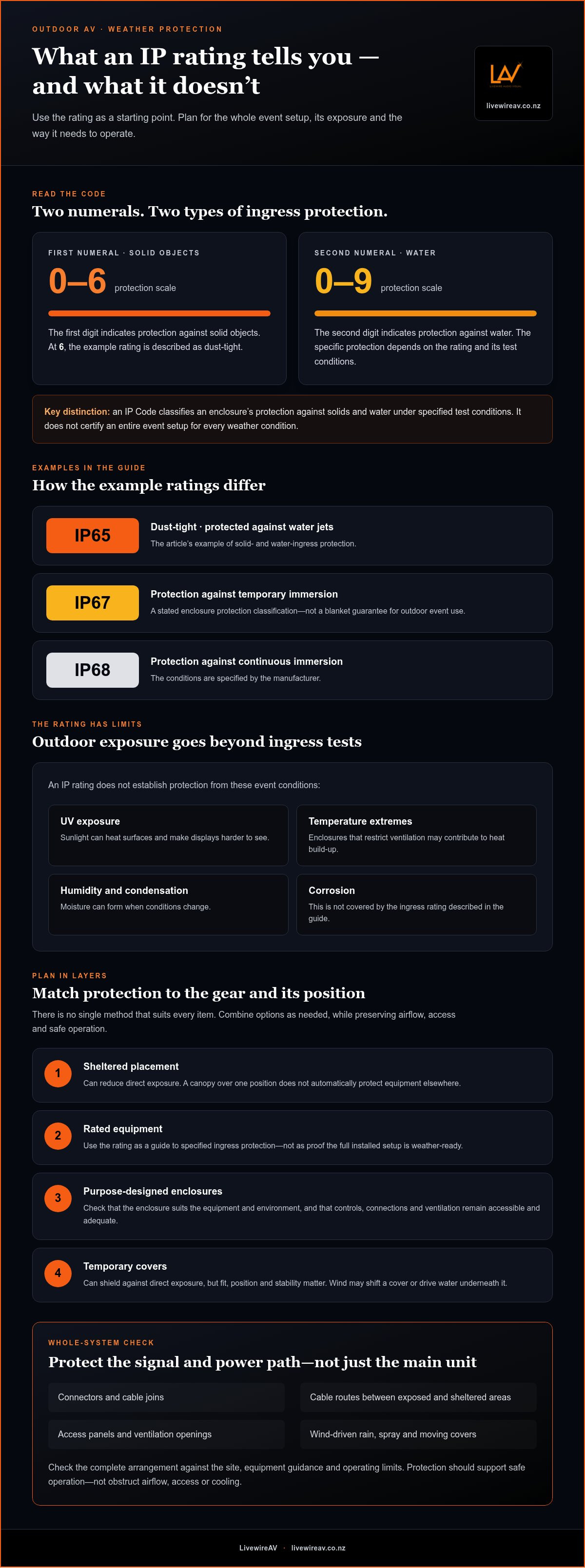
An IP rating is a useful starting point, not a complete weather-readiness decision. Under IEC 60529, the IP Code classifies how an enclosure protects against the entry of solid objects and water. The International Electrotechnical Commission (IEC) publishes information about the rating system, but a rating applies to specified test conditions for the enclosure. It doesn’t automatically describe every event setup.
What does an IP rating tell event planners?
The first numeral indicates protection against solid objects, on a scale from 0 to 6. The second indicates protection against water, on a scale from 0 to 9. For example, IP65 means dust-tight and protected against water jets; IP67 indicates protection against temporary immersion. IP68 relates to continuous immersion under conditions specified by the manufacturer.
Those examples aren’t a universal pass for outdoor use. An IP rating doesn’t establish protection from UV exposure, temperature extremes, humidity or corrosion. Nor does it show how the equipment will perform once installed with event cabling and accessories.
An IP rating describes an enclosure’s tested protection against specified ingress. It doesn’t certify an entire event setup for every weather condition.
How do covers and enclosures affect equipment performance?
A purpose-designed enclosure may provide more consistent protection and planned access than a temporary cover, but it still needs to suit the equipment and its operating environment. Check that controls can be reached, connections can be managed and ventilation remains adequate. An enclosure that restricts cooling can contribute to heat build-up, while temperature changes may create condensation inside or around equipment.
Temporary covers can help shield equipment from direct exposure, but their fit, position and stability matter. Wind can shift a cover or drive water underneath it. Neither a cover nor an enclosure should obstruct airflow, trap moisture or interfere with operation. Follow the equipment and enclosure manufacturers’ installation instructions and operating limits.
Inspect the complete arrangement, not just the main unit. Connectors, cable joins, access panels and ventilation openings can remain vulnerable, particularly where a cable enters an enclosure or crosses from a sheltered position into an exposed one. The enclosure’s rating alone doesn’t tell you how these interfaces are protected in the event layout.
For outdoor events, weatherproofing AV equipment for outdoor events means matching rated protection to actual exposure while preserving safe access and operation. Coordinated outdoor event production planning brings equipment choices, layout and on-site operation into the same plan.
Compare weather protection for outdoor AV equipment
There’s no single protection method that suits every item of event AV. Sheltered placement can reduce direct exposure, while rated equipment, suitable enclosures and temporary covers may help address remaining risks. Choose a combination based on the site, equipment guidance and how the system must be accessed and operated.
How should protection differ between audio, video and lighting?
Audio choices balance exposure with coverage and control. Keep mixing positions accessible and consider how speakers can be placed without compromising sound distribution. For video, LED displays, projectors and cameras have different needs: direct sun, heat, sightlines and operator access all affect where protection can go. Lighting fixtures also need usable angles and adjustment access. A cover that obstructs a beam or traps heat may create an operational trade-off rather than solve one.
When is shelter more suitable than an equipment cover?
A covered operating position can protect people and controls while making live monitoring easier. An exposed installation may need equipment-specific protection, but the plan must include cable routes, joins and connection points, not just visible units. Temporary covers can shield equipment from direct exposure, but they don’t automatically make it waterproof and may shift, restrict airflow or hinder access. For broader site-planning context, read the outdoor event production technical guide.
Effective weatherproofing AV equipment for outdoor events comes down to matching the method to each position, then checking that protection still allows safe, practical operation.
Weatherproofing outdoor AV gear: A practical checklist
Reliable weather planning follows a sequence: assess the site, match protection to each part of the system, check the setup, then monitor conditions during operation. Forecasts are useful planning inputs, but they can’t guarantee what the event team will face on the day. Build clear responsibilities and practical contingencies into the plan.
What should the team assess before the event?
Survey the site. Record likely exposure to rain, wind, dust and direct sun, along with available shelter, equipment positions, access routes and where operators need clear views.
Map the system. Identify each equipment location, cable route and transition between exposed and sheltered areas. Plan separately for power distribution, signal connections and operator positions.
Check operating guidance. Review equipment and enclosure documentation for installation, ventilation and environmental limits. Include applicable New Zealand electrical requirements in the power plan.
Set contingencies. Use the forecast to inform decisions about positioning, protection and monitoring. Agree how the team will respond if conditions change, rather than relying on one universal shutdown threshold for every system or site.
What should technicians check during setup and operation?
Before powering up, inspect equipment placement, covers and enclosures, connectors, cable routes and ventilation. Confirm that protection hasn’t blocked controls, access or cooling.
Agree who does what. Assign responsibility for monitoring conditions and make clear who communicates operational changes to the event team. Keep communication direct so decisions aren’t delayed or duplicated.
Recheck during the event. Watch for changing exposure, shifted covers, water near connections or anything that affects access and airflow. If conditions change, follow the agreed plan and relevant equipment guidance.
Plan pack-down. Note the order for disconnecting and packing equipment, then inspect it for moisture or debris. Dry equipment only as its manufacturer’s guidance allows, and record any issues for follow-up before it’s used again.
A weather plan only works when the team checks it before power-up and keeps checking it as conditions change. For outdoor events, weatherproofing AV equipment for outdoor events is part of the production workflow, from site assessment and equipment logistics through to live operation.
For further site-planning guidance, see the outdoor event production technical guide. You can also explore coordinated outdoor event production.
How integrated event production keeps weather protection under control
Weather planning works best when it’s built into the complete production design, rather than treated as a last-minute equipment decision. Choices about audio, video and lighting affect where systems can be positioned, what needs shelter, how cables are routed and where operators can work. Coordinating these details helps identify practical conflicts before setup, such as a protected control position with a poor view of the stage or a cable route that crosses an exposed area.
For a broader view of how technical choices fit together, see the premium event production guide.
What does coordinated weather planning look like?
Start with the site layout and the event’s technical requirements. Align equipment selection with likely exposure, available shelter, cable paths and the positions needed for operation and monitoring. Audio coverage, video sightlines and lighting angles all influence placement, so consider any change made to protect one system against the needs of the rest of the production. Lighting positions, for example, need to account for exposure, usable focus and adjustment access. The live event lighting design guide explores how lighting design decisions support the wider event experience.
Logistics matter too. Equipment needs to arrive, be set up and remain accessible in a sequence that supports the planned layout. On-site technical management helps keep installation, checks and operating positions aligned with that plan, while allowing the team to respond if conditions change.
How can a technical team reduce uncertainty on event day?
Experienced technicians provide a practical point of control. Clear roles help: a person or team can carry out equipment checks, designated operators can monitor relevant conditions, and an agreed contact can communicate operational changes to event stakeholders. This reduces the chance that a concern is missed or different teams act on conflicting instructions.
Response plans should follow equipment manufacturers’ instructions and the event’s safety procedures. They should also make clear how changes are communicated and who is responsible for coordinating them. Weatherproofing AV equipment for outdoor events is more manageable when technical design, equipment logistics and live operation are considered together, with responsibilities understood before the event begins.
Planning an outdoor event? Plan your outdoor event production with LivewireAV and request a tailored technical production proposal.
Plan for a more reliable outdoor event
Weatherproofing AV equipment for outdoor events works best as part of a coordinated production plan. Match protection to each item of equipment and its exposure, treat IP ratings as guidance rather than a guarantee for every setup, and include cable routes, airflow and operator access in the design.
Preparation matters, but so does clear on-site oversight. Forecasts inform the plan; technicians and operators can carry out checks, monitor conditions and follow agreed procedures as the event unfolds. That joined-up approach helps keep audio, video, LED walls, cameras and intelligent lighting working together through changing conditions.
LivewireAV provides full technical production for outdoor events across New Zealand, bringing equipment, logistics and on-site technical management into one plan. For a tailored proposal, plan your outdoor event production with LivewireAV.
With the right preparation and a capable team in place, you can focus on your event, knowing the technical details have been carefully considered.
Frequently Asked Questions
What does an IP rating mean for outdoor AV equipment?
An IP rating classifies an enclosure’s protection against specified conditions for the entry of solids and water, tested under defined conditions. It doesn’t guarantee that equipment is suitable for every outdoor event or exposure. Check the exact equipment documentation, installation requirements and conditions covered by the rating. Also assess connectors, cable joins, ventilation openings and access panels, as these parts can affect how well the complete setup is protected.
Can AV equipment be used in the rain at an outdoor event?
It depends on the equipment’s documented rating, installation, rain exposure and operating conditions. Wind can drive water into areas that appear sheltered, and a cover may affect cooling or access. Don’t assume a device can operate safely in rain simply because it’s designed for outdoor use. Assess the full system, including connections and power arrangements, and follow equipment manufacturer guidance and the event’s safety procedures.
How do you protect outdoor event speakers from weather?
Start with the speaker manufacturer’s environmental guidance and assess the site exposure. Consider positioning, suitable shelter or purpose-designed protection, secure mounting, and the route of signal and power connections. Keep monitoring and access needs in view so the team can operate the system as planned. Don’t assume a cover or enclosure preserves protection or performance unless its suitability is documented for that speaker and setup.
Are temporary covers enough to weatherproof event AV equipment?
Not necessarily. A temporary cover may reduce direct exposure, but its suitability depends on wind, water paths, equipment temperature and how it’s secured. It may also restrict ventilation, access to controls or visibility for operators. Treat covers as one possible layer in a wider weather plan, not as proof that equipment is waterproof. Check manufacturer instructions and include connections, cable transitions, power distribution and operator positions in the assessment.
How can event organisers protect AV cables outdoors?
Map cable routes before installation and identify exposed joins, ground crossings and transitions between sheltered and open areas. Choose protection appropriate to the cable, connection and site, following manufacturer guidance and applicable New Zealand safety requirements. Keep routes secure and accessible for inspection. Account for water exposure and event traffic, and plan cable paths so they don’t obstruct exits or create trip hazards. Include power and signal connections in the same assessment.
What should an outdoor event AV weather checklist include?
Include site exposure, equipment documentation, available shelter, equipment placement, ventilation, cable and connection protection, power arrangements, monitoring roles and contingency communication. Check the setup before operation, then agree who will respond if conditions change. The checklist for weatherproofing AV equipment for outdoor events should reflect the specific equipment and site, rather than relying on a single IP rating or a one-size-fits-all cover.
Does weatherproofing affect AV equipment performance?
It can. Enclosures and covers may affect cooling, access, visibility, sound or lighting, depending on the equipment and setup. Protection needs to balance exposure control with the manufacturer’s operating requirements. Assess each equipment category separately, and review the planned configuration before the event where practical. On site, technicians and operators can monitor equipment and check that protection hasn’t obstructed airflow, controls or the intended audio, video and lighting operation.


Comments