Professional Livestream Production Services for Events Across New Zealand
If you’re searching for professional livestream production services, the key question is how the broadcast will work with the rest of your event. A clear, dependable livestream relies on coordinated audio, vision switching, connectivity and crew, not simply a camera connected to the internet. LivewireAV brings these elements together as part of a wider event production plan, with services available across New Zealand.
It’s reasonable to be unsure how many cameras you need, who will manage the stream or what the venue can support. Poor sound, a disrupted connection or unclear responsibilities can affect the experience for remote viewers. Planning the technical scope early helps your team understand what needs to be confirmed before event day.
This article explains what professional livestream production can involve, how to compare providers beyond similar-sounding service descriptions, and what information to prepare when requesting a proposal. You’ll also find details to clarify about equipment, crew, streaming platforms, connectivity and responsibilities, so your broadcast has fewer unknowns.
Key Takeaways
Professional livestream production should coordinate cameras, audio, vision switching and streaming as one event workflow.
Use the event brief, format, venue and audience needs to clarify the production scope before requesting a proposal.
Compare providers by checking crew responsibilities, rehearsal plans, distribution arrangements and agreed deliverables.
Assess venue connectivity rather than assuming it will support a reliable broadcast, and confirm who is responsible for testing it.
Prepare the run sheet, presenter details, slides, branding and event contacts early to help the technical team plan setup and rehearsal.
Table of Contents
What do livestream production services include for a professional event?
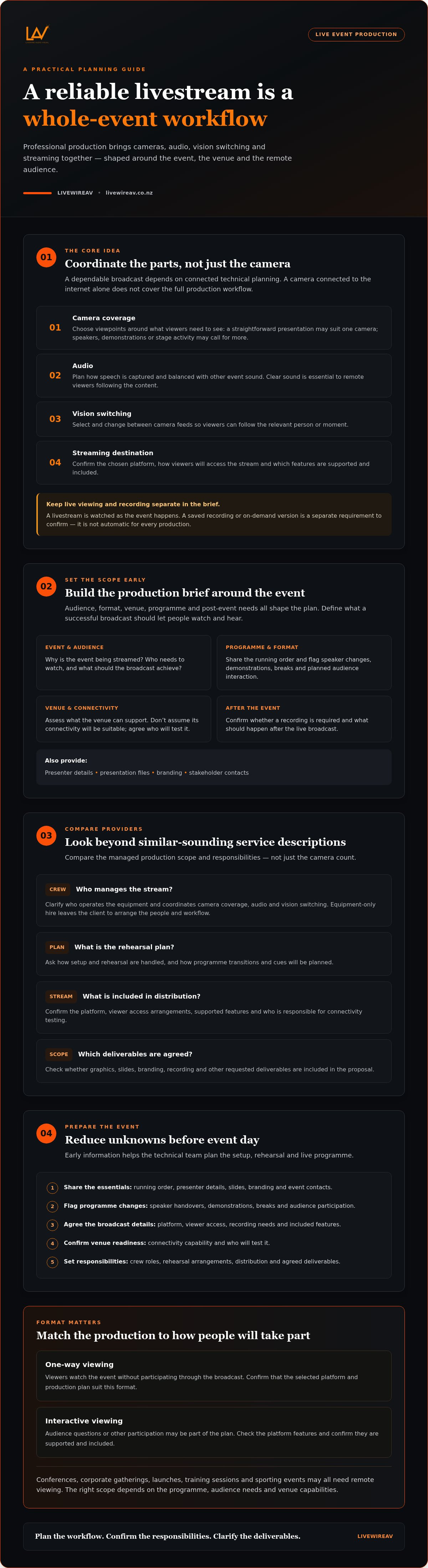
Professional livestream production coordinates the technical work of capturing an event, shaping its sound and picture, and sending a live programme to an online audience. It brings cameras, audio, vision switching and the chosen streaming destination into one planned workflow. The right scope depends on what viewers need to see and hear, how the event runs and what the venue can support.
A useful distinction: a livestream is a live transmission for viewers to watch as the event happens; a recording is a saved version intended for later viewing. Recording or making a stream available on demand is a separate requirement to confirm, not an automatic part of every production.
The process has similarities to the three main stages of video production: preparation, live production and what happens afterwards. For a broadcast, each stage needs to account for the event programme and the experience of remote viewers.
Which production elements shape the viewer experience?
Camera coverage determines what the audience can see. One camera may suit a straightforward presentation, while a programme with multiple speakers, demonstrations or activity across a stage may call for more viewpoints. Vision switching selects and changes between camera feeds, helping viewers follow the relevant person or moment rather than watching one fixed shot throughout.
Sound matters just as much. If a presenter is difficult to hear, a sharp picture won’t make the content clear. Audio planning considers how speech is captured and balanced with other event sound. Slides and branding can also be part of the visual plan, but their integration should be discussed against the event’s requirements. Confirm which graphics, platform features and deliverables are included in the proposed scope.
When is a professionally produced livestream useful?
Conferences, corporate gatherings, launches, training sessions and sporting events can all benefit when people need to follow proceedings remotely. A well-planned broadcast gives people who can’t attend in person a way to watch the programme while the in-room event continues.
Some streams are one-way: viewers watch but don’t participate through the broadcast. An interactive format may involve audience questions or other participation, depending on the selected platform and event plan. Check which platform is supported and whether the features you need are included rather than assuming every stream works the same way.
When comparing livestream production services Auckland, assess the managed production scope, not just the camera count. A basic single-camera stream may meet a simple brief; a more involved event needs coordinated equipment and technicians to manage camera coverage, audio and vision switching. That differs from equipment-only hire, where the client must arrange the people and workflow to operate it. LivewireAV provides Hybrid & Livestream Events and Full Technical Production, with the equipment and responsibilities shaped around the event requirements.
How a professional livestream moves from event brief to broadcast
A reliable broadcast starts with decisions, not equipment. Audience, event format, venue, programme and post-event needs all affect the production plan. A presenter speaking from a lectern has different camera and audio requirements from a training session with slides or a sporting event with action across a wider area.
What should be decided during the production brief?
Clarify why the event is being streamed, who needs to watch and what a successful broadcast should achieve. Share the running order, presenter details, presentation files, branding and stakeholder contacts. Flag speaker changes, demonstrations, breaks and planned audience interaction so the technical team can plan transitions and cues.
Agree how viewers will access the stream, whether a recording is required and what should happen after the event. Platform features, access settings and recording options vary, so confirm what’s supported and included rather than assuming. These details help turn a broad request for livestream production services Auckland into a production scope that can be assessed and proposed clearly.
What happens during setup, rehearsal and live operation?
The workflow usually moves through six stages:
Brief: Confirm the purpose, audience, event format, programme and expected deliverables.
Technical planning: Match camera coverage, audio, vision switching and streaming arrangements to the event and venue. Confirm responsibilities and venue requirements.
Setup: Position and connect the agreed equipment, route signals and check camera views and sound in coordination with the venue schedule.
Rehearsal: Run through key cues, speaker transitions, slides and timing with the event and technical teams.
Live operation: Follow the running order, switch between planned views and monitor the programme as it reaches viewers. Agree who communicates decisions and who responds if an issue arises.
Post-event handover: Complete the agreed wrap-up, including any confirmed recording or other deliverables.
A rehearsal helps identify timing, cue and signal-flow issues before they affect the live broadcast. It also gives presenters a chance to understand transitions and lets organisers and technicians confirm who gives each cue. It doesn’t replace confirming venue access, setup time and responsibilities in advance.
For events with several moving parts, a coordinated technical team can help keep the event plan and broadcast workflow aligned. Explore LivewireAV’s technical production services when considering a tailored proposal for your event.
How to compare livestream production providers on reliability
Service descriptions can sound similar, so compare the decisions and responsibilities behind each proposal. A provider should be able to explain how the production will fit your event, what the crew will manage and what depends on the venue or streaming platform. For livestream production, ask for a clear scope rather than relying on broad claims about quality or reliability.
What questions reveal a provider’s technical preparation?
Ask how the team will assess venue access, available setup time, connectivity and rehearsal needs. Connectivity should be assessed for the specific venue and event, not assumed from a general description. Find out what checks are planned and who will coordinate access with the venue.
Discuss disruption before event day. What contingency options are proposed for this event? Who makes the call if a technical issue affects the broadcast, and how will the organiser be kept informed? Ask how an issue is escalated and which decisions belong to the technical lead versus the event organiser. Don’t assume backup systems or other contingency measures are standard inclusions. Have any proposed options and responsibilities written into the scope.
How should you compare broadcast quality and audience access?
Judge the proposed coverage against the event’s purpose. A presentation may need a clear view of the speaker and legible slides; a programme with several speakers may need planned camera changes. Ask how presenter speech will remain intelligible and how visuals will stay consistent as the programme changes.
Assess reliability through preparation, roles, testing and contingencies. Then confirm who the audience is, how they’ll access the stream and whether privacy or restricted access matters. Ask which platform is suitable, what features are available, and whether recording or on-demand delivery is included. A useful proposal makes these details explicit, so you can compare like with like.
How to prepare your event for a smooth livestream
A clear handover gives the production team time to plan camera positions, presentation cues and technical requirements before event day. For organisers, the essentials are straightforward: current event information, confirmed responsibilities and early coordination with the venue. If your event includes both in-room and remote audiences, see this hybrid conference AV setup guide for related planning considerations.
What should presenters and organisers supply in advance?
Prepare a shared event pack and keep it current. Include:
The latest run sheet, with timings, breaks and transitions.
Presenter names, speaking order and pronunciation guidance.
Final presentation files, planned videos and approved branding.
Key event and stakeholder contacts, including one nominated decision-maker.
Flag programme changes as soon as they’re known. Agree who can approve last-minute edits and how those decisions will reach the production team. A single event contact helps prevent conflicting instructions, especially if a speaker is delayed or a presentation needs to change. Confirm how updates will be communicated during the event, so the team receives one clear direction.
How can the venue and event team support production?
Coordinate venue access and setup windows early. Share the room layout, planned presenter positions, audience movement and any known visual obstructions. Sightlines matter: a screen, lectern or audience member in the wrong position can affect the camera view. Provide information about power locations and venue connectivity so the production team can assess them against the broadcast plan.
Don’t treat general internet speed guidance as a guarantee of stream performance. Connectivity needs to be assessed for the specific venue and event, and any proposed testing or contingency arrangements should be confirmed with the provider. Allow enough time within the agreed venue schedule to set up and check the planned production before presenters take the stage.
A short coordination check before event day can surface practical issues early: Is the presentation position visible to the cameras? Can speakers move safely without blocking a camera view? Who tells the production team about a timing change? Clear answers help keep the room and broadcast working to the same plan.
If you’re considering livestream production services Auckland, prepare these details before seeking a proposal. You can discuss your event production requirements with LivewireAV and outline the format, venue information and deliverables you need.
Choose an end-to-end livestream production partner for your event
A coordinated production partner can simplify events where the broadcast depends on several technical elements working together. With a multi-speaker programme, multiple cameras, complex cues or integrated event AV, clear technical ownership helps keep the room programme and online broadcast aligned. For a simple, single-camera stream, a smaller scope may be more suitable. The right level of support depends on the event, not on choosing the largest possible production.
When does an end-to-end production team make sense?
Consider how many people and systems need to work in sync. Several presenters, frequent changes between slides and speakers, or a programme that also uses screens and in-room audio can create more coordination points. A production partner can help define responsibilities across the agreed technical scope, so organisers know who is managing cameras, vision switching and other production elements. LivewireAV provides full technical production, camera packages, vision switching and experienced technicians as part of its event production services.
For a broader view of how technical elements can be coordinated across an event, read this guide to premium event production across New Zealand.
What should your livestream production proposal clarify?
Ask for a proposal that connects the event brief to specific responsibilities. An itemised scope makes it easier to compare providers and identify what still needs to be confirmed. Check that it explains:
Which equipment and operators are proposed, including camera and vision-switching requirements.
Who is responsible for setup, rehearsal and live coverage, and what access time is needed.
What depends on the venue, streaming platform, event schedule or a technical assessment.
What contingency options are proposed for this event and who makes decisions if a disruption occurs.
Confirm distribution, access arrangements and recording requirements against the chosen platform and proposed scope. Don’t assume these are included by default. For livestream production services Auckland, as for any event production proposal, a useful comparison starts with clear deliverables, named responsibilities and venue-specific planning, not broad assurances.
Share your event format, audience needs, venue information and expected deliverables to support a tailored discussion. Discuss your livestream production brief with LivewireAV and outline the technical requirements that matter for your event.
Plan a broadcast your audience can rely on
A professional livestream is an end-to-end production shaped around your event, not a camera count alone. A clear brief, venue assessment, defined crew roles and rehearsal help reduce uncertainty before the broadcast begins. Comparing providers by their scope, responsibilities and deliverables makes it easier to choose support that fits your audience and programme.
LivewireAV provides full technical production and hybrid and livestream event services across New Zealand. Camera packages, vision switching, modern production equipment and experienced technicians support a coordinated approach, with a tailored proposal based on your event requirements. The production plan can be considered alongside the wider technical needs of the event.
Start with your event format, intended audience, venue details and required deliverables. Clear information helps establish what needs to be planned and confirmed. Discuss your event livestream requirements with LivewireAV and take the next step towards a considered, well-coordinated broadcast.
Frequently Asked Questions
What do livestream production services include?
Livestream production services coordinate the technical work needed to capture an event and deliver it to remote viewers. Depending on the brief, this can involve camera packages, vision switching, audio, streaming arrangements and on-site technicians. The exact scope varies with the event format, venue and required deliverables. Ask providers to clarify which equipment and crew roles are included, and what the organiser needs to supply or arrange.
How does professional livestream production work on event day?
On event day, the production team sets up and checks the agreed equipment, then rehearses important cues and transitions before the broadcast. During the event, technicians operate the planned production elements and coordinate with the event contact as the programme unfolds. A running order, confirmed presenter details and a clear process for communicating changes help the team respond to timing adjustments without confusion.
How much do professional livestream production services cost?
Professional livestream production is generally scoped to the event rather than priced as one fixed package. The proposal may reflect the number of cameras, crew requirements, venue conditions, setup and rehearsal needs, event duration and agreed deliverables. Ask for an itemised scope so you can compare what each proposal includes. LivewireAV provides tailored proposals based on event requirements; confirm any venue- or platform-dependent costs directly with the provider.
Is a professional livestream reliable for a corporate event?
A professional production plan can reduce technical uncertainty, but no provider should promise reliability without assessing the event requirements. Ask how the venue, connectivity, equipment, crew responsibilities and rehearsal will be addressed. Confirm who monitors the broadcast, who makes technical decisions during a disruption, and what event-specific contingency options are proposed. Clear roles and documented responsibilities help organisers understand how the team will manage the planned production.
What internet connection does a livestream event need?
The required connection depends on the streaming setup, venue conditions and platform, so there isn’t one speed figure that suits every event. Share the venue’s connectivity information with the production provider and ask how it will be assessed for the planned broadcast. Confirm whether testing is included and what options, if any, are proposed if the connection is unsuitable. Don’t treat general speed guidance as a guarantee of stream performance.
Can a professional livestream be recorded for later viewing?
A livestream may be recorded for later viewing, but recording and post-event delivery should be agreed as separate requirements in the proposal. Confirm whether recording is available for the proposed setup, who is responsible for it, what file or delivery format is expected, and when it will be handed over. Also check whether the streaming platform supports your intended access arrangements. Don’t assume a recording is automatically included with live coverage.
How many cameras does an event livestream need?
The right camera count depends on what remote viewers need to follow. A single speaker in a straightforward presentation may suit a simple camera view, while multiple presenters, demonstrations or activity across a stage may benefit from additional coverage and vision switching. Ask the provider to explain how the proposed views support your running order and audience experience. Confirm the production scope against the venue layout and event requirements.


Comments