Indoor LED Wall for Conferences: A Clear, Reliable Display
What if the clearest conference display isn’t simply the biggest one in the room? An indoor LED wall for conferences can make slides, video and live camera feeds easier to see, but the result depends on how the screen suits the room, the audience and the programme.
Choosing a display means balancing clarity with the room’s layout and the day’s technical requirements. Screen size, viewing distance, content format, lighting and sightlines all affect what delegates can see. Plan these together rather than treating the display as a standalone decision.
This guide compares LED walls with projection and other display options, then covers how to match screen size and viewing distance to your conference. It also explains how slides, video and camera feeds fit into a coordinated production. When the display, content and technical setup are planned as one system, your team can make informed decisions and create a more dependable experience for presenters and delegates.
Table of Contents
Why choose an indoor LED wall for a conference?
An indoor LED wall is a modular display made from panels joined to create a larger surface for event visuals. At a conference, it gives slides, video and event branding a shared place on stage, helping delegates follow information across the room. The panels create the display surface; the content sources and equipment used to select or play that content are separate parts of the production.
That distinction matters because a screen can only show the content it receives. Plan its role alongside the programme and the systems feeding it. For a general introduction to the technology, see this overview of the LED display, including its use in video walls and as an alternative to projection screens.
What can a conference LED wall display?
Common uses include presentation slides, pre-produced videos and event branding such as speaker names or session titles. If the production includes cameras, live images can also bring a speaker or audience interaction into view, particularly during a large plenary session.
The wall itself is not the playback system. A playback source provides media, while vision switching selects or changes the visual feed sent to the display. Keeping these roles clear helps organisers plan transitions between slides, video and camera images without expecting the screen to create or manage content on its own.
When is an LED wall a good fit?
Start with the audience and the room. A large plenary with seats spread across a wide floor may need a more prominent shared visual focus than a small session where everyone is close to the presenter. Stage position, seating angles and sightlines all affect whether delegates can comfortably see the display, including from the sides and rear of the room.
Next, consider what each session asks the screen to do. An LED wall may suit a programme with frequent changes between slides, video, branding and planned live feeds. If visuals play only a small supporting role, another display approach may fit better. The aim is not to make the screen the centre of attention at every moment. It should make information easier to follow while keeping attention on the speaker and session.
For an indoor LED wall for conferences, match the display to the venue and programme instead of selecting a screen in isolation. A considered plan accounts for who needs to see the content, where they’ll be seated and how the visuals support each part of the event.
How indoor LED walls work in a conference production
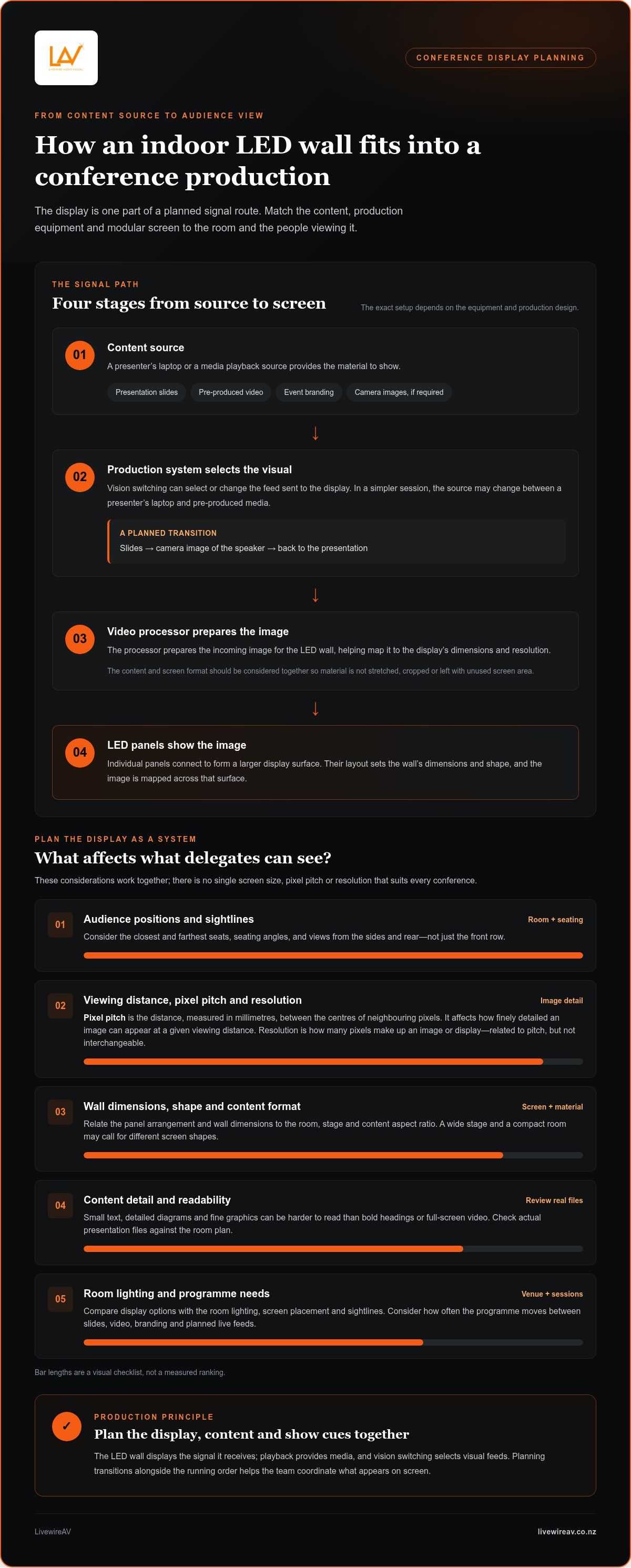
An LED wall is assembled from individual panels connected to form a larger display surface. The panel layout determines the wall’s dimensions and shape, while the image is mapped across that surface. Because the screen is modular, plan how its dimensions relate to the room and to the material being shown.
One term you’ll encounter is pixel pitch: the distance, measured in millimetres, between the centres of neighbouring pixels. Put simply, pixel pitch describes pixel spacing and affects how finely detailed an image can appear at a given viewing distance.
Pixel pitch, resolution and viewing distance
Pixel pitch and resolution are related, but they aren’t interchangeable. Pitch describes the spacing of pixels on the panels; resolution describes how many pixels make up an image or display. People seated close to a wall may notice the image structure more readily, so viewing positions matter when planning the display. There’s no single pitch or resolution that suits every conference.
Use the full seating plan, not just the front row. The wall’s width and height, the content’s aspect ratio, and the closest and farthest seats all affect how material will appear. A wide stage may call for a different screen shape from a compact room, while seats close to the display create different requirements for image detail. Match the panel arrangement to the content so slides aren’t stretched, cropped or surrounded by unused screen area.
Review the material itself, too. Small text, detailed diagrams and fine graphics can be harder to read than bold headings or full-screen video, particularly from further back. Reviewing actual presentation files alongside the room plan helps identify whether text size and image composition will work for the audience.
From presentation source to the LED display
The signal follows a planned route. A presenter’s laptop or a media playback source sends content into the production system. A video processor prepares the incoming image for the LED wall, helping map it to the display’s dimensions and resolution. The prepared signal then feeds the panels. The exact setup depends on the equipment and production design.
In a simple session, the source may change between a presenter’s laptop and pre-produced media. A more involved programme can include camera packages and vision switching, allowing an operator to select the visual source shown on the display. For example, a session might move from slides to a camera image of the speaker, then back to the presentation. Planning transitions in advance helps align the content, screen format and show cues.
LivewireAV brings LED walls together with content, camera packages and vision switching where the programme calls for them. A coordinated conference production setup gives the team a clear view of how each signal reaches the screen and supports the running order.
Indoor LED wall vs projection: which suits your conference?
Neither an LED wall nor projection suits every conference. The practical choice depends on the venue, audience layout, room lighting and what the programme needs the display to do. A screen that looks suitable on a stage plan may be less effective if lighting, seating angles or the available surface make it difficult for delegates to see.
Compare the options in the actual room. Consider whether delegates need to read detailed slides, watch video or follow live camera images, and whether the display needs to remain prominent while the room is lit for speakers or note-taking.
When an LED wall may suit the room
An LED wall may suit a stage design that needs a defined, modular display surface, particularly when visuals feature throughout the day. Its suitability still depends on the venue, screen position and audience sightlines. Review the closest seats, side angles and any obstructions, then consider how the wall will sit alongside the presenter without drawing attention away from them.
When projection may be the better fit
Projection can suit a room with an appropriate screen or projection surface and a layout that supports clear sightlines. Ambient light matters: bright conditions can reduce the perceived contrast of projected content, while a planned lighting setup may help keep the image legible. Assess the surface, projector position and seating together. The broader conference LED screen hire guide also outlines wider display-planning considerations.
Use the programme to test the choice. A plenary with video, slides and frequent changes may place different demands on a display from a discussion-led session with occasional supporting slides. For an indoor LED wall for conferences, the goal is to make content comfortable to view from the seats that matter while keeping presenters and the event in focus.
LivewireAV plans LED walls and projection as part of a wider production, tailoring the display approach to the venue and event brief. This connects screen placement, content and the audience experience instead of treating the display as a standalone decision.
How to plan an indoor LED wall for a conference
A dependable display plan starts with the room and running order, not a panel specification. An indoor LED wall for conferences needs to suit the audience’s viewing positions, stage design and planned content. Work through these steps with the production team so display decisions connect to installation and show operation.
Map the audience and room. Confirm expected attendance, seating layout, stage position and key viewing points, including the sides and rear of the room. Note sightline obstructions and how the display will sit alongside presenters, staging and other production elements.
Set the programme requirements. Identify the sessions that need slides, video, branding or live camera images. Use the run sheet to map content changes and understand whether the display has different roles across plenaries, presentations and other sessions.
Plan screen dimensions and placement. Match the display shape and position to the stage, audience sightlines and content format. Review how presentation slides and video will appear on the planned surface so important information remains visible rather than stretched or cropped.
Coordinate venue logistics. Include access and installation requirements in the wider production schedule. Plan how the display setup fits around staging, lighting, audio and other event elements, and include power requirements in the technical plan.
Check content and show operation. Schedule time before doors open to test the planned sources, playback and transitions. Rehearse cues in sequence, then confirm the screen is visible from key audience positions.
Prepare content and presentation requirements
Gather presentation files, pre-produced video, event branding and live-feed requirements in one place. Record who is supplying each item and when it needs to be available for testing. This gives the technical team time to review the actual material and plan how it will appear on the display, rather than relying on assumptions about content that may change.
Keep the run sheet practical. Note which source is shown for each session, who calls the playback cue and what should follow it. For example, a speaker moving from slides to a video needs a clear transition in the programme. Flag late changes early so updated files can be included in the relevant checks.
Coordinate setup, rehearsal and show operation
Plan installation around the venue’s access arrangements and the wider stage build. Coordinating the display with camera positions, lighting and other production elements helps avoid conflicts that could affect sightlines or show cues. During rehearsal, test content sources and transitions in the order they’ll be used, and view the display from representative seats as well as the stage.
LivewireAV coordinates display planning with conference content and technical production, with on-site technicians supporting event delivery. Discuss your conference LED wall requirements with the LivewireAV team to plan a setup that fits your room and programme.
How LivewireAV delivers indoor LED walls for conferences
Choosing a display is one part of conference production. LivewireAV provides LED walls and projection as part of a wider technical production service, coordinating the visual setup with the venue, programme and other event requirements. This joined-up approach helps organisers plan how the screen will be used, how content reaches it and how the display fits with the stage and audience experience.
For an indoor LED wall for conferences, planning needs to go beyond the physical screen. LivewireAV considers how the visual programme connects with audio, video and lighting, then organises technical production around the event’s needs. The setup is tailored to the venue and programme, not treated as a standalone equipment choice.
One coordinated production for the visual programme
Display decisions can affect other parts of the stage plan. Screen placement needs to work alongside presenter positions, lighting and camera views, while the content schedule informs how visuals are managed during each session. Coordinating these elements helps the technical team prepare for the show flow, including planned changes between presentation material, video and live images.
Where sessions need live visuals, LivewireAV can incorporate camera packages and vision switching into the production. Cameras capture the required views, and vision switching supports selection of the visual feed used during the programme. The approach depends on the event brief and the role of live images, whether that’s showing a presenter or supporting a discussion. Audio and lighting are considered as part of the wider technical plan, so display operation fits the production rather than competing with it.
These connected decisions are part of audio visual planning for large conferences, where content, staging and technical operation need to work together.
Preparation continues on site. LivewireAV’s technicians and technical management support event setup and operation, helping coordinate the planned display and visual cues with the programme. Clear roles and a shared run sheet give presenters, organisers and the technical team a common reference as sessions progress.
Plan your conference display with LivewireAV
A useful starting point is a clear outline of the event format, venue context, audience needs and programme. Include the kinds of content you expect to show, whether live camera images are part of the plan and any key changes between sessions. These details help shape a technical approach around the way the conference will run.
LivewireAV tailors technical production and equipment to each event, connecting the display with the wider production requirements. Share the programme and audience context early so the planning can account for visual and operational needs together. Plan your conference LED wall with LivewireAV.
Turn your display decision into a clear production brief
Turn your conference priorities into a practical brief. Consider what delegates need to see, how the visual programme supports the event’s purpose and what the team needs to coordinate before the day. A clear brief gives production planning a useful starting point and keeps technical decisions connected to the experience you want attendees to have.
An indoor LED wall for conferences is most effective when its role is clear within the wider event. Share the conference format, the audience experience you’re aiming for and the key moments in the programme. The display plan can then be shaped around your event rather than treated as a standalone choice.
LivewireAV supports conference and event production throughout New Zealand, with technical planning tailored to each project. Plan your conference display with LivewireAV and take the next step towards a considered, well-coordinated event setup.
Frequently Asked Questions
Can an indoor LED wall show live camera feeds?
Yes. A conference production can show camera images on an LED wall when camera packages and vision switching are included in the event design. The wall displays the selected image; cameras capture it, and the switching system manages which visual source is sent to the screen. The plan depends on the programme, stage arrangement and production requirements. For example, camera framing may need to keep a presenter visible without obscuring on-stage slides.
Is an indoor LED wall suitable for a conference room with daylight?
It can be, but suitability depends on the room’s ambient light, display placement, content and audience sightlines. Daylight through windows may affect how clearly people can see different parts of the screen, particularly from seats at an angle. Include the room’s lighting conditions in the display plan alongside the programme and stage layout. Assess the specific room rather than assuming every screen will appear equally clear in every setting.
What should presenters prepare before using slides on an LED wall?
Presenters should provide final slides and media assets early, and flag any video or live-content requirements. They should also note when playback is needed and tell the organiser about changes to files or presentation order. This gives the production team time to prepare sources and test planned transitions before the session. Keep supplied material current: a last-minute slide update can affect the version prepared for the show.
Can one indoor LED wall display different types of content during a conference?
Yes. A conference display can be planned for slides, video, event branding and live camera images across different sessions. The run sheet can show what should appear at each point, while production systems help manage changes between sources. For example, a session may move from a speaker’s slides to a prepared video and then return to the presentation. The workflow depends on the programme and production design, rather than a fixed number of inputs or layouts.
Will an indoor LED wall work for a hybrid conference?
An LED wall can be part of the in-room visual production for a hybrid conference, but it doesn’t deliver the livestream on its own. The broadcast needs a coordinated video plan that accounts for camera shots, on-stage displays and the content intended for remote viewers. For example, a slide shown in the room may need to be incorporated into the livestream separately. LivewireAV provides hybrid and livestream event services as part of event production.
How can a conference use an LED wall for sponsor content?
Organisers can schedule sponsor logos or messages alongside session content, using the run sheet to set out their sequence and timing. Gather the supplied assets early and include them in production checks so the team can review how they appear with conference material. Keep sponsor moments appropriate to the session: the display should acknowledge partners without pulling attention from a speaker or interrupting the programme’s flow.
Does an indoor LED wall replace a conference sound system?
No. An LED wall presents visual content; speeches, audio playback and audience coverage require an audio system planned for the event. Each serves a different purpose, so consider visual and audio requirements together in the technical production plan. LivewireAV provides audio and visual production services, including audio line array systems and LED walls. This coordinated approach helps align what delegates see with what they need to hear.


Comments