Event AV Contingency Planning: 2026 Practical Checklist
What if the biggest disruption on show day isn’t a technical failure, but the time lost deciding who should respond? A failed presentation feed, audio drop or livestream issue can affect the audience experience while the production team works out what to do. Effective event AV contingency planning gives the team clear, rehearsed steps to follow.
It’s sensible to plan for backup resources, but not every piece of equipment needs a duplicate. Focus on the systems and show moments where a failure would have the greatest impact, then match each risk with a practical fallback and a person responsible for action.
This checklist will help you identify event-specific failure points, prioritise critical systems and choose realistic alternatives for audio, video, lighting and streaming. It also covers who makes decisions, when to escalate and how to keep the production team informed. When technical design, on-site operators and show cues are connected in one plan, the team can respond clearly and keep the event moving.
Table of Contents
Why event AV contingency planning starts with event impact
An event AV contingency plan sets out agreed fallbacks, responsibilities and response actions for technical disruptions. It gives the team a shared way to decide what happens next, rather than leaving each person to improvise under pressure. As the general Contingency plan concept explains, planning for possible disruptions is part of managing risk. For an event, start with the impact on the programme and audience, not a list of every device in the production.
AV contingency planning protects essential event outcomes by matching likely disruptions with clear, workable responses. It can’t eliminate the possibility of failure, but it helps the team reduce risk, maintain delivery where possible and restore normal operation when conditions allow.
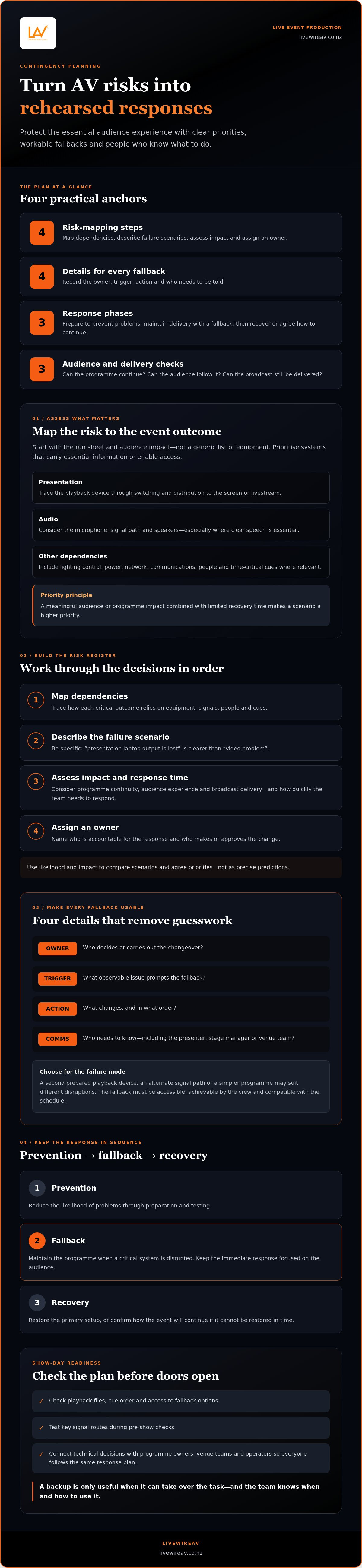
Keep three actions distinct. Prevention reduces the likelihood of a problem through preparation and testing. A fallback maintains the programme when a critical system is disrupted. Recovery restores the primary setup or confirms how the event will continue if it can’t be restored in time. This sequence keeps the immediate response focused on the audience, rather than troubleshooting every technical detail at once.
Which event outcomes depend on AV working?
Start with the run sheet and identify moments where AV carries essential information or enables access. A keynote may depend on clear microphone audio. A presentation may need its slides visible to the room, while a camera feed may be essential for a large audience to see the stage. For a hybrid programme, a livestream may be essential to remote attendees as well as those on-site.
Then separate requirements from enhancements. The speaker’s voice and key content may need to continue, while a decorative lighting look, walk-on track or secondary camera angle could be paused or simplified. The right priority depends on the event format, audience expectations and consequences of interruption. A short pause between sessions may be manageable; losing the only way to deliver a time-critical announcement may not be.
Write down the outcome each system supports. This makes it easier to rank risks by what the audience would notice and what the programme could still achieve without that system.
Why is a contingency plan different from a spare-equipment list?
A spare device is useful only if it can take over the required task and the team knows when to use it. For example, if presentation playback fails, the plan might identify an alternate source, such as a second prepared playback device, and name the person authorised to switch. The operator needs to know the changeover action, while the programme lead needs a clear way to tell the presenter whether to pause or continue.
For each fallback, record four practical details:
Owner: who makes the decision or carries out the changeover.
Trigger: what observable issue prompts the fallback.
Action: what changes, and in what order.
Communication: who needs to know, including the presenter, stage manager or venue team.
A response must suit the crew, venue and schedule. A technically sound alternative that takes too long to access, needs an unavailable operator or disrupts the next cue isn’t a workable fallback. Keep each action clear enough to follow in the moment.
How to map event AV risks before choosing backups
Build the risk register around the actual event, not a generic list of equipment failures. A keynote in one room, a multi-camera presentation and a livestream have different dependencies and recovery windows. Good event AV contingency planning matches the response to the consequence: protect essential delivery first, then decide where a simpler fallback is enough.
Work through the assessment in sequence:
Map dependencies. Trace how each critical outcome relies on equipment, signals, people and cues.
Describe failure scenarios. Be specific, such as “presentation laptop output is lost” rather than “video problem”.
Assess impact. Consider effects on programme continuity, audience experience and broadcast delivery, then estimate how quickly the team needs to respond.
Assign an owner. Name the person accountable for the response and the role that makes or approves the change.
Use a simple likelihood-and-impact matrix to guide discussion. A scenario that seems likely but has a minor effect may need a straightforward workaround; a less likely failure with serious consequences may warrant a stronger fallback. Treat the ratings as a way to compare and agree priorities, not as precise predictions. The highest-priority AV risks combine meaningful impact with limited recovery time.
Which AV dependencies should the risk register include?
Follow each signal from its source to the audience. For a presentation, trace the playback device through switching and distribution to the screen or livestream. For audio, consider the microphone, signal path and speakers. Include lighting control, power, network and communications where relevant, especially if one shared dependency supports several systems.
People and timing matter too. Record whether a scenario relies on a particular operator, presenter or time-critical cue. This shows where a technical issue could also become a programme issue.
How should organisers prioritise AV failure scenarios?
Assess each scenario against three outcomes: can the programme continue, can the audience follow it, and can the broadcast still be delivered? Add a recovery window: how long can the team take before a pause, missed cue or lost segment becomes difficult to recover from?
Record the scenario, prevention measure, fallback, accountable role and escalation trigger. For example, an outdoor event may face different exposure and site conditions from an indoor conference. Walk the venue and production areas to understand how access, layout and conditions affect equipment, signal routes and response time. A plan based on assumptions can miss the dependency that matters most.
Use the completed register to shape the technical design, crew assignments and show cues together. LivewireAV’s full technical production brings these decisions into one event-specific plan, with audio, video, lighting and on-site technical support coordinated around the production.
Compare event AV backup strategies by failure mode
A useful fallback matches the failure, the time available and the outcome the audience needs. A spare device can help with a hardware fault, but it won’t solve a failed signal route or an unavailable operator. In event AV contingency planning, protect critical single points of failure first, then add backup layers in proportion to their impact on the programme.
Use this comparison as a starting point. Confirm the trigger and changeover with the people responsible, then make sure the option fits the venue and show schedule.
What should a backup cover for audio, video and lighting?
Prioritise what carries essential content. For audio, identify an alternate microphone or playback source for critical moments. For video, plan a spare source connection, an alternate playback device or a presentation that can continue without visuals. For lighting, agree on the minimum visibility state and a simpler look if control is interrupted. Each option needs a clear cue and operator.
How do hybrid and outdoor events change the comparison?
Hybrid events add dependencies across cameras, encoding, stream paths and connectivity. Decide in advance what reduced delivery means for remote attendees, and how that change will be communicated. The hybrid conference AV setup guide covers stream-specific planning considerations.
Outdoor productions call for a site-specific assessment of weather exposure, power and equipment protection. The outdoor event production guide provides wider context for planning around outdoor conditions. In both formats, choose backups the crew can activate within the available recovery time.
Event AV contingency planning checklist for show day
A plan becomes useful when the crew can act on it quickly. Organise show-day checks around the event timeline, and make sure the latest run sheet, fallback instructions and contact details are accessible to the people who need them. This keeps checks practical and helps the team catch mismatches before they affect the programme.
Before doors: Confirm equipment is ready, critical signal routes are connected, playback files are in the correct location and fallback sources can be accessed. Check that each critical system has an assigned operator and that the current run sheet matches the planned cues.
Pre-show test: Test the show as it will run, including microphones, playback, displays, camera feeds, lighting cues and stream routes where relevant. Test both primary and fallback sources, and confirm labels, connections and cue order are clear to the operator.
Live operation: Keep the run sheet and response contacts close at hand. Use the agreed trigger to decide when to pause, switch to a fallback or simplify a cue. Log changes that affect the sequence, timing or responsibilities so the crew stays aligned.
Post-incident recovery: Confirm what failed, what workaround is active and whether the original system is ready to return. Record the change and update the run sheet before resuming the planned programme or handing over to the next operator.
Rehearse selected high-impact scenarios, not every possible fault. A short walkthrough of a lost playback source or failed microphone can confirm who calls the change, which alternative is used and how the presenter is briefed. If a rehearsal changes cue order or timing, update the run sheet and share the revision with the production team.
What should the pre-show AV check cover?
Test critical equipment in show conditions, using the actual sources and cues wherever practical. Confirm that the right playback files open, the presentation appears on the intended displays, camera feeds reach their destinations and the stream route carries the expected content. Check that fallback sources are labelled, accessible and assigned to an operator. The latest run sheet and contact details should be available to the production team, not just the event lead.
Who communicates and decides during an AV incident?
Name the person authorised to pause, simplify or change the programme. Agree who briefs presenters, informs event staff and, if needed, updates attendees or remote viewers. Keep the communication route concise: the operator reports the issue to the designated decision-maker, who confirms the response and assigns communications. Set escalation steps for an unresolved fault, plus a return-to-normal check so the team knows when it’s appropriate to resume the planned cues.
A clear checklist supports calm decisions, but it should reflect the event’s equipment, crew and programme. LivewireAV provides full technical event production, connecting technical design, on-site roles and show cues in one coordinated approach.
Build a dependable AV contingency plan with your production team
A risk register becomes a production plan when each priority is reflected in the technical design, equipment choices and crew responsibilities. An integrated team can connect the fallback for a critical signal to the equipment available, the operator assigned to switch it and the cue that tells the presenter what to do next. That detail helps organisers, programme owners, venue teams and technical operators work from the same plan.
LivewireAV’s full technical production brings audio, video and lighting planning together, with on-site technicians and operators managing equipment and cues during events. This supports event-specific planning for programmes that rely on a livestream, LED walls, camera packages, sound systems or intelligent lighting. The aim is a response that fits the event, rather than a generic list of backup equipment.
What information helps turn a checklist into a production plan?
Bring the event format, programme, venue information, audience needs and presentation requirements into the planning process. Note which moments are essential, what technical dependencies support them and what can be simplified if a system is disrupted. These priorities give the production team a clear basis for shaping the technical plan, assigning roles and coordinating show-day decisions.
Event format: Include whether delivery is in-person, hybrid or outdoors, and what each audience needs to receive.
Programme: Identify critical segments, presenters, playback content and time-sensitive cues.
Venue information: Share relevant room or site details that affect equipment placement, signal routes and crew access.
Technical dependencies: Flag livestreaming, LED walls, camera packages, sound systems and lighting requirements.
Agreed priorities: Record which outcomes must be protected and where a reduced or simplified option is acceptable.
Use this information to align the risk register with the equipment plan and show sequence. A fallback shouldn’t exist only in a document; the operator needs to know where it fits into the cue order, and the programme owner needs to understand what the audience will experience if it’s used. The premium event production guide explores how technical design, coordination and delivery come together across a production.
How can organisers take the next step?
Before a planning conversation, summarise the event, its critical moments, delivery format and known technical dependencies. You don’t need every technical answer in advance. A clear outline helps identify which priorities need a fallback, where crew responsibilities sit and how the production team will coordinate with venue and programme leads.
LivewireAV’s event production service brings technical planning, equipment and on-site roles together to shape a plan around the event’s priorities.
Keep your AV plan ready for the next decision
An event plan can change as speakers, schedules and venue details develop. Treat your AV contingency plan as a working document: revisit it when a programme change affects a critical cue or when a new requirement changes how the event will be delivered. A brief review with the people responsible for decisions keeps the response relevant, rather than leaving the team with a plan based on earlier assumptions.
That’s the practical value of event AV contingency planning. It gives your team a clear starting point when the unexpected happens, while leaving room to make calm, informed decisions in the moment. You don’t need to solve every technical possibility at once. Start with the event’s priorities, then shape a plan around the production and people that will deliver them.
Plan your event AV production with LivewireAV. Share your event format, key programme moments and technical priorities to start shaping a coordinated production plan.
Frequently Asked Questions
Is an event AV contingency plan necessary for a small event?
Yes, a small event can still need a written AV contingency plan if one failed microphone or presentation source would interrupt a key moment. Scale alone isn’t the measure; consider what the audience must hear or see and how quickly you could continue another way. For a short meeting, a single-page plan naming the critical setup, fallback and decision-maker may be more useful than duplicating every item.
Can a livestream continue if the primary internet connection fails?
Possibly, but continuity depends on the stream design, available alternative connectivity and the streaming platform’s requirements. A fallback connection needs to support the planned delivery and fit the production setup; don’t assume it will work simply because it’s available. Agree in advance whether to change to reduced delivery, such as audio-only, or pause the stream. Test the selected option as part of event preparation, without promising uninterrupted streaming.
What should an event team do first when AV fails during a presentation?
Follow the agreed incident lead and trigger, rather than having several people troubleshoot at once. The lead should protect the immediate programme priority, such as keeping the speaker audible, and direct the team to the rehearsed fallback. Keep instructions to the presenter brief, for example, whether to pause or continue without slides. Resume the planned presentation only after the responsible technical lead confirms the next action and the team is ready to proceed.
Should event AV contingency plans include backup power?
Include backup power when the production team and venue identify a power dependency whose failure could materially affect the event. Assess which equipment it would support and whether the option suits the site and technical setup; backup power isn’t automatically appropriate for every system. Document who operates it, what changeover involves and which programme functions take priority. This makes the decision specific to the event instead of treating backup power as a default solution.
How often should an event AV contingency plan be tested?
Review the plan whenever a change to the programme, venue, equipment, crew or delivery format affects its assumptions. During pre-show preparation, test the critical paths relevant to the event, such as the route from a presentation source to the display. A brief rehearsal can confirm that people understand their roles and hand-offs. It can’t guarantee every live failure will be prevented, so update the plan when a test exposes a gap.
Who is responsible for activating an AV contingency plan?
The event organiser and production team should agree decision authority before show day. The organiser or designated event lead can own programme changes, while the technical lead assesses the fault and recommends a workable response. Assign a communications role for informing presenters, staff or attendees as needed. Write down how these roles connect and who can authorise a time-critical change, so the team can act without waiting for unclear approval.
Comments