Wireless Mic Best Practices for Flawless Conference Audio
- 11 minutes ago
- 12 min read
The CEO stands centre stage, the lights dim, and just as the most critical slide of the keynote appears, the audio cuts to a harsh, metallic static. It is the kind of silence that feels heavy. The momentum of the entire morning vanishes in an instant. If you have ever managed a high-stakes corporate event, you know that wireless audio is often the most fragile link in the technical chain.
Reliability, precision, composure. These are the standards your audience expects, yet achieving them requires more than just hiring expensive gear. By implementing wireless microphone best practices for conferences, you can move beyond the fear of dropouts and interference. This article provides a pragmatic roadmap to mastering RF management, choosing the right hardware for large-scale venues, and establishing the operational discipline needed for seamless transitions. You will learn how to maintain total technical control, ensuring your next event is defined by its message rather than its technical mishaps.
Table of Contents
Beyond the Cord: Why Wireless Microphone Management Defines Conference Success
Mastering the Airwaves: Frequency Coordination and RF Stability
Selecting the Right Hardware: Matching Microphones to Presenter Styles
The Professional Pre-Flight Checklist: Ensuring Zero-Failure Audio
Scaling Your Audio Solution: When to Bring in Professional Technical Production
Beyond the Cord: Why Wireless Microphone Management Defines Conference Success
Wireless audio is the most common point of failure in live event production. It is a harsh reality. While a cable provides a physical, predictable path for sound, a wireless signal must fight through an invisible environment crowded with interference. In high-stakes corporate environments, the assumption that wireless gear is "plug and play" is a dangerous misconception. Success requires a disciplined approach to what we call the invisible infrastructure of the venue.
The airwaves are just as crowded as the foyer during a morning tea break. Mobile phones, Wi-Fi routers, and even local emergency services all compete for the same limited spectrum. Without implementing wireless microphone best practices for conferences, your event is vulnerable to signal collisions that manifest as pops, clicks, or total silence. This is not just a technical inconvenience. Crystal-clear sound has a profound psychological impact on audience engagement. When audio is flawless, the audience focuses on the message. When it falters, brand trust erodes instantly. Professionalism is heard before it is seen.
The High Stakes of Conference Audio
A single audio dropout can derail months of planning in seconds. Imagine a CEO reaching the climax of a keynote only for the sound to vanish. The momentum dies. The audience becomes restless. This is the difference between "functional" audio, which merely works in a quiet room, and broadcast-quality production. Achieving the latter for audio visual for large conferences requires more than just high-end equipment. It demands a dedicated sound engineer who can monitor signal health in real-time and make split-second adjustments. Precision is the standard, not an optional extra.
Common Pitfalls of Consumer-Grade Wireless Gear
To understand the risks, one must first define what is a wireless microphone and how it interacts with its environment. Consumer-grade systems often lack the frequency agility required for modern venues. They operate on a limited range of channels and have poor interference rejection. If a nearby room starts a session on the same frequency, your audio is compromised.
Professional systems offer several critical advantages that consumer gear cannot match:
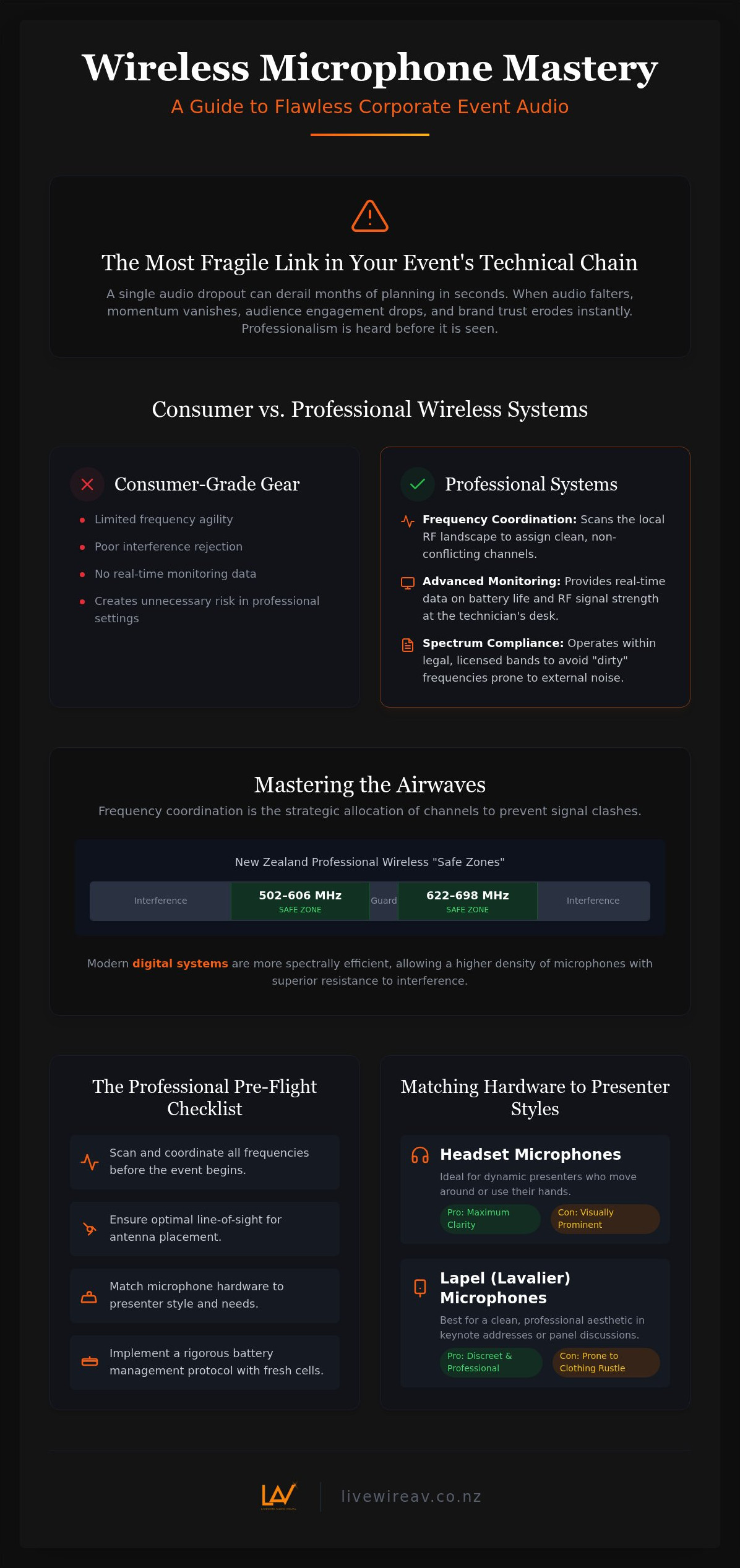
Frequency Coordination: The ability to scan the local RF landscape and assign clean, non-conflicting channels.
Advanced Monitoring: Real-time data on battery life and RF signal strength at the technician's desk.
Spectrum Compliance: Ensuring all devices operate within legal, licensed bands to avoid "dirty" frequencies that are prone to external noise.
Relying on basic equipment in a professional setting creates unnecessary risk. Meticulous management is the only way to ensure the technical production remains invisible, allowing the presenters to take centre stage with total confidence.
Mastering the Airwaves: Frequency Coordination and RF Stability
Frequency Coordination is the strategic allocation of radio channels to prevent signal clashes. It is the invisible foundation of any successful live event. Stability. Precision. Reliability. These are the outcomes of a well-managed RF environment. In the context of wireless microphone best practices for conferences, understanding the local RF landscape is a non-negotiable first step. This process involves scanning for digital TV signals and other local interference that can crowd the airwaves long before the first guest arrives.
In New Zealand, the "Safe Zone" for professional wireless operation typically resides within the 502–606 MHz and 622–698 MHz bands. Operating outside these legal ranges risks interference from public telecommunications or potential compliance issues with Radio Spectrum Management (RSM). Modern conference centres are rapidly transitioning to digital wireless systems to mitigate these risks. Unlike older analogue technology, digital systems are more spectrally efficient. They allow for a higher density of microphones in a smaller frequency footprint and provide superior resistance to intermodulation distortion, which is the interference created when multiple transmitters operate simultaneously.
Avoiding Signal Interference
High-stakes environments often feature massive LED walls and complex stage lighting. While visually impressive, these components are notorious for emitting electromagnetic noise that can raise the "noise floor" and drown out your microphone signals. Managing "RF bleed" from adjacent breakout rooms is another critical task in large convention centres where multiple events run in parallel. Even a single mobile phone in the front row can disrupt a signal if the transmitter is too close. When choosing the right presentation microphone, a technician must consider these environmental variables to ensure the hardware can withstand the local interference.
Professional RF Tools and Software
Meticulous planning begins with a spectrum analyser. This tool allows technicians to visualise the RF environment in real-time, identifying peaks of interference that the naked ear cannot detect. Networked wireless receivers also play a vital role, providing a constant stream of data regarding signal health and battery life to a central control desk. This level of oversight ensures that if a potential conflict is detected, it is resolved before the audience ever hears a pop or crackle. For those planning a high-pressure event, engaging a professional technical production partner ensures these technical nuances are managed with the quiet confidence of an expert.
Selecting the Right Hardware: Matching Microphones to Presenter Styles
Choosing the right hardware is as much about acoustic physics as it is about aesthetics. Natural, transparent, and consistent. These are the qualities of a high-end microphone capsule that define a professional production. In the framework of wireless microphone best practices for conferences, the goal is to capture the presenter's voice with absolute clarity while rejecting the ambient noise of the room. High-end capsules are essential because they provide a flat frequency response, ensuring the CEO sounds like themselves rather than a thin, electronic imitation.
Lavalier or lapel microphones are often the default choice for their discreet appearance. They allow for a hands-free experience that many speakers prefer. However, they come with technical trade-offs. They are prone to "clothing rustle" and generally offer lower gain-before-feedback because the capsule is positioned further from the mouth. Handheld microphones remain the workhorse of the industry. They are robust, reliable, and easy to use. For Q&A sessions or presenters who want tactile control, the handheld mic is the safest and most effective option.
When to Choose Headsets over Lapels
Headsets provide a consistent distance between the mouth and the capsule, regardless of how much the presenter moves their head. This stability is critical when working with large audio line array systems. In these environments, high volume levels can easily trigger feedback if a lapel mic wanders off-axis or is placed too low on a jacket. For presenters concerned about the visual impact, modern skin-tone headsets are virtually invisible from the audience's perspective. They alleviate "mic-fright" by being lightweight and secure, providing the technical security a high-stakes event demands.
Microphone Pickup Patterns for Conferences
Understanding pickup patterns is vital for maintaining stage stability. Cardioid and supercardioid patterns are the industry standard for a reason. They are designed to reject sound from the sides and rear, focusing only on the source directly in front of the capsule. Omnidirectional mics are rarely used in live reinforcement because they pick up too much stage noise and room reflections, which leads to feedback.
A practical rule for any technical director is to always have a "hot" handheld mic waiting in the wings. If a presenter's lapel mic is displaced or a battery fails unexpectedly, a technician can step in and provide a backup in seconds. This level of redundancy ensures the programme continues without a hitch, maintaining the composure of the production and the trust of the audience.
The Professional Pre-Flight Checklist: Ensuring Zero-Failure Audio
Meticulous preparation is the hallmark of a professional technical team. Applying wireless microphone best practices for conferences starts long before the first guest enters the room. Check. Calibrate. Confirm. This disciplined approach begins with battery management. We follow a strict "Fresh for Every Session" rule. Even if a battery shows three bars, it is replaced with a high-capacity lithium cell before a major keynote. Lithium cells provide a consistent voltage curve, preventing the sudden signal degradation often seen with standard alkaline batteries as they deplete.
Line-of-sight is the next critical factor. A common mistake is positioning receivers at the back of the room at desk height. This leads to "human shielding," where the audience's bodies, which are largely composed of water, absorb the radio signal. Antennas must be elevated above head height to maintain a clear path to the transmitter. Before the doors open, a technician must perform a "walk test." By moving across every square metre of the stage and floor while monitoring signal strength, we identify potential dead spots or local interference zones that require antenna adjustment.
Antenna Placement and Distribution
For large plenary halls, standard "rubber ducky" antennas are insufficient. We utilise directional "paddles" to focus the reception area and reject noise from behind the stage. It is vital to avoid the "rack-trap," which occurs when antennas are left inside a metal flight case. Metal blocks RF. Antennas belong on external stands, connected via high-quality shielded cabling. In multi-microphone setups, active antenna splitters are essential. They allow multiple receivers to share a single pair of high-gain antennas, reducing cable clutter and preventing the signal loss associated with passive splitting.
Presenter Briefing and Mic Technique
Technical excellence must be matched by presenter preparation. We brief every speaker on optimal lapel placement, typically at the centre of the sternum, away from jewellery or silk ties that cause noise. These protocols are central to wireless microphone best practices for conferences, ensuring that the technology remains a silent, reliable partner to the speaker. We also manage the "Mute Button" danger by disabling the physical switch on the transmitter. The technician at the desk must have sole master control to prevent a presenter from accidentally silencing themselves mid-speech. For a truly seamless experience, engage an expert technical production team to manage these operational nuances with composure and precision.
Scaling Your Audio Solution: When to Bring in Professional Technical Production
There is a distinct point where a DIY approach transitions from a cost-saving measure to a significant project risk. For most event organisers, this tipping point occurs when the number of wireless channels exceeds four or five. As the count increases, the mathematical complexity of frequency management grows exponentially. Implementing wireless microphone best practices for conferences at this scale requires specialised software and a deep understanding of RF intermodulation. Experience, equipment, execution. These are the pillars of a stable production.
The value of a Technical Director becomes clear when coordinating multi-room audio feeds or complex stage transitions. They don't just manage microphones; they oversee the entire invisible infrastructure of your event. A zero-failure strategy begins long before the gear is loaded onto the truck. We prioritise technical site visits for events to assess the physical and digital landscape of the venue. We scan the local RF environment, map out antenna positions, and identify potential acoustic challenges. This meticulous groundwork ensures that when the first presenter speaks, the system is already optimised for that specific room.
Integrated Technical Management
Modern events are rarely just about audio. In hybrid conference AV setups, the audio must be perfectly synchronised for both the in-room audience and the remote stream. Any latency or interference is magnified for those watching online. Managing the interaction between sound and vision is a critical task for the technical team. High-resolution conference LED screen hire can introduce significant electromagnetic noise that interferes with wireless signals. A dedicated on-site audio engineer monitors these interactions in real-time, providing the peace of mind that comes from total technical control.
Tailored Proposals for National Events
Every venue has a unique architectural signature. We design bespoke audio systems that account for high ceilings, glass walls, or sprawling plenary halls. LivewireAV acts as the steady hand behind the scenes, managing technical complexity so you can focus entirely on your content. Excellence is our standard requirement, not an occasional achievement. We provide modern, well-maintained equipment and the expert operators required to run it in a "no-excuses" environment. This collaborative partnership ensures your message is delivered without distraction. If you are ready for a flawless event, contact LivewireAV for a tailored technical production proposal.
Securing Your Technical Standard
Achieving zero-failure audio is a matter of meticulous planning rather than luck. By adhering to wireless microphone best practices for conferences, you transform the technical production from a point of anxiety into a source of stability. Success depends on the quiet coordination of frequency bands, the strategic selection of hardware, and the rigorous execution of pre-flight protocols. When these elements align, the technology becomes invisible, allowing your message to take centre stage.
LivewireAV provides the steady hand required to navigate this complexity. We offer state-of-the-art audio line array systems and expert on-site technicians for every event, ensuring total composure under pressure. Our comprehensive national coverage for New Zealand corporate events means your technical standard remains consistent, regardless of the venue. Precision, reliability, composure. These are the benchmarks of a professional production. Partner with LivewireAV for Zero-Failure Technical Production and move forward with the confidence that your next high-stakes event is in expert hands.
Frequently Asked Questions
How many wireless microphones can I use at once without interference?
The number of wireless microphones you can operate simultaneously depends on the available frequency spectrum and the efficiency of your hardware. In a standard UHF environment, you might safely manage 8 to 12 channels without complex coordination. However, professional digital systems using advanced frequency management can support 50 or more channels in a single venue. It's essential to perform a site-specific scan to determine the exact capacity of the local airwaves before your event begins.
What is the best type of wireless microphone for a roving Q&A session?
A handheld microphone with a cardioid or supercardioid pickup pattern is the superior choice for roving Q&A sessions. These capsules are designed to reject ambient room noise and the voices of nearby audience members, focusing only on the person speaking directly into the mic. Handhelds are also robust and intuitive for guests to use. To ensure a seamless experience, we recommend using a high-quality digital transmitter to maintain signal stability as the mic moves through the room.
Do I need a special licence to use wireless microphones in New Zealand?
Most event organisers in New Zealand operate under a General User Radio Licence (GURL), which allows for unlicensed use within specific frequency ranges like the 502–606 MHz band. While this is sufficient for many, high-stakes events often benefit from professional management to ensure compliance with Radio Spectrum Management (RSM) rules. For large-scale productions, technicians can coordinate frequencies to avoid interference from licensed broadcasters, providing a higher level of protection for your audio signal.
How far can a wireless microphone transmitter be from the receiver?
A professional wireless microphone transmitter typically has a reliable range of 30 to 100 metres, provided there is a clear line-of-sight to the antennas. Physical obstructions like concrete walls or large crowds can significantly reduce this distance. For large conference halls, we use directional antennas and active splitters to extend this range and maintain signal integrity. Keeping the distance between the presenter and the receiver as short as possible is a core part of wireless microphone best practices for conferences.
Why does my wireless microphone make a buzzing sound near an LED wall?
The buzzing sound is caused by electromagnetic interference (EMI) emitted by the high-frequency switching power supplies within the LED wall. These massive screens act as large antennas that can overwhelm a microphone's signal if the transmitter or receiver is placed too close. To resolve this, we move the receiving antennas away from the screen and use high-quality shielded cabling. Selecting digital systems with superior interference rejection is also a key strategy for maintaining audio clarity in modern venues.
How long do batteries actually last in a professional wireless transmitter?
Professional wireless transmitters generally offer between 6 and 10 hours of continuous use on a single set of high-capacity lithium batteries. However, we recommend a "safe window" of 4 to 5 hours before a proactive change is made. Monitoring battery telemetry at the sound desk allows our technicians to track exact remaining life. Using rechargeable lithium-ion packs designed for the specific hardware often provides more accurate data and greater reliability than standard off-the-shelf alkaline cells.
Can I use my own wireless microphone system with a venue’s built-in sound?
You can use your own system, but it requires careful integration with the house PA and the local RF environment. We must ensure the venue's built-in frequencies don't clash with your hardware and that the gain levels are properly matched at the mixing console. Bringing external gear into a new space often highlights the need for wireless microphone best practices for conferences, as a technical site visit is necessary to confirm the local spectrum is clear for your specific devices.
What happens if a wireless microphone fails during a live broadcast?
If a microphone fails during a live broadcast, our on-site technicians immediately switch to a "hot" backup handheld mic kept at the lectern or in the wings. This transition is managed at the audio console to ensure the remote audience experiences minimal disruption. We also employ 32-bit float internal recording on some transmitters as a fail-safe. Meticulous planning and having a dedicated operator monitoring the signal health are the best ways to prevent a technical failure from becoming a broadcast disaster.


Comments