Pixel Pitch on an LED Wall: How It Affects Resolution and Cost
A finer-pitch LED wall can show more detail, but it isn’t automatically the right choice. To understand what pixel pitch on an LED wall means, look at the distance between the centres of adjacent pixels, measured in millimetres. A smaller pitch fits more pixels into the same screen area, increasing resolution and allowing viewers to sit closer.
It’s easy to focus on resolution alone when planning a display, but viewing distance matters just as much. A wall viewed from across a venue may not need the fine pitch required to show detailed content close to the audience. Finer pitch can also increase cost because the LEDs are spaced more closely.
This guide explains how to measure pixel pitch, estimate a wall’s resolution from its dimensions, and understand how pitch affects cost. Consider screen size, viewing distance and content needs together to choose a specification that supports the viewing experience without paying for detail the audience may not notice.
Table of Contents
What is Pixel Pitch and Why Does It Matter?
Pitch is the spacing between adjacent pixels, and it helps determine how detailed an LED screen appears. Choose a pitch in relation to viewing distance, screen dimensions and the detail in the content.
Matching Pixel Pitch to Viewing Distance
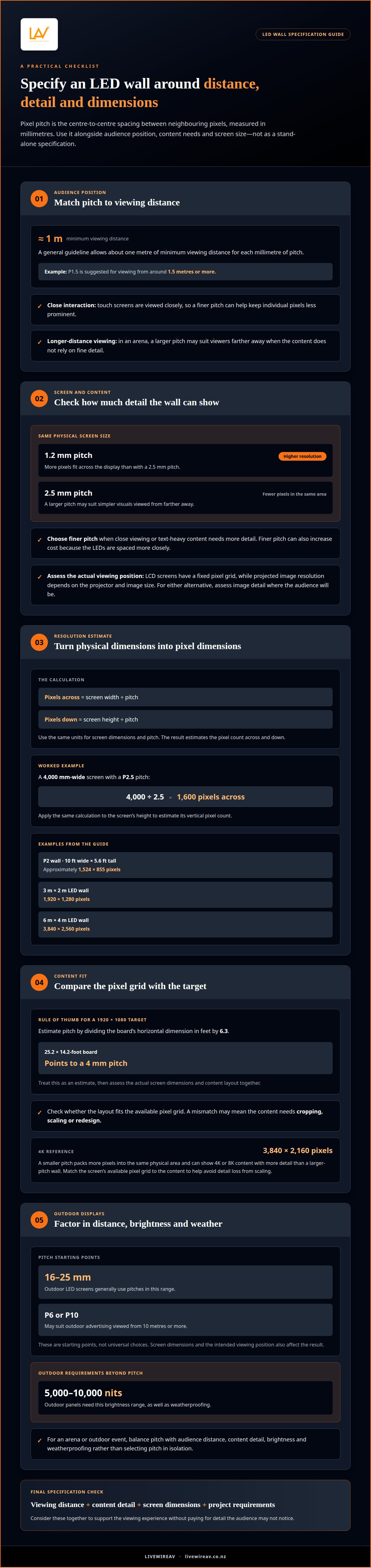
Viewing distance is how far the audience sits or stands from the screen. It matters because individual pixels are more noticeable up close, while finer detail may be less visible from farther away. A general guideline allows about one metre of minimum viewing distance for each millimetre of pitch. For example, P1.5 is suggested for viewing from around 1.5 metres or more. Touch screens need to be viewed closely during interaction, so a finer pitch can help keep individual pixels less prominent. In an arena, viewers may sit much farther away, making a larger pitch suitable for content that doesn’t rely on fine detail.
Balancing Screen Size and Resolution
Screen size and target resolution determine how many pixels the wall needs across its width and height. For the same physical screen size, a 1.2 mm pitch provides higher resolution than a 2.5 mm pitch because more pixels fit across the display. That extra detail can benefit close viewing or text-heavy content; a larger pitch may suit simpler visuals viewed from farther away. LED pixel pitch and viewing distance differ from LCD video walls and projectors because pitch describes spacing between LEDs. LCD screens have a fixed pixel grid, while projected image resolution depends on the projector and image size. For either alternative, assess image detail at the audience’s actual viewing position.
Selecting Pitch for Outdoor LED Walls
Outdoor pitch selection should account for viewing distance and the detail the content needs. Outdoor LED screens generally use pitches from 16 mm to 25 mm, while outdoor advertising viewed from 10 metres or more may suit P6 or P10. These are starting points, not universal choices: screen dimensions and the intended viewing position also affect the result. Pitch isn’t the only consideration outdoors. Brightness and weatherproofing matter too; outdoor panels need 5,000 to 10,000 nits of brightness, as well as weatherproofing. For an arena or outdoor event, balance those requirements with audience distance and the content, rather than selecting pitch in isolation.
Pixel pitch definition and measurement
On an LED display, pixel pitch describes the physical spacing of the pixel grid. The P-number provides a compact estimate: P2 indicates a pitch of 2 millimetres. People asking “what is pixel pitch on an LED wall?” are usually looking for a way to connect that specification with visible detail.
Defining LED Pixel Pitch
Pixel pitch is the centre-to-centre distance between adjacent pixels, measured in millimetres. On a 10 mm display, neighbouring pixel centres are 10 millimetres apart. The term may also be called dot pitch, line pitch, phosphor pitch or stripe pitch. These labels refer to spacing, not screen size. For an indoor wall, that distinction helps separate the panel’s physical dimensions from the pixel detail it can show.
Measuring Pitch and Pixel Density
Measure horizontally or vertically from the centre of one pixel to the centre of its neighbour. That distance is the pitch, not the gap between the edges of two pixels. Pixel density describes how tightly pixels are packed and is commonly expressed as pixels per inch (PPI). A smaller pitch means greater density; a larger pitch means fewer pixels in the same area. This relationship helps estimate how finely the screen can reproduce detail.
For a fixed-size screen, reducing pitch allows more pixels to fit across its width and height. For example, a P2 LED wall measuring 10 feet wide by 5.6 feet tall produces approximately 1,524 x 855 pixels. That example shows why pitch and physical dimensions are both needed to estimate resolution. The pitch alone doesn’t tell you the wall’s total pixel count.
In practical terms, understanding pixel pitch on an LED wall means considering its stated pitch alongside the screen’s width and height. Together, these measurements give a more useful sense of the display’s pixel density than the P-number alone. They also help explain why two indoor displays of similar size can render text and fine detail differently.
For event display planning, LED walls and projection can be considered alongside the required screen dimensions and content.
Estimating LED wall resolution from screen dimensions
Estimate an LED video wall’s pixel dimensions from its physical size and pitch. Divide the screen’s width and height by the pitch, using the same units for all measurements. The results estimate the number of pixels across and down, turning a panel specification into a practical display resolution for assessing content detail.
For example, a 4,000 mm-wide LED screen with a P2.5 pitch has an estimated 1,600 pixels across: 4,000 divided by 2.5. Apply the same calculation to the screen’s height to estimate its vertical pixel count. These figures help establish whether a layout will fit the display or need cropping, scaling or redesign.
For a 1920 x 1080 target resolution, one rule of thumb estimates pitch by dividing the board’s horizontal dimension in feet by 6.3. A 25.2 x 14.2-foot board therefore points to a 4 mm pitch. Treat this as an estimate, then assess the actual screen dimensions and content layout together.
Pixel density affects how much detail the display can reproduce. A smaller pitch packs more pixels into the same physical area, allowing an LED wall to show 4K or 8K content with more detail than a larger-pitch wall. For reference, 4K resolution is 3,840 by 2,160 pixels. Matching the screen’s available pixel grid to the content helps avoid detail loss from scaling.
Resolution examples also show how dimensions change the result: a listed 3 m × 2 m LED wall has 1920 × 1280 pixels, while a 6 m × 4 m wall has 3840 × 2560 pixels. For signage viewed at a distance, the optimal specification may prioritise legibility over fine image detail. For close viewing or detailed graphics, greater pixel density can make edges and text clearer. The right estimate connects screen size, pitch and the source content, rather than relying on a resolution label alone.
Pixel pitch and LED wall costs
Pixel pitch affects cost because finer spacing requires more closely packed LEDs. A smaller pixel pitch can require a more expensive display board. For the same screen area, moving from P4 to P2 roughly doubles the LED count per square metre. That increase helps explain why a higher-resolution video wall can cost more, even when its physical dimensions stay unchanged. The key factor is whether viewers need that extra visual detail.
Pitch isn’t the only specification that shapes project cost. Screen area, brightness requirements, indoor or outdoor use, and content resolution also affect the display requirements. A larger screen needs more display surface, while outdoor use brings brightness and weatherproofing requirements. These factors interact: choosing finer pitch for a large screen can substantially increase the number of LEDs.
A larger pitch can suit a screen viewed from farther away or content that doesn’t need fine detail, and may reduce overall cost. Close viewing, detailed graphics or small text can make the extra pixel density worthwhile. For example, a presentation dominated by broad imagery may not need the same specification as content with fine text. Assess viewing conditions and content before treating the smallest pitch as the best value.
The price depends on the project and is provided after a quote request, with screen dimensions, pitch, brightness and installation context shaping the specification. Compare options by the detail viewers need, not by pitch alone. That keeps the decision tied to the display’s real purpose. To plan an LED display specification around your event, discuss your display requirements.
LivewireAV: LED Walls & Projection
LivewireAV helps turn pixel-pitch decisions into a practical event display plan through its LED Walls & Projection offering. The right specification depends on how the screen will be used: audience viewing distance, screen dimensions, content detail and desired resolution all shape the choice.
For conferences, exhibitions and corporate gatherings, display decisions sit alongside wider production requirements. LivewireAV can coordinate the screen as part of Full Technical Production, aligning the display plan with event content and the technical setup. For a Hybrid & Livestream Event, the display also needs to work for both the in-room audience and the programme being captured.
Share your event requirements with LivewireAV to discuss your LED wall and projection setup.
Plan a display that fits the event
Understanding what pixel pitch on an LED wall means is a starting point. Next, consider how the display will support the experience you want people to have: its role in the programme, the material it will show and how it needs to work with the rest of the event. Clear priorities focus technical planning, whether the display is central to a presentation or part of a larger production. They also help coordinate the screen with presenters, staging and audience sightlines.
LivewireAV can bring LED Walls & Projection into Full Technical Production or a Hybrid & Livestream Events plan, aligning the display with the event’s wider requirements. Discuss the content and venue context to shape a considered approach, rather than choosing a specification in isolation. For your next event, contact LivewireAV to discuss your LED wall. A well-planned display gives your content a clear place in the programme and helps the audience stay focused.
Frequently Asked Questions
How Do You Calculate the Right Viewing Distance?
A practical starting estimate is the 10x rule: multiply the pitch in millimetres by 10 to estimate viewing distance in feet. For example, a 2 mm pitch suggests roughly 20 feet under this rule. If you’re asking what pixel pitch on an LED wall is useful for your setup, start with that distance estimate, then consider whether the screen shows fine text or broad imagery and where the audience will sit.
How is LED pixel pitch measured in millimetres?
Measure from the centre of one LED pixel to the centre of the next, horizontally or vertically. The distance between those centres is the pitch, expressed in millimetres. Don’t measure the visible gap between pixel edges, as that gives a different value. A specification labelled P2.5, for example, uses a pitch value of 2.5 mm, describing the display grid rather than its overall dimensions.
How does pixel pitch affect LED wall resolution and image quality?
A smaller pitch lets a fixed-size wall contain more pixels, supporting higher resolution and finer visual detail. This can make small text, detailed graphics and smooth gradients appear clearer, particularly when viewers are nearby. The source content matters too: a dense pixel grid can’t add detail that isn’t in the original image. Match the display’s pixel capacity to the resolution and format of the material being shown.
What viewing distance is recommended for different LED pixel pitches?
Recommendations vary by the viewing criterion. A 1.00 mm pitch has a listed average comfortable viewing distance of 1.72 metres, while its listed visual acuity distance is 3.44 metres. For a 3.00 mm pitch, the listed visual acuity distance is 10.31 metres. These figures use different measures, so interpret them as planning references, not interchangeable minimum distances.
How do you calculate LED wall resolution from pixel pitch and screen size?
Convert the screen width, height and pitch to the same unit, then divide each screen dimension by the pitch. The results estimate the pixel counts across and down. For example, a screen 4,000 mm wide with a 2.5 mm pitch has an estimated 1,600 pixels across. Check the resulting proportions against the content layout to anticipate scaling, cropping or unused screen area.
What pixel pitch is best for indoor LED walls?
There isn’t one pitch that suits every indoor wall. If you’re deciding what pixel pitch on an LED wall is right for an indoor space, consider its viewing distance and visual demands. Corporate boardrooms and conference rooms commonly use pitches from 1.2 mm to 2.5 mm, while command centres and control rooms typically use 1.0 mm to 1.5 mm. Content with fine text may need a different specification from broad imagery.

Comments