Overflow room AV solutions for flexible event spaces
An event can reach more people without adding rooms. Overflow room AV solutions carry the main programme into suitable breakout or family spaces using live video and audio feeds or AV over IP distribution.
An overflow space needs more than the same presentation on screen. Attendees need clear sound and a view that stays in step with the main room. With the right setup, flexible spaces can support a consistent event experience and ease pressure on the primary venue.
This article explains how live feeds and AV over IP extend sessions to additional spaces, what affects playback quality and coordination, and how scalable AV systems can adapt to different screens and locations. It also covers what a production team plans for, from room layout to how audio and video reach each audience.
Table of Contents
Flexible capacity without adding rooms or AV infrastructure
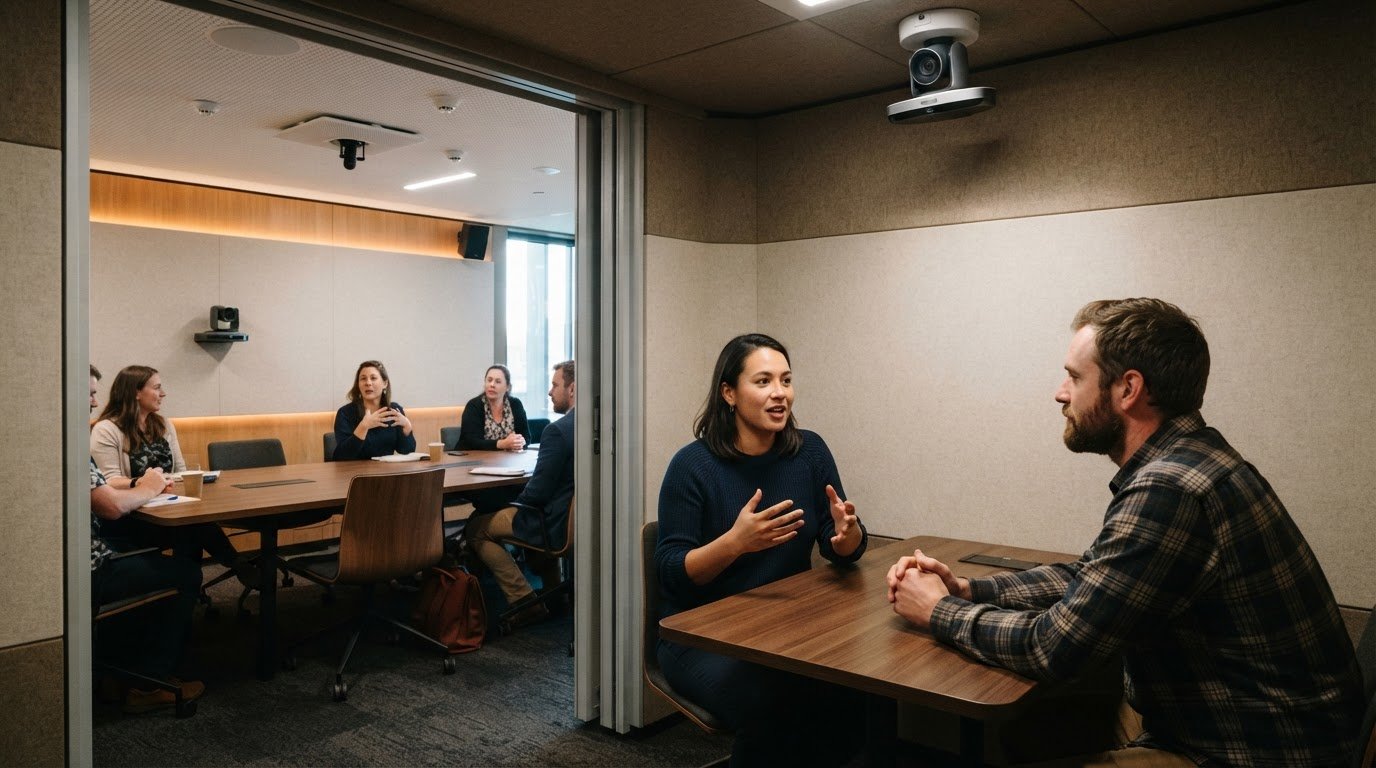
An overflow room AV solution sends a live event programme into another space, allowing more attendees to follow the same session without adding a permanent room. Suitable spaces may include existing breakout areas, family spaces or partitioned meeting rooms, with video and audio distributed to displays and speakers.
For example, a divisible meeting space can become two rooms when a partition closes. A planned signal route lets the event team send the programme to the second side, then adjust distribution when the partition opens. Synchronized video playback helps attendees in both spaces follow the same presentation. A scalable distribution setup can support 4K video at 30 Hz, depending on the system configuration.
AV over IP carries audio and video across a venue network to selected endpoints, such as a display in a nearby family room. It can extend the main-room programme without a separate full AV system in every space. The signal path still needs to suit the venue layout and playback requirements.
To reduce audio feedback, keep overflow microphones out of the main-room speaker feed and set speaker levels for each space. Manage delays by choosing a distribution path designed for live playback, then test audio and video together at every endpoint before doors open.
Production teams plan room layouts, signal routes and display positions, then test the system with the event’s actual content. They confirm the source reaches each screen, check audio clarity and synchronisation, and test routing when a partitioned room changes configuration. Common problems include signal loss, incorrect routing and out-of-sync playback. Testing every endpoint helps identify issues before attendees arrive.
Overflow Anywhere is intended for high-demand breakout rooms and events with limited venue space. It supports synchronised video playback in additional spaces, and overflow rooms can be set up in minutes with minimal technical effort.
Live video and audio feeds to additional event spaces
A live feed can carry a session from its main room to overflow areas, nearby spaces or remote sites. The production design should match the viewing needs of each audience and the signal route.
Live feeds to additional spaces
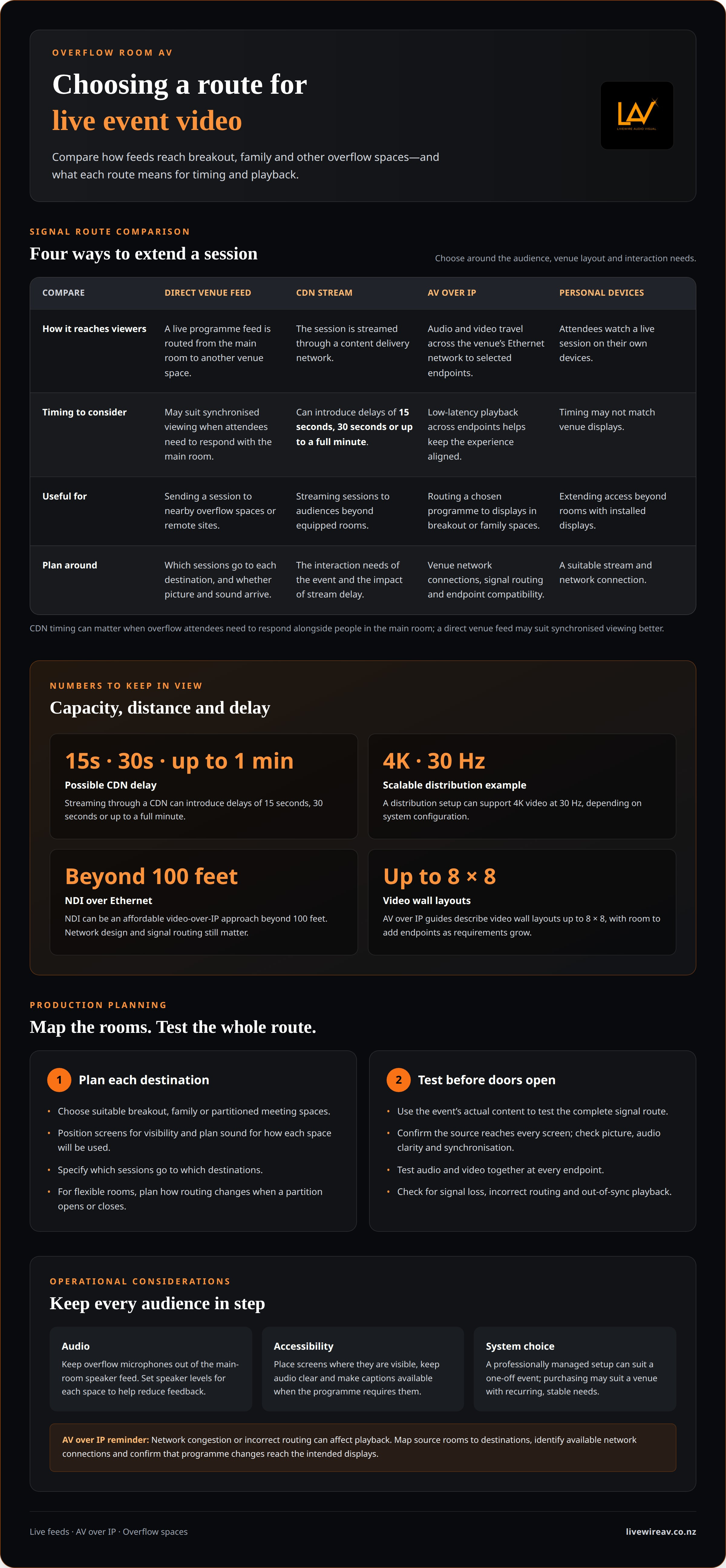
Video encoders prepare a camera or programme feed for distribution, while decoders convert it for playback on a display. This setup can route streams from any room to a chosen location, including a separate venue space. The event plan should specify which sessions go where and ensure each destination receives picture and sound. Livestreams from individual rooms can also appear on programme displays.
Streaming through a content delivery network (CDN) can introduce delays of 15 seconds, 30 seconds or up to a full minute. That lag matters if overflow attendees need to respond alongside people in the main room. A direct venue feed may suit synchronised viewing better; the production team can select the route around the event’s interaction needs.
Attendees may also watch live sessions on personal devices, extending access beyond equipped rooms. This option relies on a suitable stream and network connection, and may not match the timing of venue displays. For a larger audience, video walls can combine multiple displays; AV over IP guides describe layouts up to 8 × 8, with room to add endpoints as requirements grow.
Equipment sourcing, providers and access
A professionally managed setup can suit a one-off event, while purchasing equipment may suit a venue with recurring, stable needs. Event AV production providers in New Zealand manage feeds, encoders, decoders and display integration. The right approach depends on event frequency, venue layout and who will operate the system.
Plan for accessibility in the viewing experience: position screens where they are visible, keep audio clear, and make captions available when the programme requires them. These practical measures help attendees follow sessions in overflow spaces. A production team can coordinate the signal path and display setup around the venue and audience.
AV over IP distribution to overflow and family spaces
AV over IP carries audio and video across an Ethernet network, allowing a production team to extend event content to remote displays. Instead of running a separate source directly to every screen, the system routes signals to selected endpoints. For example, a keynote feed can appear on a display in a family space while the main room uses its own screens.
NDI is one video-over-IP option that works over Ethernet cabling. It can be an affordable approach beyond 100 feet, making it useful when an overflow display sits far from the source. The venue network and signal route still matter: network congestion or incorrect routing can affect playback, so professionals plan how each feed reaches its intended display.
At each endpoint, a decoder or compatible device converts the network feed into picture and sound for attendees. Low-latency playback across endpoints helps keep the experience aligned in overflow and family spaces. A production professional can map source rooms to destinations, sending a presentation to a family area while routing a separate programme feed elsewhere.
Planning starts with the venue layout and the event’s signal requirements. The team identifies available network connections, assigns feeds to displays and tests the full route using event content. They check picture, audio and synchronisation at each endpoint, then confirm that changing a source will not send the wrong session to another space. Clear routing also helps production staff manage programme changes without confusing remote audiences.
For flexible events, AV over IP can make it easier to extend distribution when spaces or displays are added. Practical limits depend on the network design and the number and type of endpoints. Mapping requirements early helps the event team choose a setup that supports the intended audience without treating every overflow space as a separate production.
AV system scalability
A scalable event AV system can grow from one main room to additional displays and locations as programme needs change. Programme displays can show current and upcoming sessions, live updates and sponsor messages in real time. Their size and placement can also adapt to different spaces, helping attendees find relevant information across a venue.
Planning for growth starts with the event schedule and venue map. The production team identifies which sessions need distribution, where screens will go and how each destination will receive its feed. For example, a conference may start with a keynote in one room, then extend selected breakout sessions to nearby spaces. Clear routing keeps each display aligned with the right programme.
Scalability also depends on how the network and signal distribution are organised. An added endpoint should fit the existing design rather than create a separate path that complicates operation. Production professionals account for display locations and content, then test each route before the event. This makes changes easier to manage when a session moves or another space comes into use.
Screen requirements vary with distance, room layout and viewing purpose. A programme display for session updates has different needs from a screen showing a presenter’s slides. The production plan should match each display to its role, with suitable placement and clear visibility for its audience. Audio needs separate consideration, especially when several spaces receive the same live session.
For larger productions, audio line array systems can be part of a wider plan for consistent sound across event areas. The right configuration depends on the venue and programme, so the sound system must be considered alongside video routing and screen placement. Coordinating these elements supports a seamless experience as the event expands.
Planning an event with changing room or display requirements? Discuss a scalable AV production plan for your venue and programme.
LivewireAV
LivewireAV helps event teams plan and deliver overflow AV suited to their venue, programme and audience. For conferences, exhibitions and corporate events, Full Technical Production can coordinate the audio, video and signal distribution needed across the main room and additional spaces.
When sessions also need to reach remote attendees, Hybrid & Livestream Events can form part of the production plan. LED Walls & Projection provide display options for different event spaces, while Audio Line Array Systems support event sound requirements. The right combination depends on the room layout, content and how attendees will follow each session.
Contact LivewireAV to discuss overflow AV for your event.
Plan the next event with confidence
The next step is to match the event programme to the venue’s practical layout. Decide which sessions need to reach additional spaces, how attendees will use those areas, and whether remote participation is part of the plan. These priorities give the production team a clear basis for designing overflow room AV solutions around the event, rather than adding technology without a defined purpose.
As you prepare, bring together the venue plan, session schedule and known audience access requirements. This context helps shape a coordinated approach, from room-to-room distribution to the displays and production format suited to the programme. LivewireAV can develop the event’s technical production plan around those needs.
Start a conversation about your event’s spaces, schedule and audience. Contact LivewireAV about your AV needs, and take the next planning step with a clear brief.
Frequently Asked Questions
What AV equipment is needed in an overflow room?
A typical setup needs a display or projection surface, speakers and equipment to receive the programme feed. Depending on the event, the signal chain may also include a video decoder, audio processor, microphones for local contributions and a control point for selecting sources. For example, a panel session may need a camera feed and clear speech audio, while a presentation-only space may need just the session image and sound.
How do AV professionals stream live audio and video to an overflow room?
Production professionals capture the programme feed, encode it for distribution, then route it to the overflow room’s playback equipment. They set the audio and video sources, configure the destination and test with actual event content. For a multi-session conference, this means confirming that each room receives the correct session when the programme changes and that audio remains clear where the audience is listening.
What internet bandwidth and backup systems should a professional overflow room streaming setup include?
Bandwidth needs depend on stream resolution, encoding settings, viewer numbers and other network traffic. The production team assesses the intended stream and connection, then plans capacity around those demands rather than relying on a generic figure. A backup may use an independent signal route or connection, supported by a clear changeover plan. Testing the primary and fallback paths helps reveal issues before the session starts.
Which New Zealand AV companies provide overflow room solutions?
LivewireAV helps event teams plan and deliver overflow AV for conferences, exhibitions and corporate events.
Comments