How to Prevent Event Audio Problems: The Complete Technical Guide
Flawless event sound is engineered entirely during pre-production, never improvised during showtime. Preparation. Discipline. Composure. When an executive or keynote speaker steps up to the lectern, nothing disrupts audience confidence faster than a piercing feedback loop or a wireless dropout that swallows critical dialogue. If you want to know how to prevent event audio problems, the solution does not involve frantic mixing adjustments mid-show; it requires eliminating technical vulnerabilities long before your audience enters the venue.
You already know that live production carries zero margin for error, and no organiser should have to hope their audio system holds up under pressure. This guide shows you exactly how to eliminate feedback, signal dropouts, and uneven venue acoustics before your event gets underway. From disciplined gain staging and modern RF coordination to an operational checklist for briefing your technical crew, here is the practical blueprint for delivering total speech intelligibility across every seat in the room.
Table of Contents
Why Live Event Audio Fails: The Core Vulnerabilities
Live sound failures are rarely accidental; they are mathematical. When corporate organisers search for how to prevent event audio problems, they frequently encounter gear catalogues that ignore physical laws. In professional live sound reinforcement systems, failure typically stems from broken signal discipline, harsh physical boundaries, or uncalibrated equipment reacting to human unpredictability.
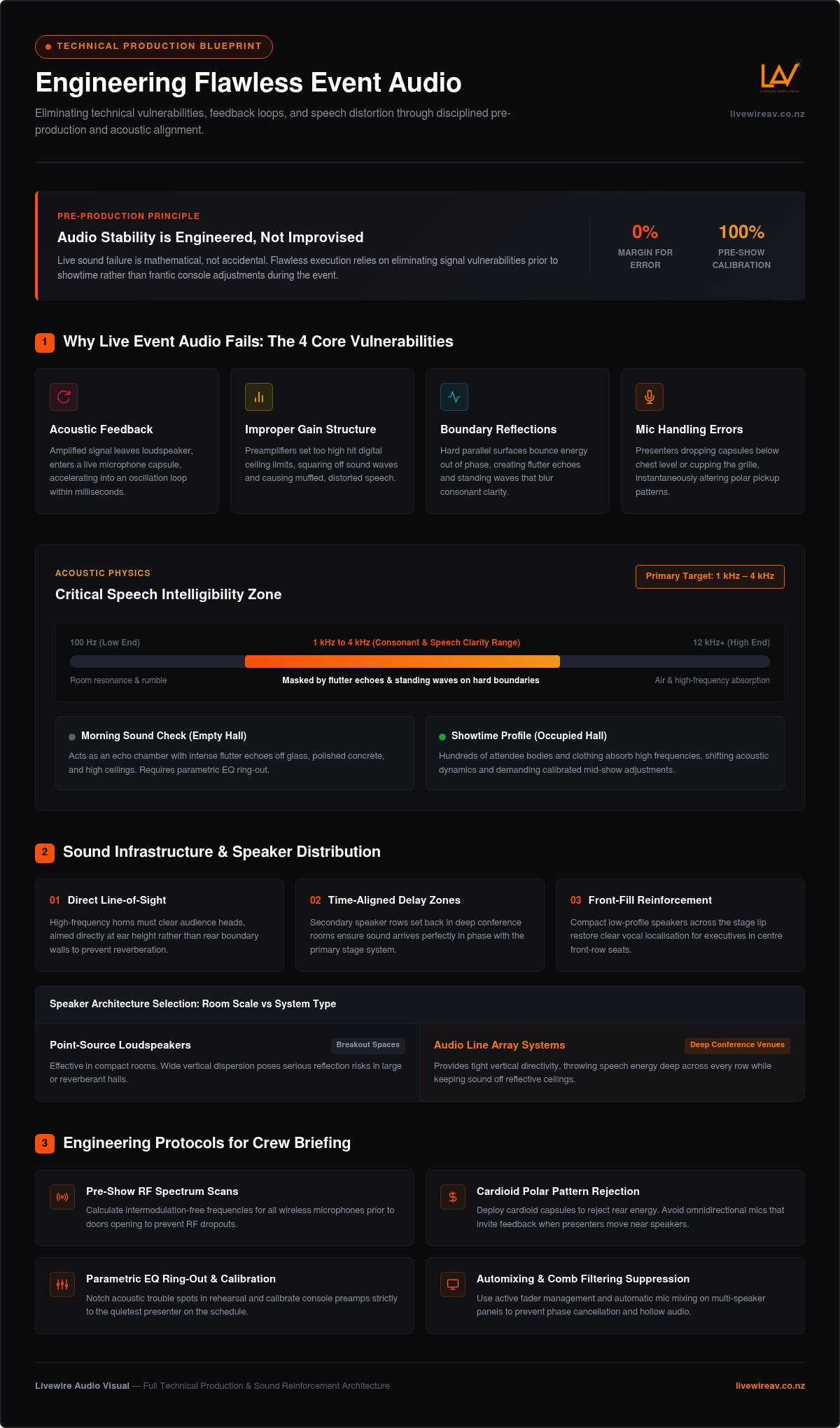
Every audio breakdown traces back to four primary vulnerabilities:
Acoustic feedback: An amplified signal leaves a loudspeaker, enters a live microphone capsule, and loops continuously until it becomes an intolerable squeal.
Improper gain structure: Input preamplifiers set too high will clip early, delivering muffled speech and harsh distortion regardless of downstream volume trims.
Boundary reflections: Untreated architectural surfaces bounce sound energy into the seating area out of phase, blurring consonants.
Microphone handling errors: Presenters drop wireless capsules below their chest or cup the grille, altering the polar pickup pattern instantly.
Understanding Feedback Loops and Distortion
Feedback is a closed loop of runaway energy. When a microphone captures sound that the system has already amplified, that frequency accelerates into oscillation within milliseconds. Cranking the master volume fader never resolves a weak voice; it simply drives the microphone capsule past its unity gain threshold into screeching feedback. Similarly, severe digital clipping happens when hot preamplifier stages hit ceiling limits, squaring off sound waves and turning natural vocal dynamics into harsh, unintelligible static.
Venue Acoustics and Reflection Traps
Glass walls, polished concrete, and high ceilings present hostile environments for spoken word clarity. Sound waves striking parallel hard surfaces trigger flutter echoes and standing waves, masking critical voice frequencies between 1 kHz and 4 kHz. Knowing how to prevent event audio problems requires recognising how venue physics alter between the morning sound check and showtime. An empty conference hall acts like an echo chamber; once hundreds of attendees enter the room, their clothing and bodies absorb high frequencies, shifting the acoustic profile and demanding calibrated mid-show adjustments.
Pre-Event Planning: Designing Your Sound Infrastructure
Even coverage across every seat protects your organisation's credibility. Poor speaker placement forces sound operators to push volume levels too high near the stage, subjecting front-row executives to harsh listening fatigue while back-row attendees struggle to decipher key takeaways. Understanding how to prevent event audio problems begins with mapping room geometry long before flight cases enter the loading dock.
Disciplined sound infrastructure relies on deliberate speaker distribution rather than raw volume output:
Direct line-of-sight: High-frequency horns must clear audience heads, aiming directly at listener ear height rather than rear boundary walls.
Time-aligned delay zones: Secondary speaker rows set back in deep conference rooms ensure sound arrives in phase with the primary stage system.
Front-fill reinforcement: Compact low-profile speakers across the stage lip restore clear vocal localisation for the centre seats.
Selecting the Right Speaker Architecture
Standalone point-source loudspeakers work well in compact breakout spaces, but their wide vertical dispersion triggers reflections in large conference venues. In long or cavernous halls, audio line array systems deliver tight vertical directivity, throwing speech energy deep into the room while keeping sound off reflective ceilings. If you are coordinating a large plenary, reviewing detailed blueprints for audio visual for large conferences ensures your speaker arrays and rigging match room dimensions accurately. Partnering with a specialist team for full technical production guarantees these structural acoustic calculations are bench-tested and deployed correctly from day one.
Microphone Selection for Stage Presenters
Cardioid capsules are mandatory for rejection. Omnidirectional microphones pick up energy uniformly from all directions, creating an immediate feedback risk once a presenter steps near a loudspeaker. Lavalier clip-on microphones remain popular for aesthetic reasons, but they introduce phase problems when presenters turn their heads. For roaming keynote speakers, miniature head-worn microphones place the capsule two centimetres from the mouth corner, guaranteeing high signal-to-noise ratio and consistent gain staging.
Handheld wireless units require internal pneumatic shock mounts to prevent rumble from nervous hand shifts. Professional operators also review baseline spectrum standards such as FCC regulations for wireless microphones to understand how modern hardware handles RF power limits, interference isolation, and transmission stability. Matching transducer architecture to presentation formats is the baseline strategy for anyone learning how to prevent event audio problems reliably.
Managing Wireless Microphones and Radio Frequencies
Radio frequency dropouts will derail an otherwise pristine production in seconds. Silence. Confusion. Lost momentum. While consumer audio gear relies on basic auto-sync functions, commercial corporate stages demand systematic spectrum management. Knowing how to prevent event audio problems in high-density venues means treating wireless airwaves with the same engineering rigor applied to physical cabling.
A reliable wireless environment requires an uncompromising four-step RF protocol:
Step one: Real-time spectrum scanning: Run an on-site RF scan across UHF channels during load-in to baseline ambient activity, locating clear spectrum before assigning frequencies.
Step two: Intermodulation coordination: Calculate mathematical spacing between transmission channels using dedicated software to prevent intermodulation distortion products from polluting your active carrier bands.
Step three: Directional remote antennae: Mount external directional paddle antennae directly facing the performance area, maintaining unhindered line-of-sight to the stage while avoiding long coaxial cable runs that bleed signal strength.
Step four: Strict battery and lock discipline: Seat fresh, calibrated cells in every transmitter prior to each session and mechanically engage button locks to stop presenters from inadvertently powering down devices.
Preventing Radio Frequency Interference
Modern ballrooms present an invisible minefield of RF noise. Dense clusters of guest mobile devices, massive LED video walls, and heavy venue Wi-Fi networks flood local airwaves with electromagnetic hash. These stray emitters elevate the RF noise floor, making weak microphone transmissions vulnerable to severe dropouts. Sound engineers coordinate clean frequencies in advance, maintaining substantial safety margins around digital broadcast channels. Pair this RF groundwork with disciplined effective soundchecking techniques during rehearsals to ensure transmission paths stay rock-solid when the stage warms up.
Transmitter Protocols and Battery Management
Never rely on part-used batteries. Replace all cells with fresh commercial-grade units before critical sessions, logging discharge telemetry at front of house. Mechanical mute locks must be engaged on every beltpack and handheld handle; speakers frequently fiddle with controls while awaiting their cue, silencing channels unintentionally. Assign clear colour-coding rings to microphone bodies, matching them identically to beltpack clips and console channel faders. This visual link lets your sound team identify and adjust an active presenter instantly, providing an essential operational safeguard for how to prevent event audio problems across busy schedules.
The Technical Rehearsal: Sound Checking and Live Tuning
A technical rehearsal bridges theoretical design and live reality. Structure. Testing. Verification. Walking onto an uncalibrated stage invites immediate failure, whereas a disciplined sound check establishes the electronic boundaries needed for an effortless show. When determining how to prevent event audio problems under live conditions, the rehearsal window is where sound engineers lock in gain structures, tune out room resonances, and set dynamic safeties before audiences arrive.
Console preamplifiers must be calibrated to the quietest presenter on the run sheet, not the loudest. If an operator sets gain for a booming executive, a softly spoken panellist will disappear into the background noise floor. Preamps should be dialled in with adequate headroom, backed by fast-acting peak limiters and transparent vocal compression to catch sudden, energetic outbursts without triggering console clipping or room slapback.
Ringing Out Room Frequencies
Ringing out the room establishes safe operating gain before feedback occurs. An experienced audio engineer pushes open stage microphones until specific frequencies begin to ring softly, then applies surgical, narrow notch filters on a digital parametric equaliser to cut those problem frequencies by two to four decibels. This subtractive process eliminates room resonance spikes while preserving natural vocal body, leaving clear acoustic headroom so presenters can walk freely without exciting feedback.
Conducting an Effective Presenter Sound Check
Dry runs provide an opportunity to coach stage talent on microphone positioning and natural projection. When speakers understand that keeping a handheld capsule three finger-widths from their chin produces crisp delivery, half the battle is won. During these rehearsals, sound engineers carefully balance stage foldback monitors against the main house PA, ensuring presenters hear themselves comfortably without stage spill washing out front-of-house clarity or muddying outbound hybrid feeds.
Coordinating these interdependent elements requires deep technical focus and seasoned live oversight. For complex corporate summits, securing premium event production New Zealand professionals eliminates guesswork across every technical cue. To guarantee zero-failure execution for your upcoming summit, partner with our dedicated technical production team.
Live Show Audio Protocols: Active Mixing and Redundancy
Execution requires constant vigilance. Vigilance. Precision. Restraint. An audio system does not operate itself once the house lights dim, regardless of how thorough pre-event calibration was. Dynamic panel conversations, spontaneous questions from the floor, and abrupt shifts in presentation energy introduce real-time variables that automated equipment cannot evaluate alone. Understanding how to prevent event audio problems during showtime relies on active fader discipline supported by invisible failover redundancies.
Live show mixing centers on maintaining four operational safeguards:
Active level balancing: Riding vocal faders manually to adjust for sudden conversational lulls or energetic debate without touching preamp gains.
Automated speech processing: Implementing real-time gain-sharing algorithms across simultaneous open capsules.
Dedicated output busses: Routing isolated mixes for room PA, media distribution, and remote streaming feeds rather than copying a single master stereo bus.
Hardware signal redundancy: Dual-powering key distribution frames and staging hot-spare capsules within arm's reach of the stage manager.
Managing Multiple Open Microphones
When four or five panellists share a stage, keeping every microphone wide open degrades clarity instantly. Multiple open capsules picking up the same voice at slightly different intervals cause comb filtering, creating a thin, hollow sound. Sound engineers deploy Dugan automixing to lower the gain of idle microphones dynamically in milliseconds, restoring full level only when a participant speaks. This suppresses ambient room bleed, stops phase cancellation, and keeps walk-up entrance stings punchy without drowning out introductory remarks.
Contingency Systems and Signal Failovers
Reliable operations treat failure as a design parameter, not an unexpected shock. A secondary, battery-verified wireless handheld sits permanently at the lectern base or stage wing, pre-patched to an adjacent console channel for instant swap-outs. Crucial mixing surfaces, digital stage boxes, and audio processing racks operate through uninterruptible power supply (UPS) units, protecting digital routing tables from mains fluctuations. Knowing how to prevent event audio problems means ensuring the audience never notices when an anomaly occurs behind the scenes. Partnering with seasoned production specialists via LivewireAV safeguards your live environment through rigorous bench-tested protocols and quiet technical composure.
Engineering Flawless Audio for Your Next Event
Precision. Calibration. Execution. Delivering crystal-clear spoken word across a crowded room is never an accident; it is the direct outcome of disciplined pre-production. Mastering how to prevent event audio problems requires matching speaker architecture to venue geometry, calculating interference-free wireless spectrum, and maintaining vigilant fader control throughout every session. When these technical layers work together, your presenters speak without distraction and your audience stays fully engaged.
Your organisation's message deserves complete acoustic clarity. Backed by over a decade of end-to-end technical production across New Zealand, LivewireAV eliminates live show risk through enterprise-grade audio line array systems, bench-tested digital wireless racks, and experienced on-site sound engineers ensuring flawless execution. Partner with LivewireAV to secure seamless technical delivery, giving your team total peace of mind from the opening keynote to the closing address.
Frequently Asked Questions
Why do microphones make a loud squealing sound during events?
Microphones squeal when an acoustic feedback loop occurs. Sound emitted from the front-of-house loudspeakers travels back into the live microphone capsule, which amplifies that specific frequency repeatedly until it turns into a runaway oscillation. This happens when a presenter steps directly in front of a speaker cluster, when microphone gain staging is pushed too aggressively, or when venue room resonances have not been notched out using parametric equalisation during sound check.
How do sound engineers stop microphones from dropping out?
Engineers eliminate dropouts by coordinating clean radio frequencies long before showtime. Understanding how to prevent event audio problems caused by RF interference requires running a live spectrum scan to locate unoccupied UHF channels, calculating intermodulation spacing, and deploying directional paddle antennae with direct line-of-sight to the stage. Using high-grade low-loss coaxial cables and fresh commercial-grade batteries also ensures transmitters retain continuous, uncorrupted signal strength throughout lengthy keynote sessions.
What is the difference between a lapel mic and a headset mic?
Lapel microphones clip to clothing roughly fifteen centimetres below the collar, making them visually subtle but vulnerable to head turns and fabric rustle. Headset microphones position the capsule directly alongside the mouth corner, maintaining a fixed two-centimetre distance regardless of how the speaker moves. This proximity provides a vastly superior signal-to-noise ratio, delivers higher gain before feedback, and prevents vocal volume from fluctuating when presenters look side-to-side across the audience.
Can built-in venue sound systems handle large conferences?
Built-in venue systems rarely meet the acoustic demands of large corporate conferences. Ceiling speakers and recessed wall units are typically engineered for low-level background music or emergency announcements rather than directional speech intelligibility. In deep or acoustically reflective spaces, relying on generic in-house systems leads to muddy sound and uneven coverage. Dedicated production deployments with engineered audio line array systems ensure articulate vocal reproduction across every delegate row.
What should a presenter do if their microphone stops working?
Presenters should maintain composure and avoid tapping the capsule or shouting into the microphone. Physical tapping damages sensitive diaphragms and creates harsh spikes if the channel suddenly restores. Instead, pause speaking and make eye contact with the stage manager or front-of-house engineer. A professional production always positions an identical, active backup handheld microphone at the lectern or stage wing, allowing an immediate, discreet equipment handover without derailing the presentation.
Why does audio sound completely different once the room fills with people?
Human bodies and clothing absorb substantial high-frequency acoustic energy. When an empty room fills with hundreds of attendees, reverberation time drops dramatically, altering the acoustic reflection patterns established during morning rehearsals. The ambient noise floor also rises as people move, whisper, and settle in. Sound engineers anticipating how to prevent event audio problems actively monitor these live changes, applying real-time equalisation and subtle fader adjustments to preserve vocal clarity in a full venue.
How many backup microphones should an event have on hand?
Every live corporate production should maintain at least two dedicated backup microphones pre-patched and calibrated at the sound console. This includes one hot-spare wireless handheld placed directly on stage for immediate speaker handover, along with a secondary wired microphone on standby. For multi-speaker panel sessions, allocating an additional spare beltpack transmitter and fresh capsule ensures technical staff can rectify an unexpected hardware fault within seconds without halting the session.


Comments