Digital Vision Switching: Expert Guide to Seamless Visuals
- Jul 30
- 12 min read
You’ve likely seen it happen. A presenter clicks a button, the screen flickers to a generic "No Signal" logo, and the room’s energy evaporates in an instant. It’s a common frustration for event organisers. You spend months planning the perfect keynote, only to have the momentum stalled by a clunky HDMI switch or noticeable lag on your LED walls. Precision. Composure. Reliability. These are the standards your audience expects and your brand deserves.
We understand that in high-stakes environments, technical failures aren't just inconvenient; they're a risk to your reputation. This guide explains why professional digital vision switching for events is the invisible engine behind a polished, broadcast-quality experience. Discover how professional management ensures flawless transitions and high-impact storytelling for your next large-scale production, creating a stress-free environment for everyone on stage.
We’ll explore the technical differences between simple switching and professional mixing, how to eliminate visual latency on large LED displays, and the meticulous steps required to ensure your in-room visuals and livestream feeds remain perfectly synchronised from start to finish.
Table of Contents
What is Digital Vision Switching? Elevating Your Event Production
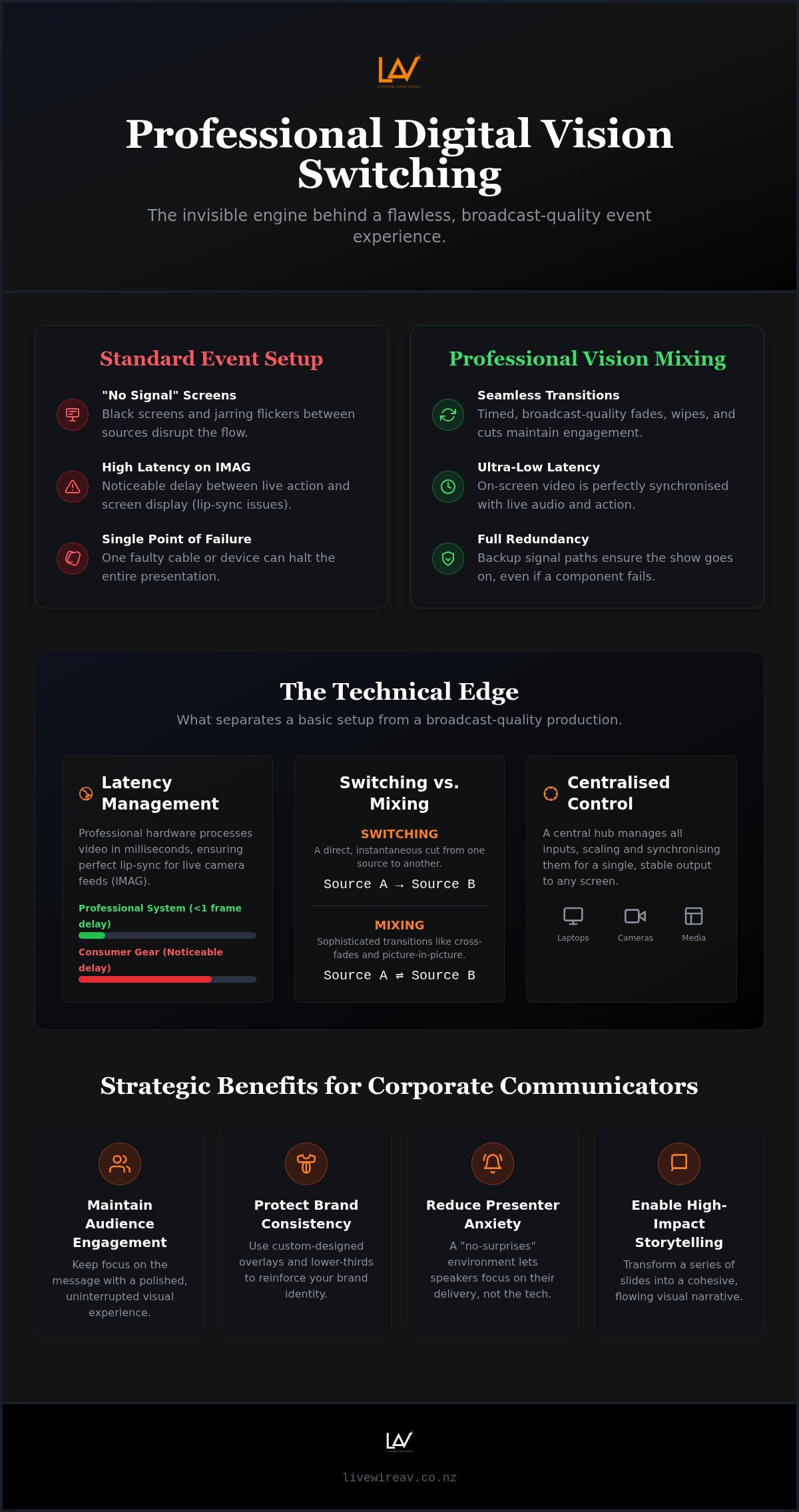
Digital vision switching for events is the real-time process of selecting, mixing, and routing multiple visual sources to your audience. It is the technical heart of any large-scale production. In high-stakes environments, you can't afford the flicker of a loose cable or the "no signal" screen of a basic setup. Professional switching replaces these failures with timed, intentional transitions that keep the audience focused on the message. It is about control. It is about precision. It is about reliability.
A professional vision system involves more than just a single box. It is a coordinated ecosystem of high-bandwidth switchers, broadcast-grade cameras, and media servers, all managed by a seasoned operator. This setup ensures that when a presenter finishes their slide deck, the transition to a video or a live camera feed is instantaneous. Unlike the basic HDMI switchers used in small meeting rooms, professional systems are designed for stability. Consumer-grade gear often suffers from "handshake" delays where the screen goes black while the hardware identifies a new laptop. Professional systems use internal frame synchronisers to lock every source into a single, stable output, eliminating these gaps entirely.
The Difference Between Switching and Mixing
While people often use the terms interchangeably, there is a distinct difference between switching and mixing. A simple "switch" is a direct cut from one source to another. While effective, "mixing" allows for sophisticated transitions such as cross-fades, wipes, and picture-in-picture layouts. For high-end corporate galas or product launches, this level of polish is essential. It allows a technical director to call cues with surgical timing, ensuring the visual narrative matches the speaker's rhythm perfectly. This methodical approach transforms a series of slides into a cohesive brand story.
Multi-Camera vs. Single-Source Setups
In many large New Zealand venues, a single laptop feed is rarely enough to maintain engagement. Integrating a camera package allows for Image Magnification (IMAG), which brings the speaker's expressions to the back of the room via large LED walls. Digital vision switching for events also facilitates seamless handovers between multiple presenters. While one laptop is live on the screen, the operator can preview and prep the next source on a private monitor. This "no-surprises" environment reduces presenter anxiety and ensures the programme flows without a single technical hiccup.
The Technical Mechanics of High-Definition Vision Mixing
The journey from a camera lens to the final display is a complex chain of data. In a professional environment, this signal path is the nervous system of your event. It begins with high-definition capture, moves through shielded SDI or NDI cabling, and enters a high-bandwidth vision mixer. Every stage must be managed with absolute precision to ensure the final image on your LED wall is sharp, vibrant, and stable. Precision. Composure. Reliability. These are the standards that separate a basic setup from a broadcast-quality production.
Latency is the silent enemy of live production. When using digital vision switching for events to provide Image Magnification (IMAG), even a few milliseconds of delay can be catastrophic. If the audience sees a speaker's lips move on the screen after they hear the sound through the PA system, the illusion of presence is broken. Professional switching hardware prioritises low-latency processing, ensuring that the visual feed remains perfectly synchronised with the live audio. This technical rigour is why we manage every input source, from 4K cameras to legacy laptops, through a centralised processing hub that scales and matches resolutions instantly.
Redundancy is not a luxury; it's a standard requirement. High-stakes environments leave no room for single points of failure. A professional technical team always deploys primary and backup signal paths, often running through secondary switchers or hardware cross-points. If a cable is snagged or a source drops out, the system can failover to a backup feed so quickly the audience never notices. This level of meticulous preparation allows you to focus on your message while we maintain total technical control behind the scenes.
Input Sources: More Than Just Laptops
Modern events require the integration of diverse visual sources. We don't just switch between PowerPoint decks. A robust setup involves bringing in remote presenters via video conferencing platforms, managing pre-recorded motion graphics, and even incorporating live social media feeds for audience Q&A. Each source has a different frame rate and aspect ratio. Our role is to organise these disparate signals into a single, cohesive output that looks intentional and polished.
Output Destinations: Where the Vision Goes
The final output must be tailored for its specific destination. Driving a large-scale LED wall rental for events NZ requires pixel-perfect accuracy to avoid stretching or distorting your brand assets. Simultaneously, the system may need to provide a different feed for the livestream audience and a clean "archival" recording for post-event highlights. If you are planning a complex multi-screen layout, our team can help you organise your technical production to ensure every screen shows exactly what it should, exactly when it needs to.
Beyond the Screen: Strategic Benefits for Corporate Communicators
Professional communication requires more than just a well-rehearsed script. It demands a visual frame that reinforces your authority. Investing in digital vision switching for events means you aren't just hiring a piece of hardware; you're securing a narrative engine. This technology allows for the seamless integration of custom-designed overlays, lower-third graphics, and brand-aligned colour palettes. These elements transform a standard presentation into a broadcast-level production, immediately building trust with stakeholders and investors who expect excellence as a standard requirement.
The emotional state of your presenters is often overlooked in technical planning. A "no-surprises" visual environment is the best way to reduce stage fright. When a speaker knows that their transitions will be crisp and their media will play without lag, they can focus entirely on their delivery. We act as the steady hand behind the scenes, ensuring the technical complexity remains invisible. This composure on the backend translates to confidence on the stage, creating a more persuasive environment for your audience.
Audience focus is a finite resource. A great vision mix maintains this focus by switching to the most relevant content at the precise moment it's mentioned. If a speaker references a specific data point, the operator cuts to a close-up of that chart. If they tell a personal anecdote, the vision shifts to a tight shot of the presenter. This active storytelling prevents the "passive viewing" slump, keeping the room engaged through intentional visual variety and professional timing.
Seamless Transitions and Picture-in-Picture (PIP)
Engagement increases when the audience can see the presenter and the data simultaneously. Picture-in-Picture (PIP) layouts are particularly effective for this, allowing slides to remain visible while a live camera feed shows the speaker’s body language. These advanced layouts are essential for hybrid conference AV setup NZ requirements, as they ensure remote viewers feel just as connected as those in the room. The psychological difference between a jarring hard cut and a smooth cross-fade is significant; one disrupts the flow, while the other guides the viewer's eye naturally.
The "Invisible" Technical Advantage
A successful vision mix is one the audience doesn't notice. It feels natural, logical, and inevitable. This level of seamlessness requires a "calm professional" operator who can anticipate unscripted moments and react with composure. Meticulous planning is the foundation of this invisibility. By aligning every visual cue with the event programme during pre-production, we eliminate the guesswork. This disciplined approach to digital vision switching for events ensures that even when things change on the fly, the visual output remains polished, purposeful, and precise.
Planning for Success: Integrating Vision Switching into Your Event Design
Success in live production is never accidental. It's the result of a disciplined approach to pre-production that begins weeks before the first guest arrives. Integrating digital vision switching for events requires more than just booking the right gear. It demands a holistic view of the event programme, where visual cues are treated with the same importance as the keynote script. Planning. Coordination. Execution. These are the pillars of a seamless experience.
The "Run of Sheet" is the master document for any technical team. It aligns every slide change, video playback, and camera angle with the live programme. We work closely with event organisers to ensure this document is exhaustive. Every transition is mapped out to prevent the hesitation that leads to "dead air" or visual glitches. This methodical preparation allows our technical team to maintain total composure, even when the live environment becomes unpredictable. If you need a partner to manage your technical production with this level of detail, early engagement is essential.
A unified production requires seamless communication between departments. The vision team doesn't operate in a vacuum; we must be perfectly synchronised with audio and lighting. When the vision mixer transitions to a high-impact video, the audio engineer must be ready to trigger the soundscape, and the lighting designer must dim the room accordingly. This level of cross-functional reliability is what creates a truly immersive environment for your audience.
Rehearsals are non-negotiable for high-stakes corporate events. We typically categorise these into two distinct phases. Tech-only rehearsals allow the crew to test signal paths, check resolutions, and verify that every input is stable. Full-dress rehearsals then bring the presenters into the space to time their delivery against the visual cues. This process identifies potential friction points early, ensuring that on show day, the technical management remains invisible and effective.
Technical Site Visits and Signal Mapping
Large New Zealand venues often present unique logistical challenges. We conduct technical site visits to identify potential signal interference and map out cable runs. Long distances between the stage and the control position can lead to signal degradation if not managed with high-quality SDI or fibre optic cabling. We also verify that the venue’s power supply is sufficient for our high-bandwidth switching racks, ensuring a stable foundation for the entire event.
Managing the "Run of Sheet" Cues
During the show, the vision switcher operator acts as the hands of the Technical Director. Clear communication via professional headsets (comms) is vital. The operator must interpret cues instantly, switching sources with surgical precision. This role is about more than just following a script; it’s about having the technical literacy to manage live changes. If a speaker skips a slide or a remote guest loses their connection, the operator must react with quiet confidence to keep the visual narrative on track.
The LivewireAV Standard: Precision Vision Switching Across New Zealand
LivewireAV doesn't just provide equipment. We provide a promise. Our approach to digital vision switching for events is built on more than 10 years of experience in high-stakes environments. We prioritise reliability. We prioritise precision. We prioritise composure. By deploying modern, high-bandwidth switching technology, we ensure that every pixel on your LED wall is sharp and every transition is seamless. This isn't about being flashy; it's about being right. Every single time. We understand that in a live environment, there are no second chances, which is why our standard for execution is zero-failure.
We offer premium event production New Zealand wide, from major metropolitan centres to regional conference hubs. Our national coverage means we understand the logistical nuances of the country's primary venues. We manage the technical complexity of high-definition vision mixing so you can focus on the message. This allows your team to stay present while we handle the signal paths, frame rates, and hardware redundancies that define a professional event. Our commitment is to remain invisible behind the scenes while making your brand look extraordinary on the stage.
Experienced Technicians: The Core of Our Service
Composure is our most valuable commodity. While deep technical knowledge is a standard requirement, the ability to remain calm under the pressure of a live broadcast is what sets our on-site teams apart. Our technicians are seasoned specialists who thrive in high-pressure environments. By providing a single point of contact for all visual technology, we simplify the planning process and ensure clear communication. Our "venue-aware" approach means we anticipate the specific challenges of each space, from power limitations to cable run logistics. Planning. Coordination. Execution. This methodical rhythm ensures setup and pack-down are handled with maximum efficiency and minimal disruption.
A Partner in Your Event’s Success
We don't just show up on show day. We collaborate with your team from the initial design phase to the final cue. This partnership is built on meticulous preparation and honest communication. We understand that your event is a significant investment and a reflection of your brand’s reputation. Our goal is to provide total technical control, allowing you to deliver your message with absolute peace of mind. When every detail has been accounted for long before the first guest arrives, the result is a seamless, stress-free experience. If you are ready to discuss your next project, reach out to us for a tailored proposal that meets the specific needs of your national event. We are ready to handle the technical weight so you can focus on the storytelling.
Securing Flawless Execution for Your Next Event
Professional visuals are the backbone of any high-stakes corporate gathering. We've explored how technical precision, low-latency processing, and methodical planning transform a simple presentation into a broadcast-quality narrative. Digital vision switching for events isn't just about the gear; it's about the steady hand that manages it. It's the difference between a jarring technical hitch and a seamless experience that lets your message take centre stage.
With 10+ years of technical event excellence, LivewireAV specialises in high-stakes corporate AV. We provide nationwide New Zealand service delivery, ensuring that your production standards remain consistent across every venue. Our commitment to meticulous preparation and zero-failure execution provides the composure you need to deliver your work with total confidence. Every detail is accounted for long before your first guest arrives.
Ready to elevate your next production? Request a tailored technical production proposal from LivewireAV today. We're here to manage the complexity so you don't have to. Let's work together to create an environment where your brand can truly shine.
Frequently Asked Questions
What exactly does a vision switcher do during a live event?
A vision switcher acts as the central hub for every visual element in your production. It receives signals from cameras, laptops, and media servers, allowing an operator to select which source appears on the screens at any given moment. This hardware enables smooth cuts, professional fades, and sophisticated overlays like lower-third graphics. It ensures your audience sees a polished, continuous feed rather than a series of disconnected technical transitions.
Do I need professional vision switching for a small corporate presentation?
If your event involves more than one laptop or a single camera feed, professional switching is highly recommended. While a simple meeting might get by with a manual cable swap, any high-stakes environment benefits from the stability of a dedicated switcher. It eliminates the "no signal" screens and resolution flickering that occur during presenter handovers. This creates a more reliable, "no-surprises" environment for both the organiser and the speaker.
How many cameras do I need for a professional event video mix?
Most professional corporate events start with a two-camera setup. This typically includes a wide shot to capture the entire stage and a tight "follow" shot to focus on the presenter’s expressions. Adding a third camera allows for audience reaction shots or alternative angles, which significantly increases the production value. The right number depends on the size of your venue and the level of engagement you want to achieve for your in-room and remote audiences.
What is the difference between a vision switcher and a video mixer?
In the modern event industry, these terms are often used interchangeably. Technically, a "switcher" refers to the hardware used to cut between sources, while a "mixer" refers to the ability to blend those sources using transitions like cross-fades or wipes. Most modern digital vision switching for events involves hardware that performs both functions. We focus on providing the right "mix" of sources to ensure your visual narrative feels natural and intentional.
Can vision switching handle both the in-room screens and a livestream?
Yes, professional switchers are designed to manage multiple independent outputs simultaneously. This means the audience in the room can view full-screen presentation slides while the livestream audience receives a different mix, such as a picture-in-picture layout. This capability is essential for hybrid events, as it ensures both audiences receive a tailored experience that is optimised for their specific viewing environment.
How much space does a professional vision switching setup require at a venue?
A standard vision control position, often called "Vision Land," typically requires a 1.8m or 2.4m trestle table. This area houses the switcher, preview monitors, playback laptops, and communication gear for the crew. For larger productions with multiple operators, we may require a slightly larger footprint. We always identify the best location for this control centre during our initial technical site visits to ensure it doesn't interfere with your guest seating.
Does vision switching cause a delay or lag on the big screens?
Professional-grade digital vision switching for events is specifically designed for low-latency processing. While consumer-grade equipment can introduce noticeable lag, our broadcast-quality hardware ensures that live camera feeds (IMAG) stay perfectly synchronised with the live audio. This is critical in large venues where even a few milliseconds of delay between a speaker’s lips moving and the image appearing on the LED wall can be distracting for the audience.
What information do I need to provide for a vision switching quote?
To provide an accurate quote, we need to know the number of visual sources, such as laptops and cameras, and the number of display destinations, like LED walls or projectors. It’s also helpful to know if you require a livestream feed or archival recording. Providing the venue name and a draft "Run of Sheet" allows us to map out the signal paths and identify the specific hardware required to ensure a zero-failure delivery for your project.


Comments